Why a Hermes cron job is not running: one tick, start to finish
By Christophe Paka · Facts checked on 7 November 2026
"Hermes has no persistence," one reader titled a thread on r/hermesagent. Crons barely run, and workflows break after a reboot. The schedule looks right, yet the morning brief never comes.
The worst part is the silence. A missed job leaves no error, so you only notice when the result is not in your chat.
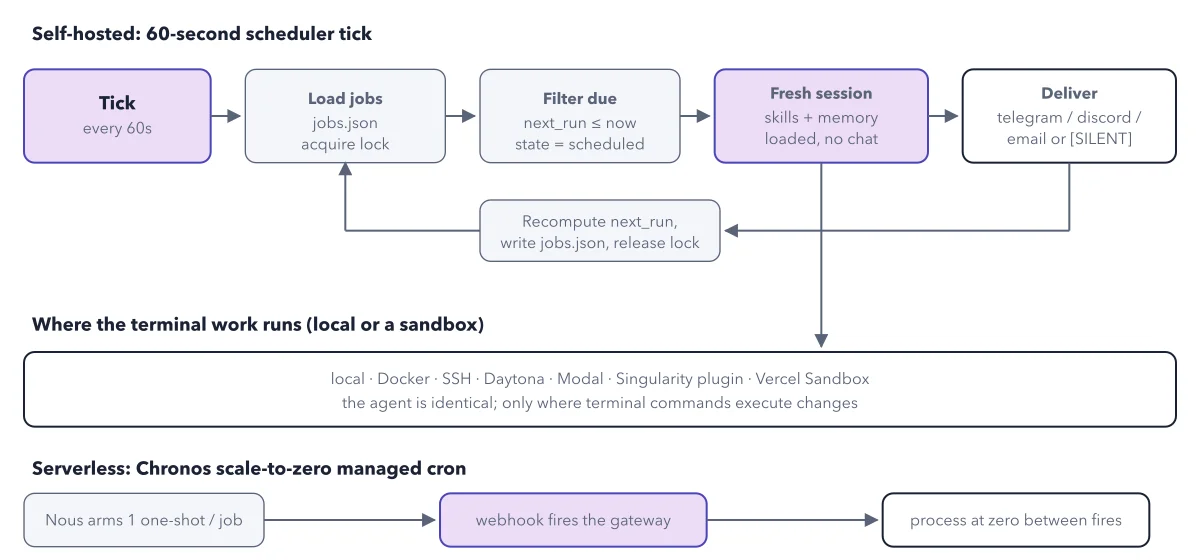
Almost every case of a Hermes cron job not running has the same cause, and it is not the schedule. The figure below follows one scheduler tick from start to finish, so you can see where a job gets lost, and the worked example ends with the fix.
Use this diagram on your site
Free to share in your blog post, docs, course or slides, as long as the credit link stays. Paste the code below where the figure should go.
How to read this figure
Start at the tick. A cron job is a prompt Hermes runs on a schedule you set, with no one at the keyboard. The scheduler tick is the check for due jobs every 60 seconds. It runs inside the gateway: the part of Hermes that stays running in the background, links your chat apps and runs your jobs. No gateway, no tick.
Load the jobs and take the lock. The tick opens your saved list of jobs, a file named jobs.json in the Hermes folder. Then it takes a lock, a note that says "being handled". So two ticks never run one job twice.
Keep only the jobs that are due. The filter keeps each job whose next run time has passed and whose state is scheduled. Every other job waits for a later tick. A paused job stays put.
Run each job in a fresh session. Each due job runs with your skills and memory loaded, but with no chat history. That is why the prompt must say everything: the job cannot stop and ask you a question.
Deliver, then loop back. The result goes to its delivery target: back where the job was made (the default), a chat app such as Telegram, email, or files only. A [SILENT] job delivers nothing. Then the loop works out the next run, writes
jobs.jsonand releases the lock.Skip the bottom rows for a first job. The two bottom rows matter only for special setups. The middle row lists where the job's commands run, such as your machine or Docker; the agent is the same in each. The last row is Chronos, a scheduler Nous runs for hosted gateways that sleep between jobs. Hermes Cloud users never set it up.
Key takeaways
- Test every new job at once with /cron run, before you trust the schedule.
- Install the gateway as a service, then reboot once to prove the job survives.
- When a brief goes missing, run hermes cron status before you touch the schedule.
Worked example: one weekday brief over one week
Take a brief set to 0 9 * * 1-5, which means 9:00, Monday to Friday. The schedule never changes all week. Only where the gateway runs does.
- Monday: the gateway runs on your laptop with the lid open. At 9:00 the tick runs and the brief arrives.
- Tuesday: you close the lid at 8:50. No gateway, no tick: no brief, and no error.
- Wednesday: the gateway runs on your server, in a terminal you then closed. Closing the terminal stopped it, so no brief.
- Thursday: the gateway runs on the server as a service. The brief arrives.
- Friday: the server reboots. The service starts again at boot, so the brief arrives.
Result: The schedule was right all five days. The two missing briefs were two days with no gateway. A system service fixes both: a program your computer starts by itself at boot and restarts if it stops. To set one up, run hermes gateway install once in a terminal, the text window for commands.
Questions readers ask
Why did my Hermes cron job not run, with no error?
Only a running gateway checks for due jobs. No gateway means no tick, no job and no error. Run hermes cron status: it reports whether the scheduler is alive and shows the next run. Away from a terminal, look at your home channel. A missing weekday brief most likely means the gateway was not running.
How do I make Hermes cron jobs survive a reboot?
Install the gateway as a service. hermes gateway install sets up a user service, which is launchd on a Mac. On Linux, sudo hermes gateway install --system starts it at boot, before anyone logs in. Then reboot once and check hermes gateway status and hermes cron status.
How do I stop every Hermes cron job at once?
Run hermes pause. It stops every scheduled job at once, and you can add --reason with a note. Run hermes resume to lift it. No job runs while paused, so learn this command before you leave jobs running alone.
Does a Hermes cron job remember its last run?
Not by default. Each run is a fresh session with your memory loaded, but no chat history. Add --continuity when you create or edit the job, and each run sees its last result. Use it for jobs that ask what changed since last time.
Sources: Cron (Hermes Agent docs); Cron internals (Hermes Agent docs); Automate with cron (Hermes Agent docs).
This figure is from Hermes Agent Made Crystal Clear, chapter 9.
The chapter builds the idea step by step, with recipes you can follow, a Try it to check yourself, and every source.
Get the book