How to write better AI prompts: from sticky note to brief
By Christophe Paka · Facts checked on 23 October 2026
You type a quick ask: write something about our product launch. The answer is generic, the tone is wrong, the length is off. You rewrite it three times and it is still not usable. It is easy to conclude the tool is weak.
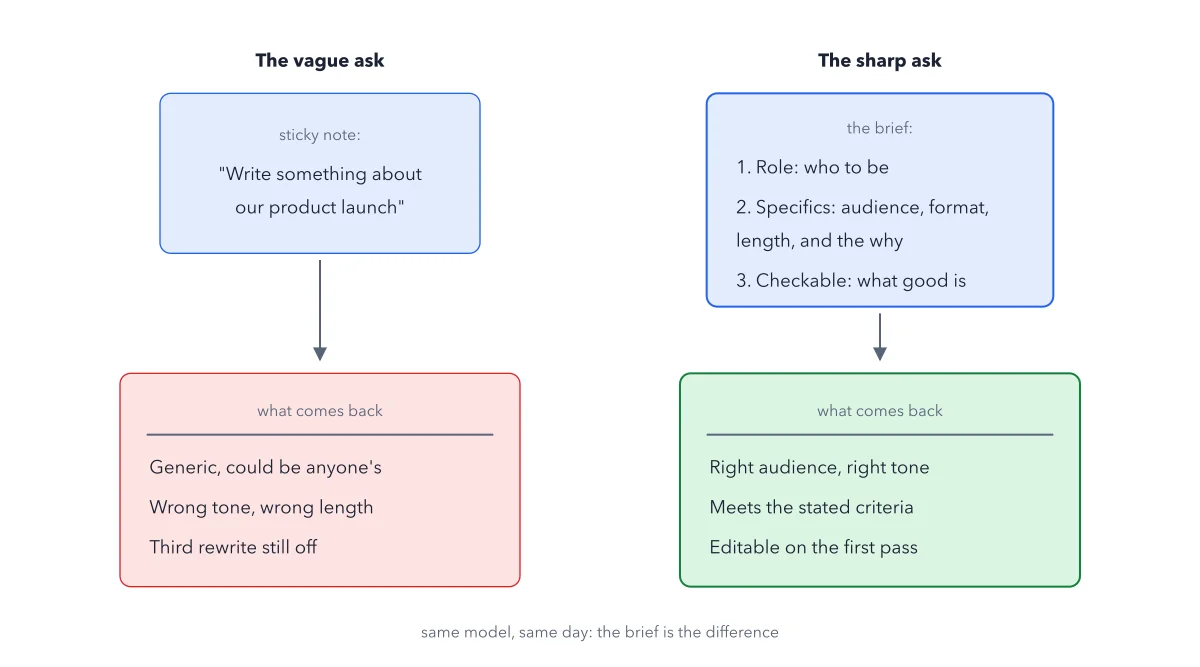
Usually it is the ask, and every round of rewrites costs you time you meant to save. Learning how to write better AI prompts takes about a minute per task. The figure below sends a sticky note and a short brief to the same model on the same day, and shows the three moves that make the brief come back usable.
How to read this figure
Read the sticky note on the left. The vague ask is one line: write something about our product launch. It comes back generic, in the wrong tone and length, and still off after three rewrites. Nothing about the audience was typed, so nothing about it exists for the model.
Read line 1 of the brief. Role: one sentence on who the AI should be. It focuses the tone and the expertise of the answer.
Read line 2 of the brief. Specifics with the why: audience, format, length and limits, plus the reason behind each strict rule. A reason helps the model follow the rule, according to Anthropic's prompting guide.
Read line 3 of the brief. Checkable: state what a good answer must contain. You can then check the result against your points instead of rereading it forever.
Compare the two results. The brief comes back with the right audience and tone, meets the stated criteria, and is editable on the first pass. Same model, same day: the brief is the difference.
Key takeaways
- Before you send a prompt, add a role, the specifics with the why, and what a good answer must contain.
- Say what you want instead of what to avoid; a do not puts the unwanted words on the desk.
- When format matters, paste 3 to 5 finished examples after your instructions, each labeled Example.
Try this: upgrade one real prompt in ten minutes
Any chat AI works, a free account is fine. Pick one real task from your week.
- Type the ask the way you naturally would, in one line. Send it in a fresh chat and keep the answer.
- Add the role: You are an experienced job title who writes for audience.
- Add the specifics with a why: the task, the length and the real reason for it, the audience and the tone.
- Add the check: a good answer must include the three things you will check. If information is missing, ask me instead of inventing it.
- Send the upgraded prompt in a fresh chat and put the two answers side by side.
Expected result: The upgraded answer is closer to usable: right audience, right shape, and checkable. Most often the specifics move changed it most. If it still misses, a detail you assumed was never typed.
Questions readers ask
Why does ChatGPT ignore my instructions?
Often the instruction is missing its reason, or it is phrased as a do not. Telling a model not to mention the old price puts the old price on the desk, where it feeds the next prediction. Say what you want, mention only the new price, and why.
Do I need prompt engineering skills to get good answers?
No special skill. Run the colleague test: could a coworker with no context do the task from your prompt? If not, add what they would need. The three moves are that test, written down.
Sources: Anthropic: Prompting best practices; Anthropic: Prompt engineering overview.
This figure is from AI Made Crystal Clear, chapter 4.
The chapter builds the idea step by step, with recipes you can follow, a Try it to check yourself, and every source.
Get the book