Build an AI agent from scratch: each box of the loop is one line
By Christophe Paka · Facts checked on 23 October 2026
You want to learn how agents work inside. Every tutorial starts with a framework, a big library that hides the loop. People ask why there is no serious resource to build an AI agent from scratch: the loop, the tool calls, the stop.
Without that view, every bug looks like a mystery, and every framework looks like the only way. But the core is small. The notes agent in this book is about 80 lines of plain Python with one tool. The figure below puts each box of the agent loop next to the line of code that does it.
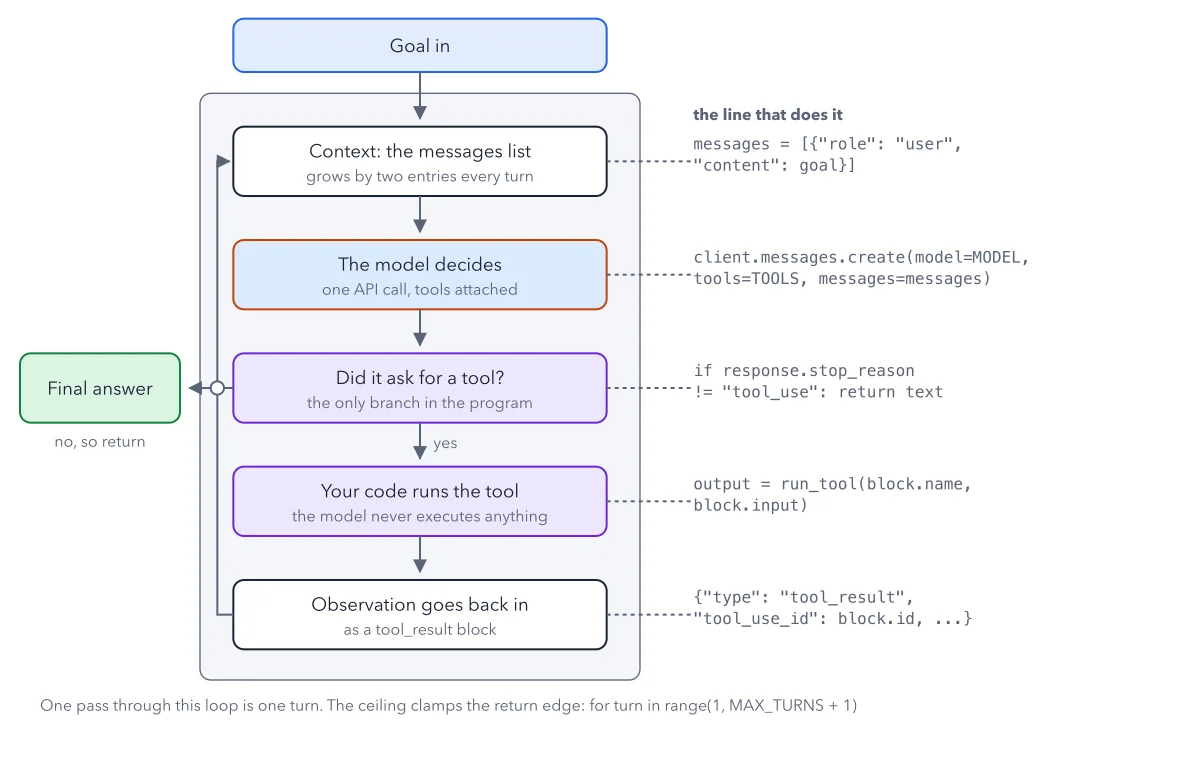
How to read this figure
Start at Goal in. The blue box at the top is your goal. The first box inside the frame is the messages list: the running transcript of the conversation, each entry marked with who said it. The code on the right is Python; you can skip it. Its first line starts the transcript with your goal. This transcript is all the model sees, and it grows by two entries every turn.
The orange box: the model decides. Next comes one API call: one request to the model's web service, with your tools attached. In plain words, the line says: ask this model, show it these tools, send it the transcript. The model can only ask for a tool that is on that list.
The only branch: did it ask?. Every answer from the model carries a short label that says why it stopped. In code the label is
stop_reason, and the valuetool_usemeans it wants a tool. Any other value means no tool request, so the arrow exits left to the green Final answer box. That one check is the only branch in the program. The turn ceiling, at the bottom, is the second way out.Your code runs the tool. On yes, the arrow goes down to the purple box. Your own code runs the tool the model named, with the inputs it wrote. The box says so: the model never executes anything. It wrote a request, and your function did the work.
The result goes back in. The last box sends the output back as a
tool_resultblock, tied to the request byblock.id. Then the line on the left climbs back to the messages list, and the next turn starts. One run of the notes agent follows two of these turns arrow by arrow.Find the ceiling on the return edge. The note at the bottom says one pass through the loop is one turn. A turn ceiling, a hard limit on turns, clamps that return edge:
for turn in range(1, MAX_TURNS + 1). The notes agent sets it to 8. If turn 8 ends with yet another tool request, the program returns a plain message instead of an answer: stopped, hit the 8 turn ceiling.
Key takeaways
- Write the loop by hand once before you pick a framework, so you know what it hides.
- Never ship a loop that only stops when the model stops: add a turn ceiling.
- Set a spend limit on your API account before you run anything that loops.
Try this: map the loop onto your own file
Take any agent script, your own or the notes agent from the book, and find each box of the figure in it. To run the book's script you need a terminal, Python, the anthropic package and an Anthropic API key with a spend limit set.
- Find the line that builds the messages list from the goal.
- Find the model call and check that it sends your tools with every request.
- Find the check on
stop_reason. It should be the only place the run can end on its own. - Find where your code runs the tool and builds the tool result with the matching id.
- Find the turn ceiling. If there is none, add
MAX_TURNS = 8and loop over it.
Expected result: Five boxes, five places in your file, plus one ceiling. If you cannot find a box, that part is hidden in a library, and you now know what to look for in its docs.
Questions readers ask
If you were starting from zero, how would you learn to build an AI agent?
Start with the raw loop, not a framework. Give one model one tool, such as reading a file, and loop until it answers in plain text. The book's notes agent does this in about 80 lines. Then add a turn ceiling and break it on purpose to see a runaway.
Does the SDK directly affect the intelligence of the agent?
No. An SDK is a library that wraps the API, the model's web service, so you write fewer lines. It runs the same loop: send the transcript, read why the model stopped, run the tool, send the result. The model's answers are the same. What changes is the defaults, and some SDKs set no turn limit unless you set one.
What does a tool definition need?
Three fields the model reads: a name, a description and an input schema. The description says what the tool does, when to use it and what it returns. The input schema lists the inputs and their types in JSON Schema, a standard way to describe that data.
Can I build an AI agent without code?
Yes, the same loop runs inside no code tools, where you connect blocks on screen. Find the step that runs each tool, and the setting that caps how many rounds the agent takes. If there is no such setting, assume there is no cap. The book's first build recipe gives the full Python script for readers who want to type it.
Sources: Define tools (Claude docs); The agent loop (Claude Agent SDK docs); Building effective agents (Anthropic).
This figure is from AI Agents Made Crystal Clear, chapter 4.
The chapter builds the idea step by step, with recipes you can follow, a Try it to check yourself, and every source.
Get the book