How does an agent call a tool? One run, three players
By Christophe Paka · Facts checked on 23 October 2026
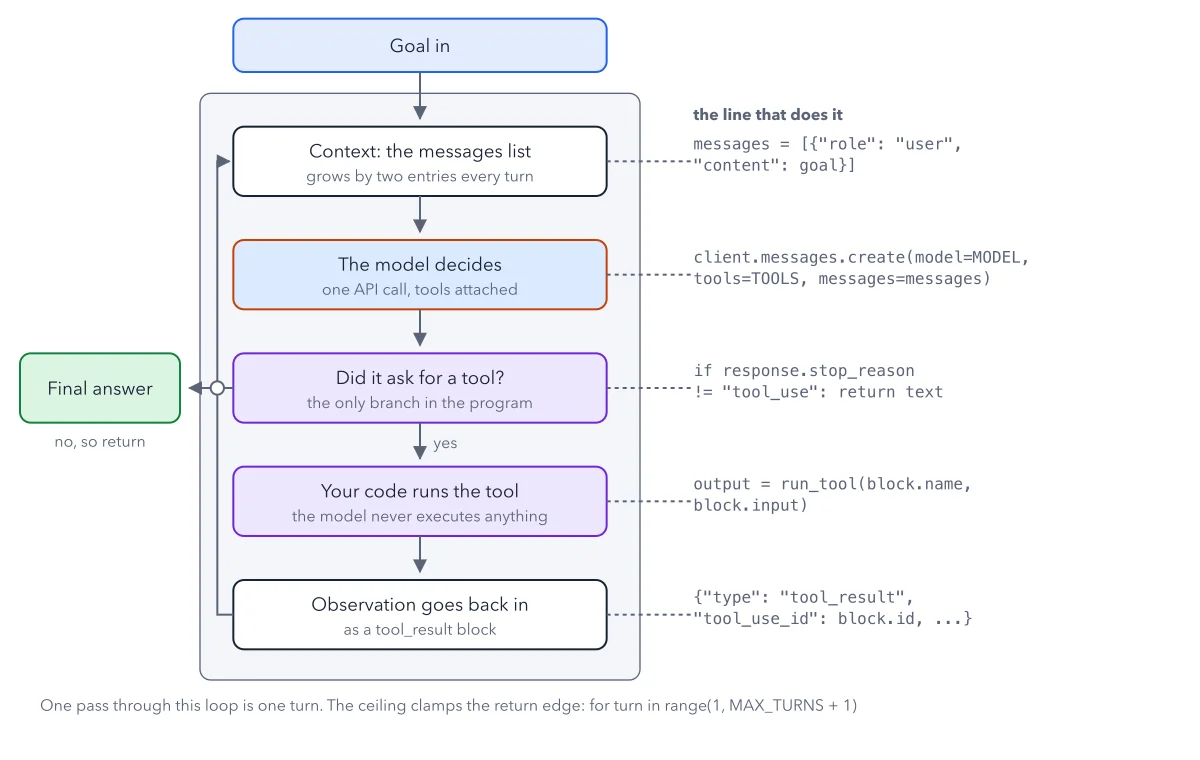
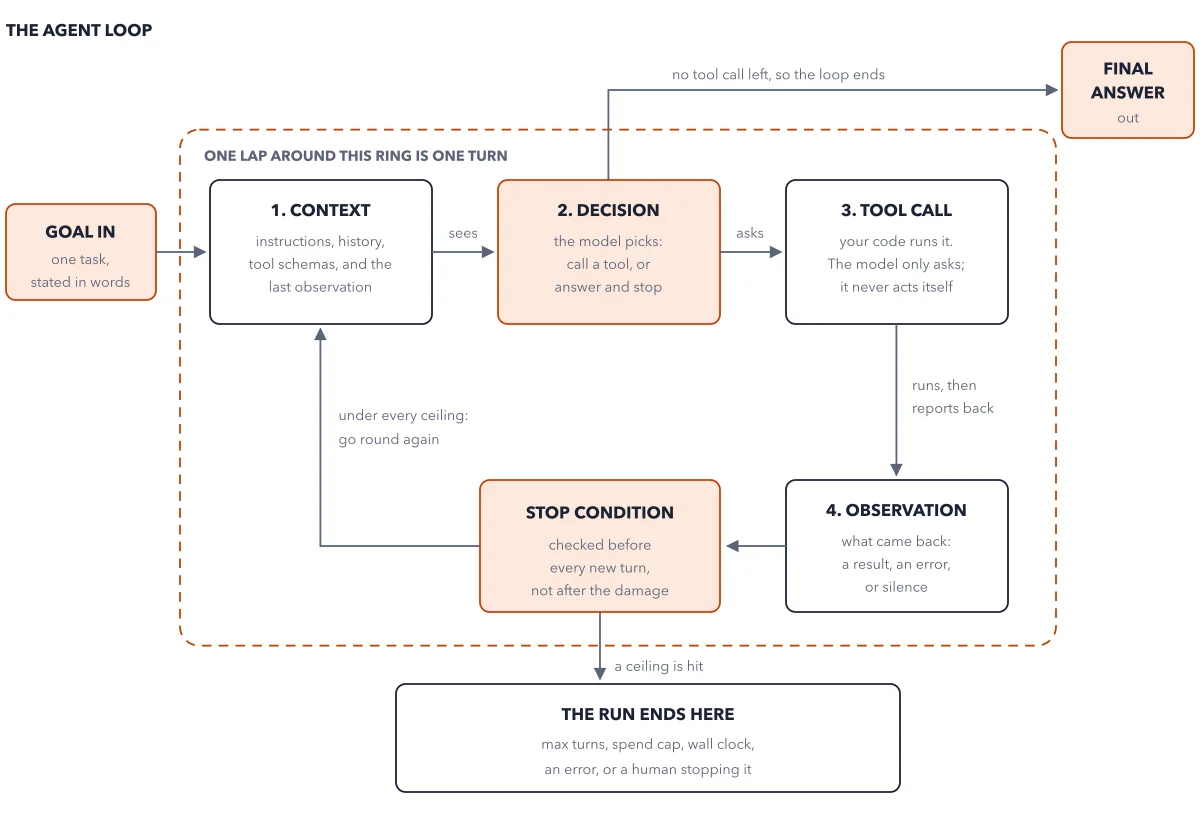
You read that an agent "used a tool" to read a file or send an email. But a language model only reads text and writes text. It has no hands. So how does an agent call a tool? Is some other program watching its output and turning it into real actions?
If you miss this, you hand control to the wrong place. You trust the model to stay in bounds, when the only code that can check, refuse or log an action is yours. The figure below follows one small run of a notes agent, arrow by arrow, across the three players.
How to read this figure
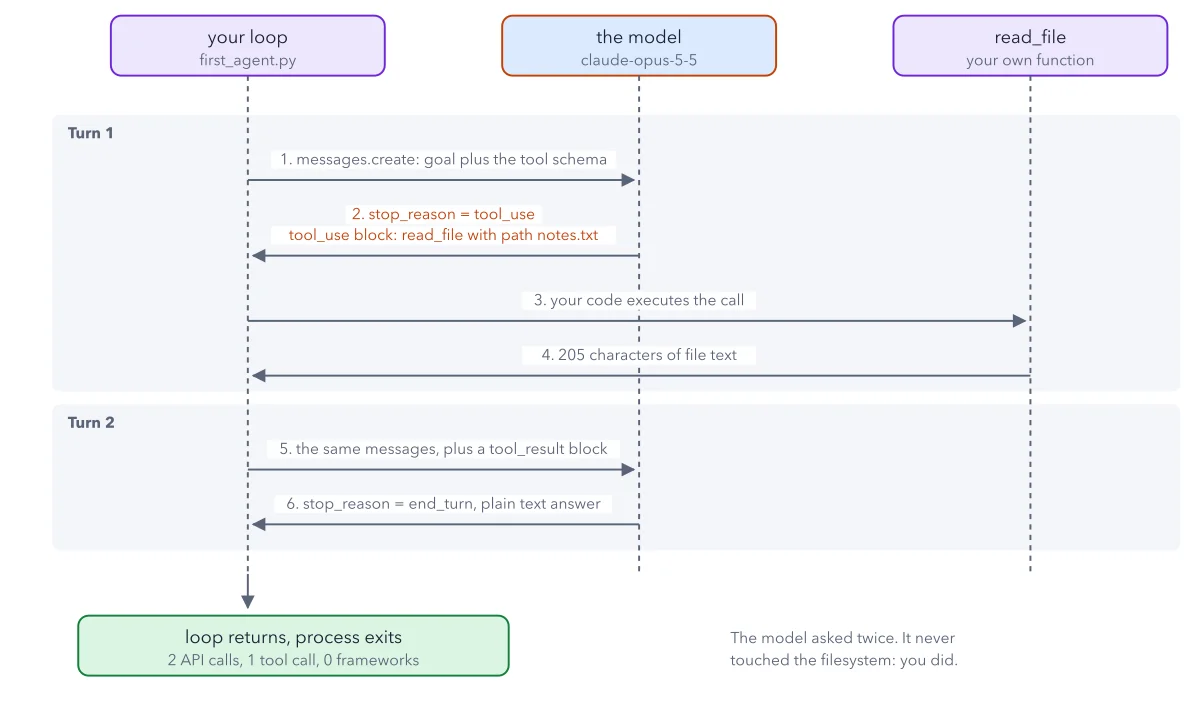
Meet the three players at the top. Three boxes head three dashed lines. On the left is your loop, the Python file
first_agent.py. In the middle, in orange, is the model. On the right isread_file, your own function. Every arrow runs between two of these lines.Arrow 1: your loop asks the model. In turn 1, your loop makes one API call (one request to the model's web service). It sends the goal plus the tool schema: the tool's name, what it does, and the inputs it takes. The goal asks how many lines of
notes.txtmention To do.Arrow 2: the model writes a request. The orange arrow comes back. The model sets
stop_reasontotool_use, which means it is waiting for a tool result. It adds atool_useblock: read_file, with the path notes.txt. That block is only text. Nothing has run yet.Arrows 3 and 4: your code runs it. Your loop reads the block and calls your read_file function. The part of your loop that does this is the dispatcher: the code that reads each request and runs it. The function returns 205 characters of file text. The model never touched the disk.
Arrows 5 and 6: the second turn. In turn 2, your loop sends the same messages again, plus a
tool_resultblock holding the file text. The model answers withstop_reasonset toend_turnand plain text: three lines mention To do. No new request, so the loop ends.Read the green box and the note. The green box at the bottom left adds it up: 2 API calls, 1 tool call, 0 frameworks. The note beside it says the rest. The model asked twice. It never touched the filesystem: you did.
Key takeaways
- When someone says an agent used a tool, ask which code ran it, and who can check it.
- Put your checks, refusals and logs in the dispatcher, because every action passes through it.
- Append the model's own turn first, then the tool result with the matching tool_use_id.
Worked example: the notes agent's two turns, message by message
The file notes.txt is a release checklist of six lines and 205 characters. Three lines start with To do. Here is what the messages list holds as the run goes on. The model reads only this list.
- Start: one message, the goal from the user. Your loop sends it with the read_file schema.
- The model answers with a request to read notes.txt. Your loop adds that answer to the list as the model's own turn.
- Your dispatcher reads the file and adds a tool result. It carries the 205 characters and the id of the request it answers.
- Your loop sends all three messages back. The model reads the file text and writes its answer: three lines, and the last one asks legal about the data retention line.
Result: Two API calls and one tool call, in about 80 lines of plain Python. If you add the tool result before the model's own turn, the API answers with a 400 error that names tool_use_id.
Questions readers ask
How does an agent call a tool? Is there another process that reads the output?
Yes, and it is your code. The model writes a request: a tool name and its input. Your loop reads that request, runs the matching function and sends the result back as text. The model never runs anything itself.
Why use an agent instead of just asking ChatGPT normally?
A chat model can only tell you what to do. An agent pairs the model with a loop that runs tools for it, so the work gets done, such as reading the file and counting its lines. See the agent loop for the full cycle.
Do I need a framework to build an agent?
No. The notes agent uses no framework: one package to call the model, one tool, and a loop that repeats until the model answers in plain text. A framework runs the same loop for you. Building it once by hand shows you what that framework does.
Sources: Tool use overview (Claude docs); The agent loop (Claude Agent SDK docs).
This figure is from AI Agents Made Crystal Clear, chapter 4.
The chapter builds the idea step by step, with recipes you can follow, a Try it to check yourself, and every source.
Get the book