How diffusion makes AI video, and why your seed fails
By Christophe Paka · Facts checked on 23 October 2026
You liked take 3, on a tool that shows a seed. You change one phrase, "slow dolly in" to "slow push in", and reuse take 3's seed. You expect the same clip with a new camera move. You get a different clip. One reader summed up this first month in a line: it is "basically rolling the dice every time".
Each surprise costs a paid take. The fix starts with how diffusion makes AI video: the model starts from random static and removes a little of it, step by step. The figure below shows where the seed and your prompt come in, and what to keep instead of a seed.
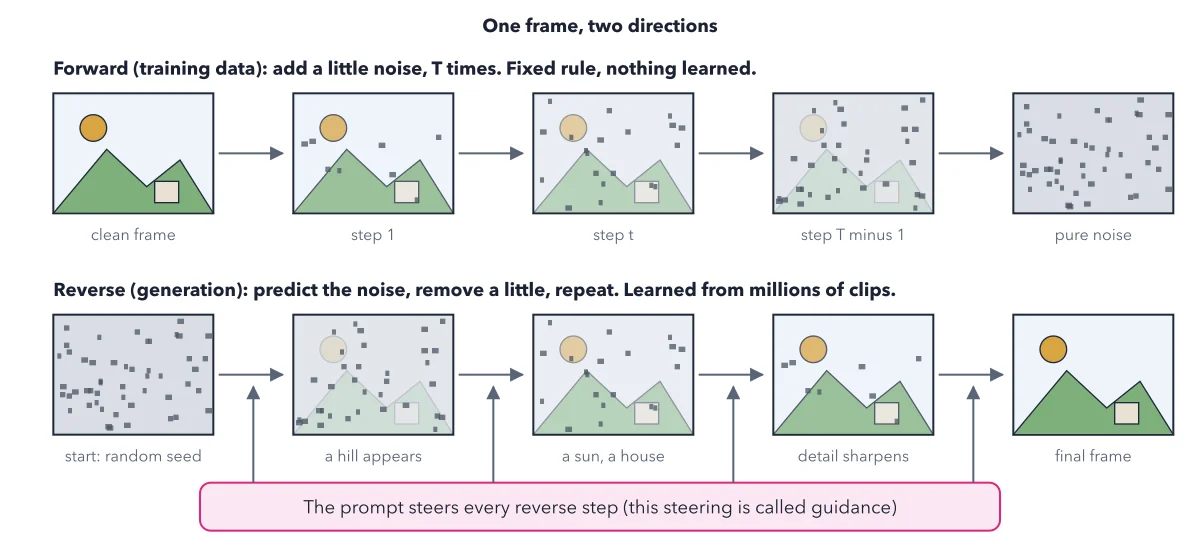
How to read this figure
Top row: how the model was taught. You never run this row; it shows how the model learned. Its makers took clean frames and added static step by step, until only static was left. T is just the number of steps. By seeing millions of clips buried in static this way, the model learned to dig a frame back out.
Bottom row: what happens when you press the button. Generation starts from fresh random noise, picked by a number called the seed. The model predicts which specks do not belong and removes a little. A hill appears, then a sun and a house, then the detail sharpens.
Count the arrows: each one is a step. Each pass that removes a little static is a denoising step, and a clip takes many of them. One free library's example uses 50. More steps cost more computing time and, past a point, add nothing you can see.
Read the pink bar: guidance. Your prompt steers every reverse step. How strongly it steers is called guidance. Too weak, and the model ignores your words. Too strong, and colours burn and motion freezes. Tools you install on your own computer, such as the free Diffusers library, show it as a setting next to steps and seed.
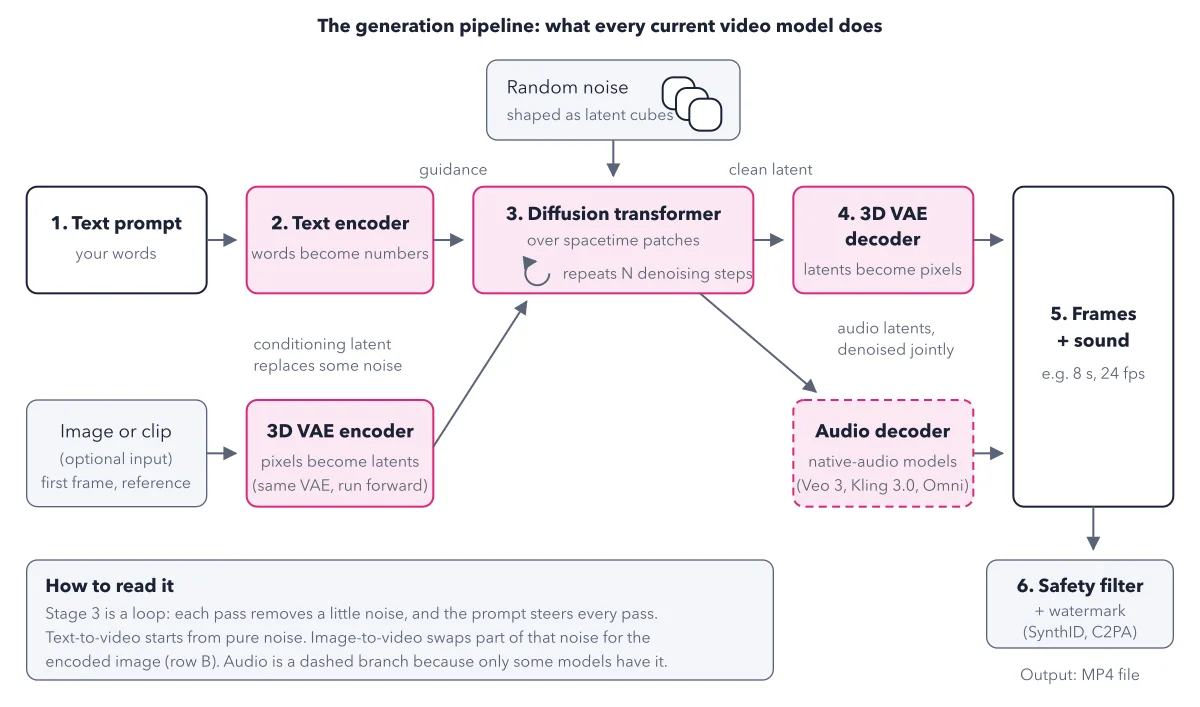
Look at the first box again. The start of the bottom row is random, so each take starts somewhere new. That is why one prompt gives a different clip each time. Read the six stage pipeline to see where this loop sits.
Key takeaways
- Reuse a seed only on the same model, with the same prompt and the same settings.
- Keep the MP4 file of every take you like; the file is the clip, not the seed.
- Hold a seed fixed and change one word when you want to see what that word does.
Worked example: the seed trap on the MONDAY mug
Picture a pair of loaded dice. Your prompt and pictures load the dice, and the seed is the throw. Now run the book's mug prompt on a tool that shows seeds.
- Takes 1 and 2 fail: still steam, then a mug that reads MODNAY. Each started from new noise.
- Take 3 has the right word and moving steam. You note its seed.
- You change "slow dolly in" to "slow push in" and reuse that seed.
- The clip is new. One new word loaded new dice, so the old throw lands somewhere else.
Result: The seed only repeats a take on the same model with the same prompt and settings. To keep take 3, keep its file. On tools with no seed setting, which includes many hosted services, treat every take as new. To keep the same face across clips, hand the model a picture instead: see the consistency ladder.
Questions readers ask
What is a seed in AI video?
The seed is the number that picks a generation's starting noise. Same seed, same model, same prompt and same settings give a very similar take. Change one word and you hold new dice. Google's Veo guide says its seed setting "doesn't guarantee determinism, but slightly improves it".
Why does the same prompt give me a different video every time?
Every take starts from fresh random static, and the model cleans it into a clip. Same prompt, new static, new clip. Many tools show no seed setting at all: Google's Gemini Omni Flash lists none, and the book found none published for Kling or Seedance, so check your tool's settings. Plan for several takes per clip you keep.
Do more denoising steps give a better clip?
Only up to a point. A clip takes many steps, and more steps cost more computing time. Past a point they add nothing you can see. On hosted services the step count is set for you; you only see it in tools you install on your own computer.
How do I make many versions of an ad that still match?
Do not count on the seed. Keep the MP4 file of every take you like, because the file is the clip. When a face or a product must match across clips, hand the model a picture, since a picture replaces part of the starting static. Where a tool does show a seed, hold it fixed and change one word to see what that word does.
Sources: Gemini API: Veo guide; Veo 3 Tech Report (Google DeepMind, PDF).
This figure is from AI Video Made Crystal Clear, chapter 2.
The chapter builds the idea step by step, with recipes you can follow, a Try it to check yourself, and every source.
Get the book