The CLAUDE.md hierarchy: four layers, read broadest first
By Christophe Paka · Facts checked on 23 October 2026
You wrote a rule in your project CLAUDE.md. You also keep a CLAUDE.md in your home folder, and your team keeps one at the top of the shared project folder. Claude follows one rule and ignores another, and you cannot tell which file it read.
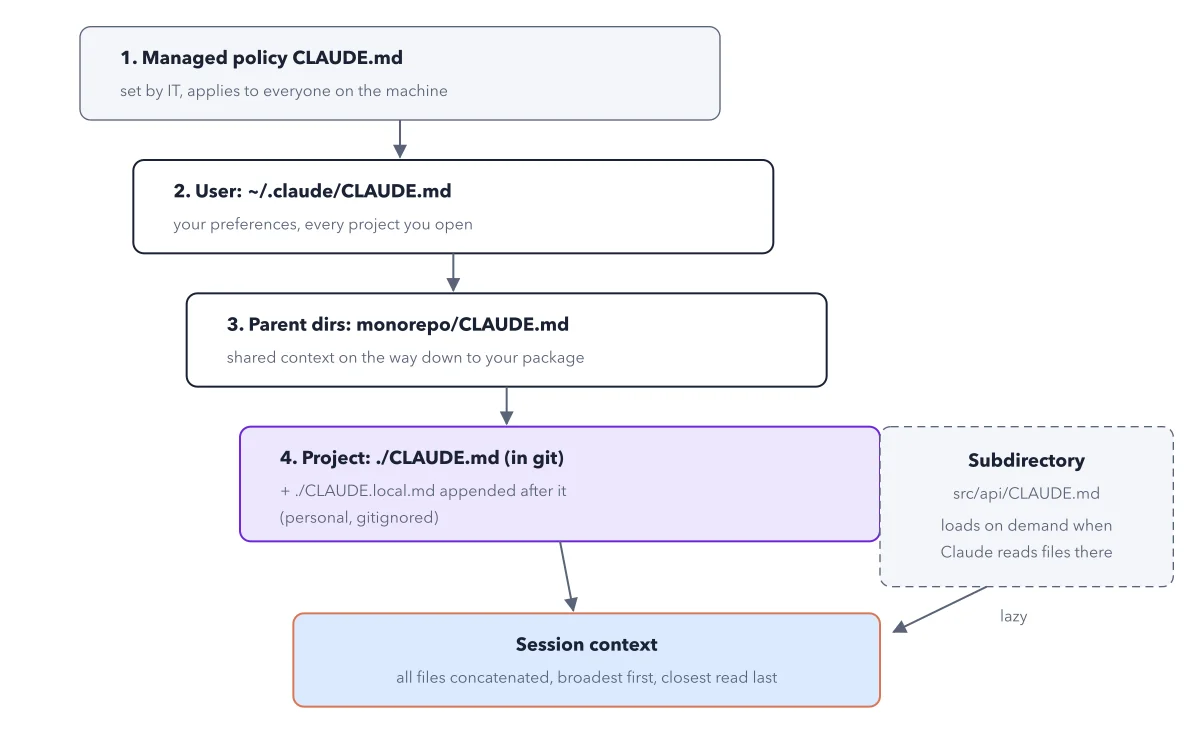
When files clash, Claude may follow either, and you lose time on the wrong fix. The CLAUDE.md hierarchy is the order in which a session reads these files. Working alone, you need one of them: the project CLAUDE.md, maybe a user file too. The figure below draws all four layers, plus one file that loads late.
How to read this figure
Start at the top box. CLAUDE.md is a plain text note Claude reads at the start of every session. Box 1 is the managed policy CLAUDE.md: a file a company's IT team places on the machine. It applies to everyone who uses that machine. Working alone, you will not have one, so skip it.
Step down to the user file. Box 2 is your user file, ~/.claude/CLAUDE.md. The ~ stands for your home folder, the one named after you. The .claude folder inside it is hidden, because its name starts with a dot, so you do not need to hunt for it: ask Claude to add a line to it, and run /memory to see its path. This file holds your preferences for every project you open.
Pass the parent folders. Box 3 says parent dirs: dirs is short for directories, another word for folders. These are the folders above your project. Monorepo is the name for one big folder that holds several projects, with a CLAUDE.md at its top for all of them. Working on one project alone, you will not have this layer, so skip it.
Reach the project box. Box 4, with a purple border, is the project file, ./CLAUDE.md, in your project's own folder. In git means it is saved by git, the tool that keeps versions of your files and shares them with the team. Your CLAUDE.local.md is added after it. Gitignored means git never saves it, so it stays personal.
Read the session context box. All arrows end in the session context box: all files concatenated, broadest first, closest read last. Concatenated means joined end to end, so no file replaces another. Read last is about order only. Claude gets the joined files as notes to follow, not as rules a program enforces. When two lines disagree, Claude has to guess, and either line can win. So keep each rule in one file only.
Note the dashed box on the right. The dashed subdirectory box holds src/api/CLAUDE.md. Its arrow is labelled lazy. It loads only when Claude first reads or edits a file in that folder, so it costs nothing elsewhere.
Key takeaways
- Working alone, keep one project CLAUDE.md in git and add a user file only for habits you want everywhere.
- Remove any rule two files disagree on; read last is an order, not a win.
- Put notes for one folder in a CLAUDE.md inside that folder, so they load only there.
Try this: see which files your session loaded
Open a project that has a CLAUDE.md, and start Claude in its top folder.
- Run /clear to start a clean session.
- Run /context and read the list of loaded files. /memory also shows each loaded file's path.
- Look for your project CLAUDE.md, and your user file if you wrote one.
- Ask Claude to read a file inside a subfolder that has its own CLAUDE.md, then run /context again.
Expected result: The project and user files appear from the start. The subfolder CLAUDE.md appears only after Claude reads a file in that folder.
Questions readers ask
Do I commit CLAUDE.md to the repo?
Commit the project CLAUDE.md, so every teammate's session starts with the same brief. To commit is to save a version in git. Keep CLAUDE.local.md personal: add it to .gitignore, the list of files git must never save. Never put secrets in either file.
CLAUDE.md or AGENTS.md?
AGENTS.md is the shared instructions file other coding agents read. If your team also uses one, keep AGENTS.md and start a short CLAUDE.md with the line @AGENTS.md. Claude Code then reads AGENTS.md first, then your Claude lines.
If two CLAUDE.md files disagree, which one wins?
Neither is sure to win. Claude Code joins the files and reads the closest last, but that sets the order, not a winner. The files are notes Claude tries to follow, so when two disagree, it may follow either. Remove the clash. A rule that must never break belongs in settings, which Claude Code checks itself. What to keep in each file is in the CLAUDE.md litmus test.
Sources: How Claude remembers your project (Claude Code docs); Using CLAUDE.md files (Claude).
This figure is from Claude Code Made Crystal Clear, chapter 5.
The chapter builds the idea step by step, with recipes you can follow, a Try it to check yourself, and every source.
Get the book