OpenAI Codex history on one line, and what it means for you
By Christophe Paka · Facts checked on 23 October 2026
You find a Codex tip in a popular thread. It tells you which model to pick and which setting to change. You open Codex, and the name is not in your menu. Below the tip, two replies argue for two other names.
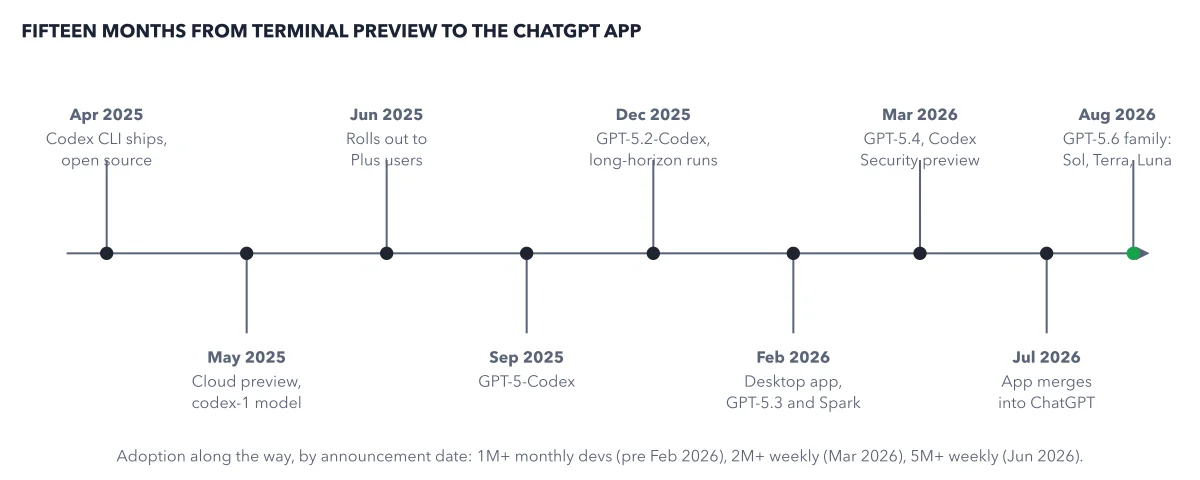
Advice about Codex goes stale fast, and a stale tip can send you to a setting that no longer exists. The openai codex history in the figure below shows why. Product news and new AI versions take turns on one line, about one every two months. Once you see the pace, you will check the date on every tip before you act on it.
How to read this figure
Read the line from left to right. Each dot is a station: one date and what arrived on it. Labels sit above and below the line in turn, so they have room. The line runs from the first command line tool to a new family of models.
Start at the first two stations. In April 2025, the Codex CLI shipped as open source. In May 2025, a cloud preview followed. A CLI is a program you use by typing commands in a terminal. Open source means anyone may read, use and change its code.
Watch product news and models take turns. Between the product stations sit new versions of the AI model behind Codex, with names like GPT-5-Codex. You do not need to learn them; watch the pace. Product news, like a desktop app or a security scanner preview, alternates with them. Count the dots: nine stations in the eighteen months the title names, so about one every two months.
Find the move into ChatGPT. In July 2026, the Codex desktop app merged into ChatGPT's own desktop app, and the merged app reaches every plan, Free included. Every way into Codex still draws on the same account and plan.
Note the busiest station at the end. The last station, September 2026, is the busiest. A whole family of models arrived in one month. Three names matter for your usage. Astra is the top model and drains it fastest. Luna is the lightest and drains it slowest. 6.1 Sol is the default for daily work, between the two. Treat any model name you read as dated.
Read the adoption footer. Over 1 million monthly developers before February 2026, over 2 million weekly in March 2026, over 5 million weekly in June 2026. Each count dates from its announcement. Together they say Codex is widely used and changes fast.
Key takeaways
- Check the date on any Codex tip before you copy its model name or setting.
- Type /status in a session to see which model you have, instead of trusting a thread.
- Search the official changelog when a name you read does not match your menu.
Try this: date check a Codex tip before you use it
Pick a tip you found in a forum or a video, one that names a model or a setting.
- Find the date on the post. If there is none, treat the tip as old.
- Open a Codex session and type
/status. It shows the model, what Codex may touch and how much usage is left. - Compare the model name in the tip with the one
/statusshows. If they differ, the idea may still hold, but the names in it may not. - Open the Codex changelog and search for the name the tip uses.
Expected result: You know whether the advice was written for the model you run, before you change a single setting.
Questions readers ask
Is OpenAI Codex the old code model from years ago?
No. Years before this agent, OpenAI used the name Codex for an older program that finished short snippets of code as you typed. That product is history. Anything written about it, its limits or its prices, says nothing about the agent on this timeline.
How often does Codex change?
On this timeline, about one station every two months, with product news and new AI versions taking turns. That pace is why a tip from a few months back can name a model you no longer see. It is also why the book dates its facts.
Do the desktop app and the command line tool use different accounts?
No. Every way into Codex draws on the same account and plan. You sign in once per machine, and the terminal, the editor, the app and the cloud all share your plan's usage.
Does the model I pick change how fast my usage drains?
Yes. Your plan meters Codex work, and the model you pick and how long it thinks set how fast that meter drains. On Plus, one Astra message uses about three times a 6.1 Sol message. So a tip that names a model is also a tip about your usage. Type /status before a heavy prompt to see your model and what is left.
Sources: Codex changelog (OpenAI); What's new (OpenAI).
This figure is from OpenAI Codex Made Crystal Clear, chapter 1.
The chapter builds the idea step by step, with recipes you can follow, a Try it to check yourself, and every source.
Get the book