A Codex workflow for beginners: the seven stations of one session
By Christophe Paka · Facts checked on 23 October 2026
You open your project, type codex, and a cursor waits. A reader new to Codex asked power users for "your complete workflow." The top replies agreed on one thing: plan first, and do not overdo it at the start.
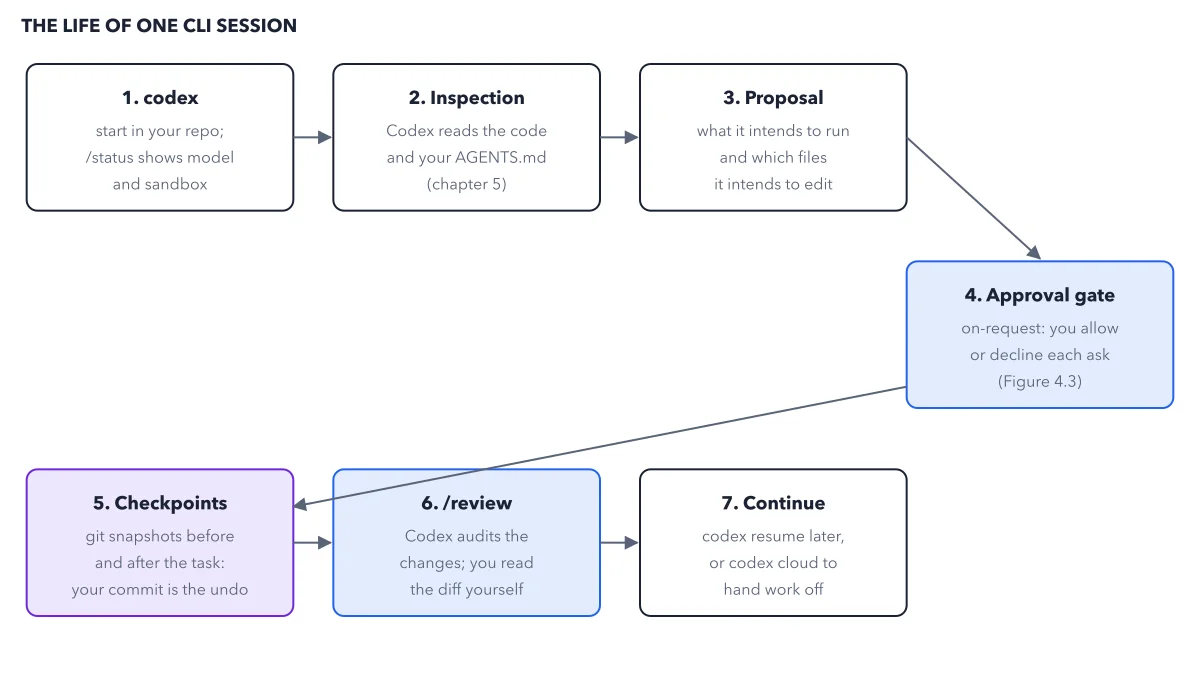
Skip that, and you can end up with edits in files you never named, and no clear way to see what changed. This codex workflow for beginners follows one small task through the same seven stations Codex uses every time. You act at only two of them, and the figure shows which.
How to read this figure
Station 1: start in your repo. Type
codexin your repo, the project folder that git tracks. Git is the tool that saves versions of your files. Then type/status. It shows two things: the model, and the sandbox. The sandbox is the set of limits on what Codex may touch, such as files outside your folder or the network. Type/statusagain whenever Codex behaves differently from yesterday.Stations 2 and 3: inspection, then proposal. At station 2, Codex reads your code and your AGENTS.md, a file of standing instructions for the agent. At station 3, it says what it intends to run and which files it intends to edit. A good plan is small, names real files and says how it will check the result. If it looks wrong, correct it in plain words, such as "only touch docs/api.md".
Station 4: the approval gate. This is the first place you act. In the default permission mode, Ask for approval, Codex asks before it acts outside your project folder, such as
npm install, which needs the network. The box prints that mode by its setting name, on-request. Edits inside the folder do not ask. Read the whole ask, then allow or decline it. The book reference in the box is online as one ask, read line by line.Station 5: checkpoints. Codex saves git snapshots before and after the task. The figure adds the rule that counts: your commit is the undo. A commit is a saved copy of your project that you make on purpose, so make one before the task starts. See the git safety net for how it works.
Station 6: /review, then the diff. This is the second place you act. Type
/reviewand Codex looks over the changes and reports problems without editing anything. Then read the diff yourself: the line by line list of what changed. The review is a second opinion. The diff is the evidence.Station 7: continue.
codex resumereopens the chat later.codex cloudhands work to Codex Cloud, which runs tasks on OpenAI's computers while you do other work. Resume brings back the chat, never your files.
Key takeaways
- Commit your project before every task, so the undo is yours and not the agent's.
- Read every approval ask in full, and decline any that reaches a folder or site the task does not need.
- After
/review, read the diff yourself; when the summary and the diff disagree, trust the diff.
Try this: your first supervised task
The book runs this on tally, its small sample project. Any small project under git works, and it takes a few minutes.
- Save first: run
git add -A, thengit commit -m "before Codex". These two git commands save a copy of every file in the folder. Git should report nothing left to commit. - Start Codex in the folder and brief two small changes in two files. End the brief with: "Change nothing else. Done means the diff touches only those two files."
- Watch the plan. Correct it once in words, such as "only touch docs/api.md first", and watch Codex plan again. Read any ask before you answer it.
- When Codex says it is done, type
/review. Expect a list of findings, or none, and no new edits to your files. - Run
git diff. Predict first: how many files should it list?
Expected result: Two files, the ones you named, and nothing else. A third file means Codex left the brief: put it back with git restore and the file name.
Questions readers ask
What is a good Codex workflow for a complete beginner?
Plan first and start small. Codex goes through seven stations: start, inspection, proposal, approval gate, checkpoints, review and continue. You act at the approval gate and at the review. Pick a task with a definition of done you can check in a minute, and commit before you start.
Does Codex ask before every change?
No. In a git project, edits inside your project folder run without a prompt. Codex asks before it acts outside the project, such as running npm install, which reaches the network. So the failures readers fear, such as a wiped drive, need your yes first.
How much usage does /review take?
A local review counts toward your plan's usage limits, the 5 hour window and the weekly limit, like your other messages. The docs give no figure per review. If your plan is tight, type /status before and after one review and compare what is left.
Does codex resume undo the changes Codex made?
No. codex resume reopens a saved conversation, so the chat comes back, but your files stay as they are. Your undo is git: a commit before the task, and git restore after it for any file you did not ask Codex to touch.
Sources: Codex CLI guide (OpenAI); Developer commands for the CLI (OpenAI).
This figure is from OpenAI Codex Made Crystal Clear, chapter 3.
The chapter builds the idea step by step, with recipes you can follow, a Try it to check yourself, and every source.
Get the book