Which Codex tool to use for the job in front of you
By Christophe Paka · Facts checked on 23 October 2026
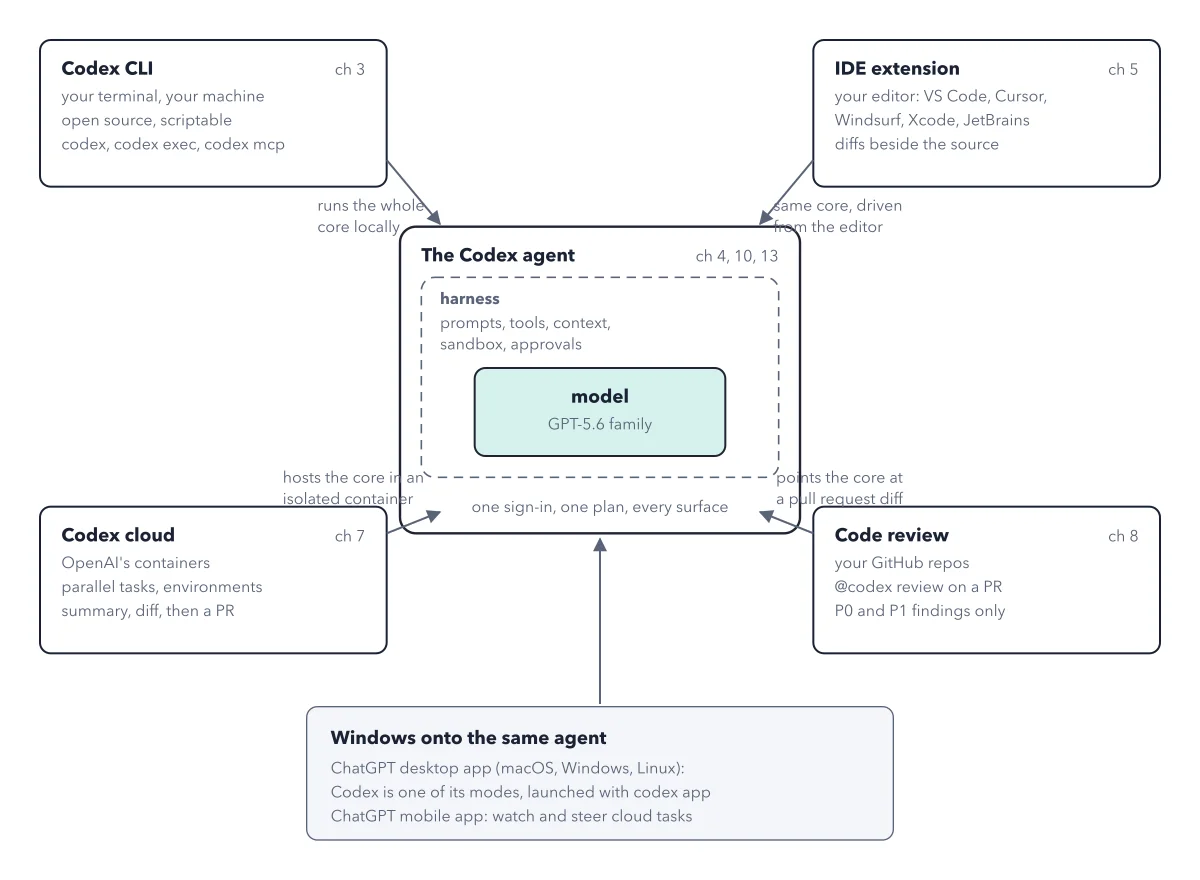
You have Codex in your editor, your terminal, the cloud and the ChatGPT app. A job lands on your desk, and you open the one that looks most serious.
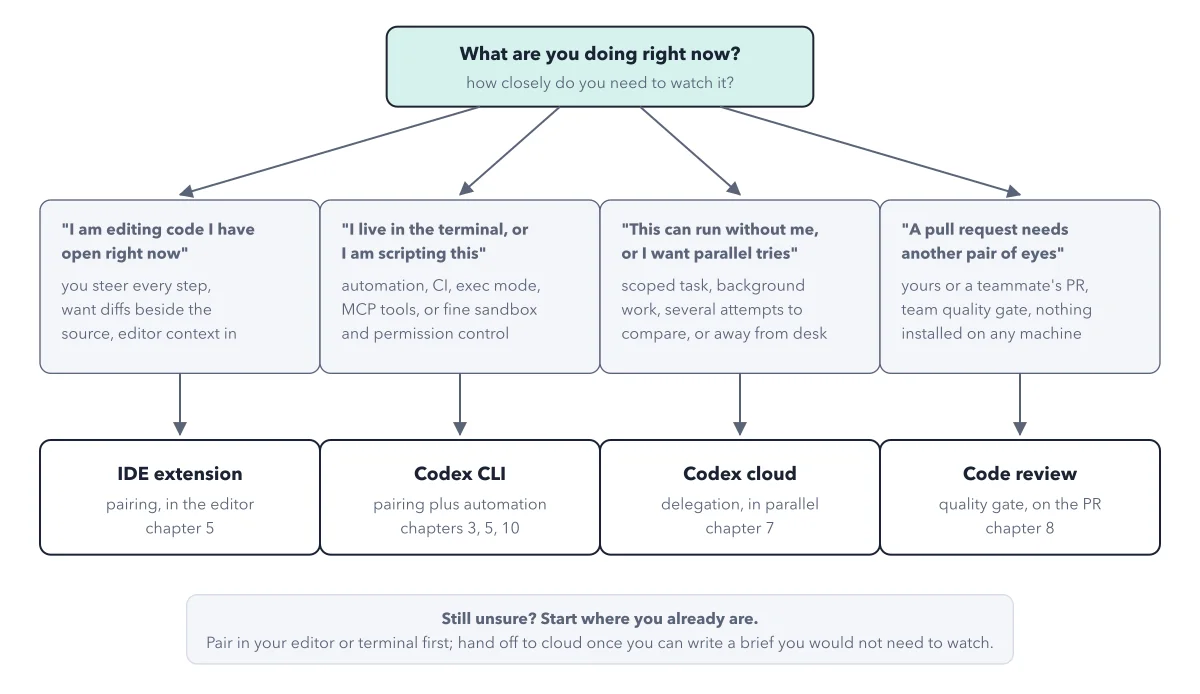
Pick wrong and you either end up babysitting a job that could run alone, or you hand off work you needed to watch. Deciding which codex tool to use takes seconds once you ask one question: how closely do you need to watch this work? The figure below turns that question into four paths, worded the way readers ask.
How to read this figure
Start with the question at the top. The top box asks what you are doing at this moment, and how closely you need to watch it. Every branch below answers that one question. The two left branches pair with you as you watch. The two right ones work alone, and you review the result.
Branch one: code you have open. You steer every step and want diffs beside the source. A diff is the exact list of changed lines. Take the IDE extension, which pairs with you inside the editor.
Branch two: the terminal or a script. You want Codex to run from scripts, or fine control over what it can touch and when it asks. The card's CI and exec mode mean running Codex from a script with nobody watching, such as a nightly check. MCP tools are add ons that connect Codex to other systems. If none of this is your work, skip this branch. Take the Codex CLI, the command line tool: pairing plus automation.
Branch three: work that runs without you. A scoped task in the background, several attempts to compare, or you are away from the desk. Take Codex cloud, which runs tasks in OpenAI's containers, in parallel. See the life of a cloud task.
Branch four: a pull request needs eyes. A pull request is a proposed change sent for review before it joins the main code. Yours or a teammate's, take code review, the quality gate on the pull request. It needs nothing installed on any machine.
Read the box at the bottom. Still unsure? Start where you already are. Pair in your editor or terminal first, and hand off to the cloud once you can write a brief you would not need to watch. Working alone and not a coder? The ChatGPT desktop app needs no terminal; start there and pair.
Key takeaways
- Ask how closely you need to watch before you pick where to run Codex.
- Pair first in the editor or terminal; delegate to the cloud once your brief stands on its own.
- Start a team with code review: nothing to install, and findings land in the pull request.
Worked example: three tally jobs, routed through the map
tally is the small invoicing app the book builds. Three jobs land on one morning. Run each one through the map.
- You are fixing a date bug in a file you have open, and you want to see each change. You need to watch every step, so take branch one: the IDE extension.
- You want a task to run while you are in a meeting and come back as a pull request. It can run without you, so take branch three: Codex cloud. The IDE extension pairs with you as you watch, on your own computer, so it does not fit.
- A teammate opens a pull request for the fix. It needs another pair of eyes, so take branch four and comment
@codex reviewon it.
Result: Three jobs, three surfaces, one sign in and one plan. The question did the choosing, not the look of the tool.
Questions readers ask
What is the best way to use Codex away from the computer?
Hand the job to Codex cloud. It runs the task in OpenAI's containers while you are away and ends in a diff you can turn into a pull request. The ChatGPT mobile app lets you watch and steer cloud tasks from your phone.
Do I need to pay for each Codex surface separately?
No. Every surface on your plan draws on the same usage, so a team buys one product, not five. Cloud tasks and automatic code review need Plus or higher; on Free and Go you run /review in the app instead. One agent, many surfaces shows how they connect.
Do several cloud attempts at once use more of my plan?
Yes. Cloud tasks share your plan's allowance and may use more of it than local messages, and each attempt running at once drains the same meters. OpenAI publishes no cost per cloud task. So run one, then open the usage dashboard at chatgpt.com/codex/settings/usage to see what it took before you queue several.
Where should a lead or budget owner start?
With Codex code review. It needs nothing installed on anyone's computer, and every finding shows up in the pull request where the whole team reads it.
Sources: Codex cloud guide (OpenAI); Code review (OpenAI); IDE extension guide (OpenAI).
This figure is from OpenAI Codex Made Crystal Clear, chapter 2.
The chapter builds the idea step by step, with recipes you can follow, a Try it to check yourself, and every source.
Get the book