Codex always approve? Read one approval moment first
By Christophe Paka · Facts checked on 23 October 2026
The prompt pops up again: Codex wants to run a command. A reader on r/codex typed "always approve" and "full access" into the chat to make it stop. Their verdict: "Has not worked."
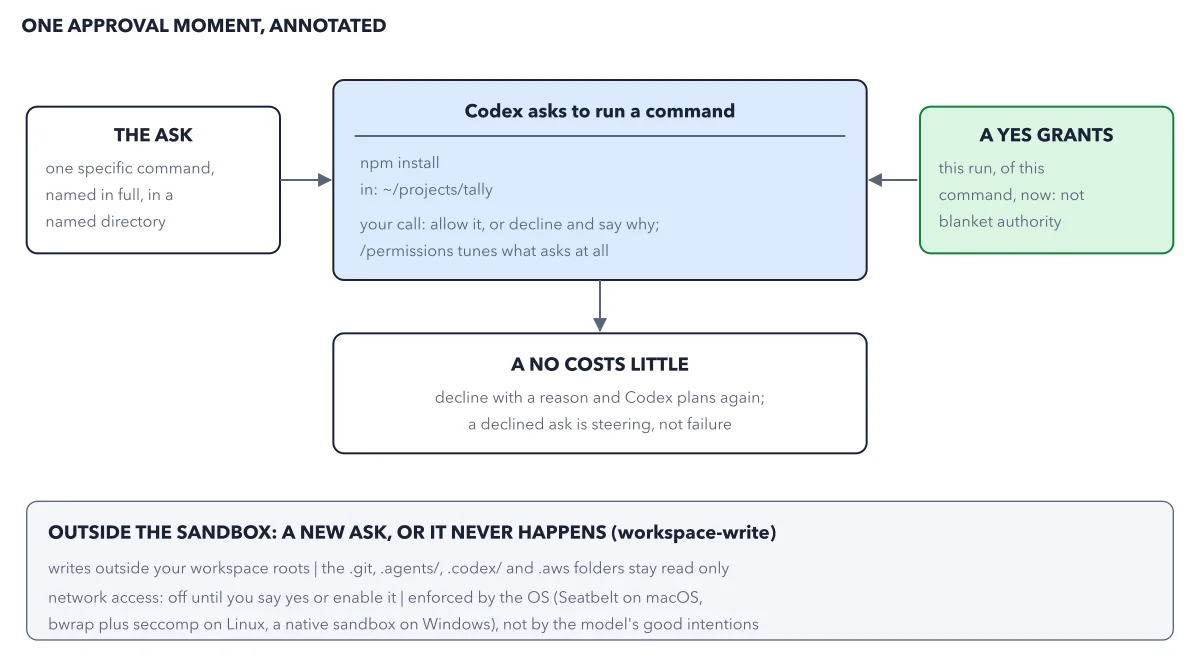
Click yes without reading, and one day a yes lets the wrong command through. There is no codex always approve phrase, because the prompt comes from a setting, not from the model. But each ask is small and precise. The figure freezes one approval moment, so you can answer in seconds and know what you gave.
How to read this figure
Read the card in the middle. Codex asks to run one command,
npm install, in one folder,~/projects/tally. That command downloads ready made code that the project uses from the internet, so it must cross the network wall. The card ends with your call: allow it, or decline and say why.The ask: one named command. The box on the left says the ask is one specific command, named in full, in a named folder. Read the whole line before you answer. Say no when it reaches a folder or a site the task does not need.
A yes grants this run only. The box on the right: a yes grants this run of this command, now. It is not blanket authority. The next command that crosses a wall asks again. Where the walls stand is mapped in approvals vs sandbox.
A no costs little. Below the card: decline with a reason and Codex plans again. A declined ask is steering, not failure. For example, "do not install anything, use the date library we have" sends Codex back to a plan that needs no download.
The band at the bottom. In the
workspace-writesandbox, three things stay outside: writes outside your workspace, four hidden folders, and the network. The hidden folders have names that start with a dot. They hold your undo history, Codex's own instructions and settings, and Amazon cloud keys, so Codex may read them but not change them. Each needs a new ask or never happens. The operating system enforces these walls, not the model's good intentions.
Key takeaways
- Read every approval request in full before you answer: a yes opens the wall for that one action.
- Decline with a reason in plain words, so Codex plans again around your limit.
- To be asked less often, change the permission mode with
/permissions, not the chat.
Worked example: the same npm install in two permission modes
Codex asks to run npm install on tally, the book's sample project. The download must cross the network wall. The figure shows the first permission mode below, where you answer; the second mode is not drawn. Permission modes are the named presets you pick with /permissions.
- In Ask for approval, you see the question. A yes lets this one install run. A no means nothing downloads.
- Switch to the mode called Approve for me. Now a reviewer called auto review answers in your place: a second Codex agent with one job, to approve or deny requests to cross the walls. You are asked only for actions it flags as potentially unsafe. Does the reviewer draw on your plan's usage? The docs do not say, so on a tight plan, compare
/statusbefore and after a long task. - Suppose a planted instruction tells Codex to send the project's payments key to an unknown site. The reviewer denies critical risk actions like this one, and the app marks the request Denied.
- Codex is told why and must find a safer way or ask you. After 3 denials in a row, it stops the turn.
- If a denial was wrong,
/approvelets one denied action retry once, and the reviewer checks the retry again.
Result: Approve for me answers most asks for you, but it never widens the walls. The docs call auto review "not a deterministic security guarantee", so start in Ask for approval and move on only for a repo you know.
Questions readers ask
Can I make Codex always approve everything?
Not by typing it. The popups come from the approval policy, a setting, not from what you tell the model. Change the permission mode with /permissions in the CLI or the permissions control in the app. Full access removes every question and every wall, so keep it for a machine you can lose.
Does saying yes once approve that command forever?
No. A yes grants this run of this command, now. It is not blanket authority. The walls in the band stay up for everything else, and the next request to cross one asks again.
What happens when I decline a Codex approval?
Codex plans again around your answer. Decline with a reason, such as "use the date library we have", and the next plan works around it. A correction in words, before any code exists, is the cheapest one you will ever make.
Is Approve for me safe for a team?
The book's rule: start in Ask for approval, move to Approve for me on a repo you know, and keep Full access for a machine you can lose. The docs call auto review "not a deterministic security guarantee". On Business or Enterprise, an admin can enforce one safe baseline for everyone with managed configuration.
Sources: Permission modes (OpenAI); Auto-review (OpenAI); Agent approvals and security (OpenAI).
This figure is from OpenAI Codex Made Crystal Clear, chapter 4.
The chapter builds the idea step by step, with recipes you can follow, a Try it to check yourself, and every source.
Get the book