A DeepSeek API example, read field by field
By Christophe Paka · Facts checked on 23 October 2026
"I've never used any AI through an API before," one reader wrote; only through a subscription. You copy a sample, run it, and a greeting prints. But what did you just send, and what did it cost?
Skip that question and the first surprise comes with the bill, not with an error.
This DeepSeek API example puts the request beside the reply. The figure below shows which fields you set, where the answer text sits, and which two counts decide what you pay.
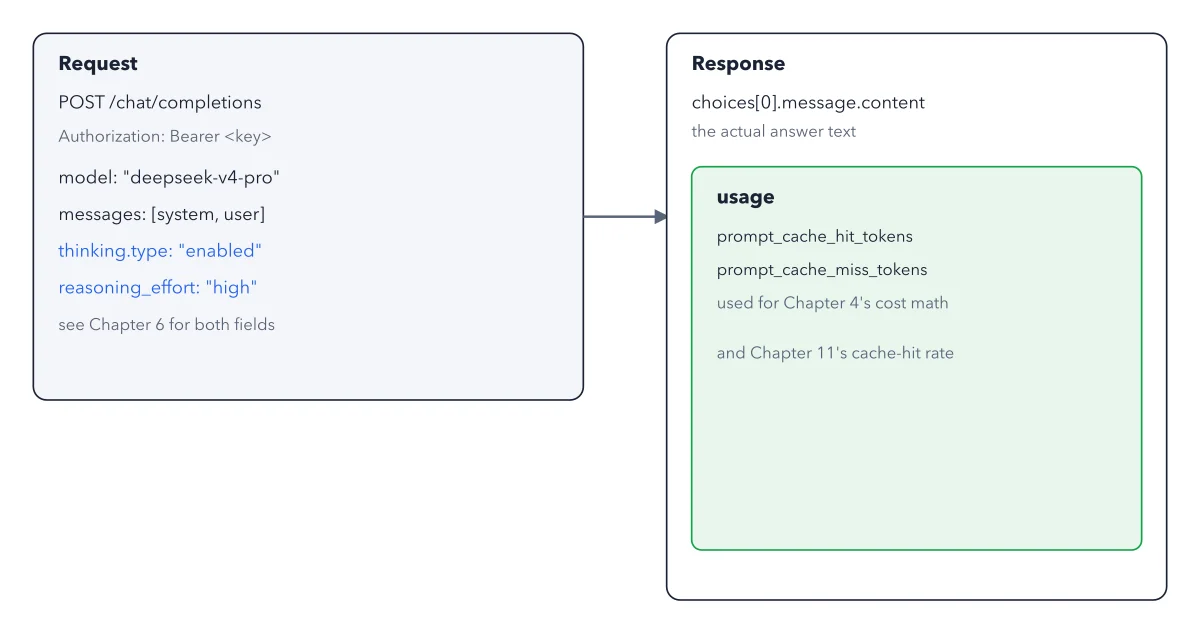
How to read this figure
Start at the request's first lines. The first line,
POST /chat/completions, says where the request goes: DeepSeek's chat address. Every call starts from the base URL,https://api.deepseek.com, the web address your code sends to. The greyAuthorizationline carries your API key, the secret string that ties each call to your account. Anyone with it can spend your money, so keep it out of your code.Name the model and the messages.
modelpicks the model by name, heredeepseek-flash.messagesholds a system message, which sets the role, and a user message, the question. The format copies OpenAI's, so OpenAI's ready made Python library works with two settings changed:base_url="https://api.deepseek.com"andmodel="deepseek-flash".Read the two blue lines.
thinking.typeandreasoning_effortset thinking mode: the model writes out its working before the answer. It is on by default, so the sample only spells it out. Thinking adds output too, so a default bill runs higher than one with thinking off.Find the answer on the right. The answer text sits at
choices[0].message.content. Read it left to right:choicesis the list of answers,[0]picks the first one (counting starts at zero), then its message, then that message's text. That is the one field most scripts print. Print the whole response once, so you see what else comes back.Read usage as your bill.
usagecounts the tokens you pay for.prompt_cache_hit_tokenscounts input that repeats text DeepSeek has already seen, billed at a far lower price.prompt_cache_miss_tokenscounts new input at the full price. The price grid shows what each side costs.
Key takeaways
- Keep your API key in an environment variable, never inside code you share.
- Log the usage block after every test call, so cost surprises show up early.
- Work out your cache hit rate from the two input counts: hits divided by hits plus misses.
Try this: send this DeepSeek API example from your terminal
You need a terminal (the window where you type commands, the Terminal app on a Mac) and a few dollars. Every call goes to DeepSeek's servers in China, so test with made up text, never customer data.
- Sign in at platform.deepseek.com, open API keys, then Create new API key. Copy the key, which appears once, and pay in a few dollars on the Top up page.
- Put the key in an environment variable, a named value your terminal keeps for programs to read:
export DEEPSEEK_API_KEY="your_key_here" - In the same window, send the call with curl, a small program that sends web requests:
curl https://api.deepseek.com/chat/completions -H "Content-Type: application/json" -H "Authorization: Bearer ${DEEPSEEK_API_KEY}" -d '{"model": "deepseek-flash", "messages": [{"role": "system", "content": "You are a helpful assistant."}, {"role": "user", "content": "Hello!"}], "stream": false}' - In the reply, find the greeting under
choicesand the token counts underusage, the fields from the figure.
Expected result: A reply with a short greeting and a usage block of token counts. Error 401 means your key is wrong or not set in this window; error 402 means the money you paid in ran out.
Questions readers ask
Which field of the DeepSeek reply holds the answer text?
choices[0].message.content: the first choice, its message, its content. Print that field alone and you see a short greeting. Print response.usage as well to see the token counts you pay for.
Can I use the OpenAI library with the DeepSeek API?
Yes. DeepSeek's main format copies OpenAI's request shape, so code written for OpenAI works after two changes: the base URL and the model name. Your words still go to DeepSeek, not to OpenAI. If you see an error from OpenAI, the code still sends to OpenAI, so fix the base URL.
What do errors 401 and 402 mean on the DeepSeek API?
Error 401, Authentication Fails, means your key is wrong or not set in the terminal window you run from. Error 402, Insufficient Balance, means the money you paid in ran out: the API is prepaid, and calls stop at zero. Top up, then run again.
Sources: DeepSeek API Docs, Your First API Call; DeepSeek API Docs, Error Codes; DeepSeek API Docs, Models and Pricing.
This figure is from DeepSeek Made Crystal Clear, chapter 3.
The chapter builds the idea step by step, with recipes you can follow, a Try it to check yourself, and every source.
Get the book