ElevenLabs Made Crystal Clear · chapter 2: How AI Voice Works: Core Concepts and the Big Picture
The model picker
2026-09-24
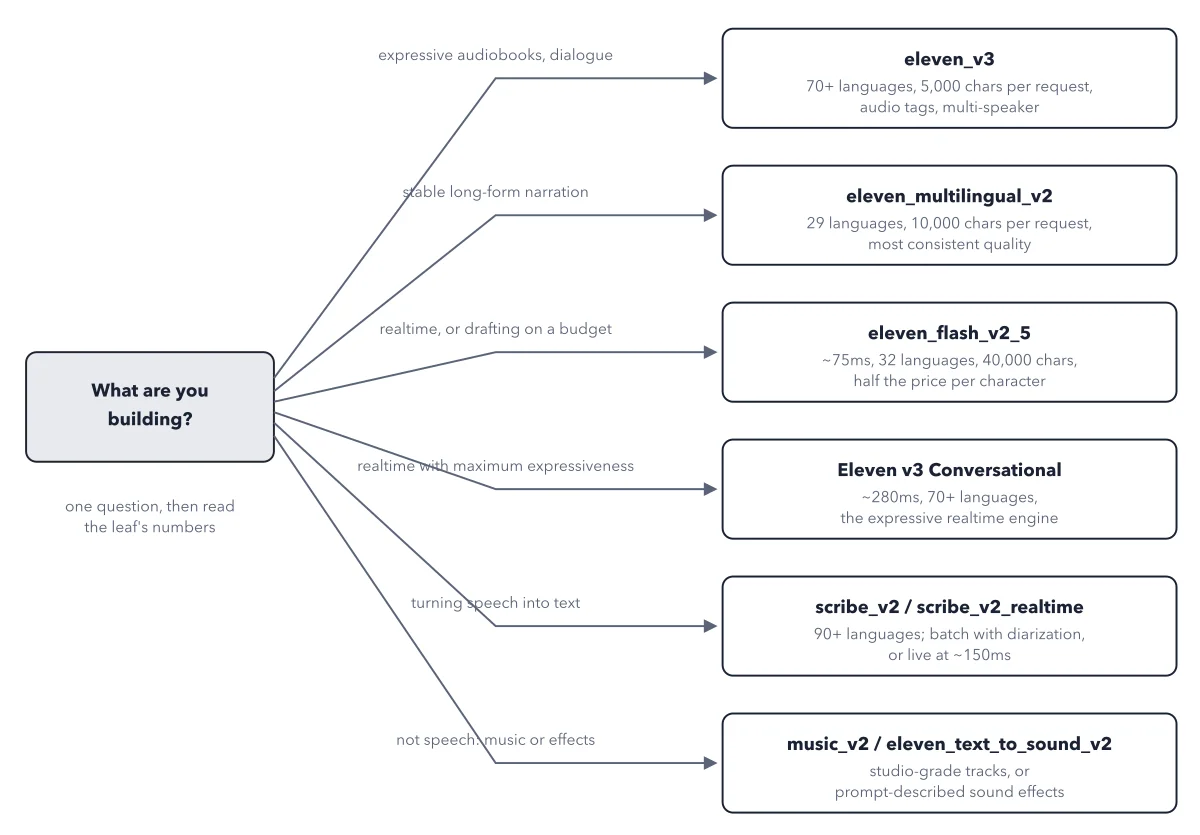
Start from the job, land on a model ID, then check the leaf's latency and character limit against your needs. When in doubt, draft on Flash v2.5 and render the final on a quality model.
Below: the paragraph from the book that builds this idea, then the diagram itself (Figure 2.3), and a recap. About a minute of reading.
The menu becomes easy once you ask one question first: what are you building? The official docs' own guidance maps jobs to models: high quality and content creation route to Multilingual v2, audiobook production to Eleven v3, low-latency and realtime work to the Flash models or v3 Conversational, transcription to Scribe v2 (batch) or Scribe v2 Realtime (live). Figure 2.3 turns that guidance into a decision tree, with each leaf annotated with the numbers that matter: latency and per-request character limit.
Recap
- The idea: Start from the job, land on a model ID, then check the leaf's latency and character limit against your needs.
- The picture: Figure 2.3, from chapter 2 ("How AI Voice Works: Core Concepts and the Big Picture") of ElevenLabs Made Crystal Clear.
- Go deeper: the chapter builds this step by step, with recipes and sources at the end.
This diagram is one of many in ElevenLabs Made Crystal Clear.
Every chapter opens with the gist, draws the hard ideas, and ends with recipes and sources.
Get the book