Gemini in Google Workspace, app by app: where it saves time
By Christophe Paka · Facts checked on 7 November 2026
One morning a panel offers to draft your email. You did not choose it. Gemini in Google Workspace came with your company's plan, and nobody said what it is good for.
So you try it on everything. Some answers save an hour. Others look fine, go out under your name, and hold a mistake you now own.
The figure below sorts six apps into two columns: jobs Gemini reliably helps with, and jobs where it wastes your time. One simple test explains the split.
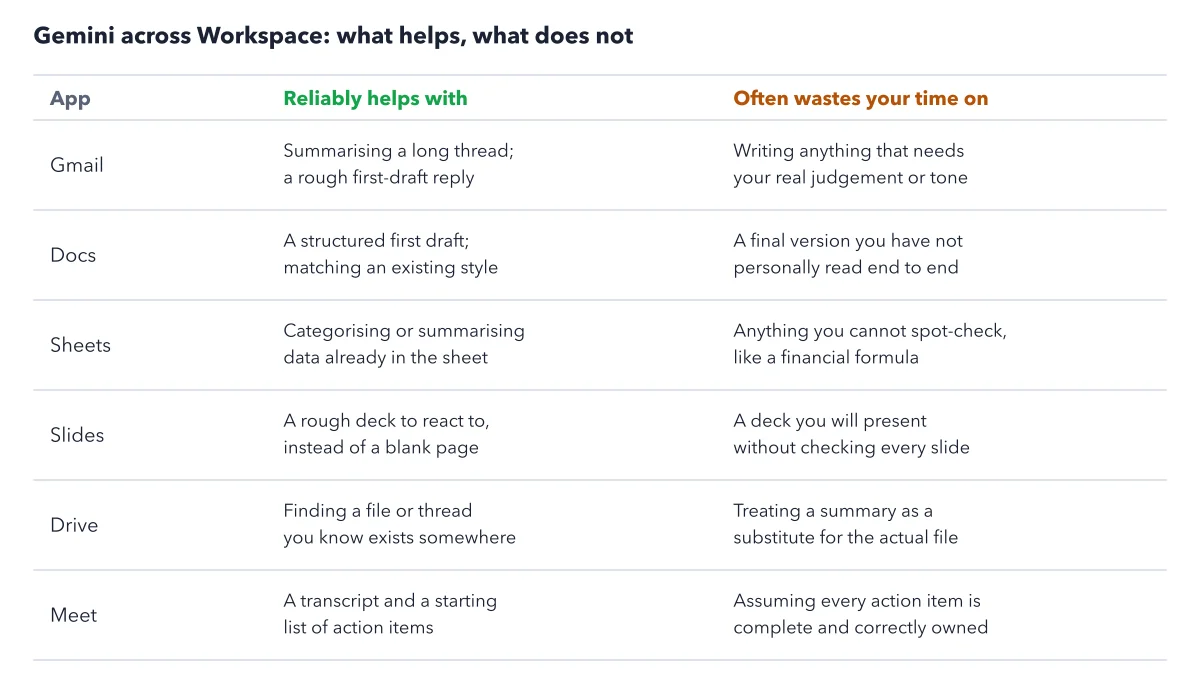
How to read this figure
Read the two column heads. The left column lists jobs Gemini reliably helps with. The right column lists jobs where it often wastes your time. Every job on the left shares one trait: you can check the result fast, against the thread, the sheet or the file.
Start with Gmail and Docs. In Gmail, Gemini sums up a long thread and drafts a rough reply. In Docs, it writes a first draft with a clear structure, or matches a style you already use. Both fail the same way: a final message you send without reading every word.
Check Sheets and Slides. In Sheets, it sorts or sums up data already in the sheet. A money formula you cannot spot check belongs on the right. In Slides, a rough deck beats a blank page. A deck you present unchecked carries its errors into the room.
Finish with Drive and Meet. In Drive, Gemini finds a file you know exists. A summary of that file is a taste, not a substitute. In Meet, Take notes for me writes a transcript and a first list of action items. Someone still has to give each item an owner.
Apply the test to your own task. Before you ask, picture the check. If you can confirm the answer in a minute, Gemini earns its keep. If the output leaves under your name, or a small error costs a lot, do the job yourself or read every word.
Key takeaways
- Use Gemini for summaries, first drafts and finding files, then read every word before anything leaves under your name.
- Before each task, ask how fast you can check the result; if you cannot check it, skip Gemini.
- Give every Meet action item an owner and a date before you send the list.
Try this: clear an inbox backlog without losing a thread
Use this after a holiday week, when a support inbox in Gmail holds a backlog. You need Gemini in Gmail on a computer, since the side panel is a desktop feature.
- Open the oldest unread thread: that customer has waited longest. Click Ask Gemini and type: Summarize this thread in three bullets.
- Decide yourself: reply, hand it over, or archive it. Gemini does not know your priorities.
- For a reply, ask for a draft. Read it in full and rewrite it in your voice.
- Delete any promise your policy does not make, such as a refund date. The draft does not know your policy unless the thread states it.
- Finish each thread before you open the next, then write a two line log.
Expected result: A log that names every message you replied to, handed over or archived. The summary usually says what happened. What the customer wants is often in the last message, so read that one yourself.
Questions readers ask
Which Workspace edition gets which Gemini?
A Workspace edition is the package your employer buys. Business Starter puts Gemini in Gmail, in Google Vids and in a chat with Gemini, and nowhere else. Standard, Business Plus and Enterprise add Docs, Sheets, Slides, Drive, Meet and Chat. Business Plus is a Workspace edition, not the Google AI Plus app plan. It and Enterprise add more storage and admin protection, but no more Gemini apps. Who can switch each app on is a separate question.
Why is a Gemini feature missing from my Docs at work?
A missing feature usually means your edition, your country or your admin. Ask your admin whether Gemini is on for that app; you cannot turn it on yourself. If your edition lacks the app, as Starter lacks Docs, there is no switch to flip. A personal Google AI Pro plan will not fix it: it covers your personal Gmail and Docs only.
Does an add on give my team more Gemini apps?
No. AI Expanded Access is a paid Workspace add on for more Gemini use. It buys more use, not new apps, and Google publishes no numbers for the extra use. Skip it unless your team already hits Gemini's usage limits. Seat prices vary by country, so read Google's pricing page the day you buy.
Is my Workspace data treated differently from my personal Gemini?
Yes. On a qualifying business edition, Google says it does not train on your data without permission. People do not review your chats or files, and your use stays within your organization. Google's Privacy Hub, linked under Sources, states these promises, but it is a summary, not your contract. Read your company's own agreement before regulated work.
Sources: Gemini in Docs, Sheets, Slides, Vids, Forms and Drive (Google); Generative AI in Google Workspace Privacy Hub (Google); Google Workspace pricing.
This figure is from Gemini Made Crystal Clear, chapter 4.
The chapter builds the idea step by step, with recipes you can follow, a Try it to check yourself, and every source.
Get the book