Git rebase vs merge: merge keeps, rebase copies
By Christophe Paka · Facts checked on 7 November 2026
Your branch has two commits. Meanwhile main moved on. You could merge, or you could rebase, and you have read that rebase destroys work. So you click the merge button every time and hope nobody asks why.
The fear misses one fact. Rewriting makes new commits, and the old ones only look gone. The figure below solves one split two ways, so you can see git rebase vs merge on the same commits and pick with a reason.
Use this diagram on your site
Free to share in your blog post, docs, course or slides, as long as the credit link stays. Paste the code below where the figure should go.
How to read this figure
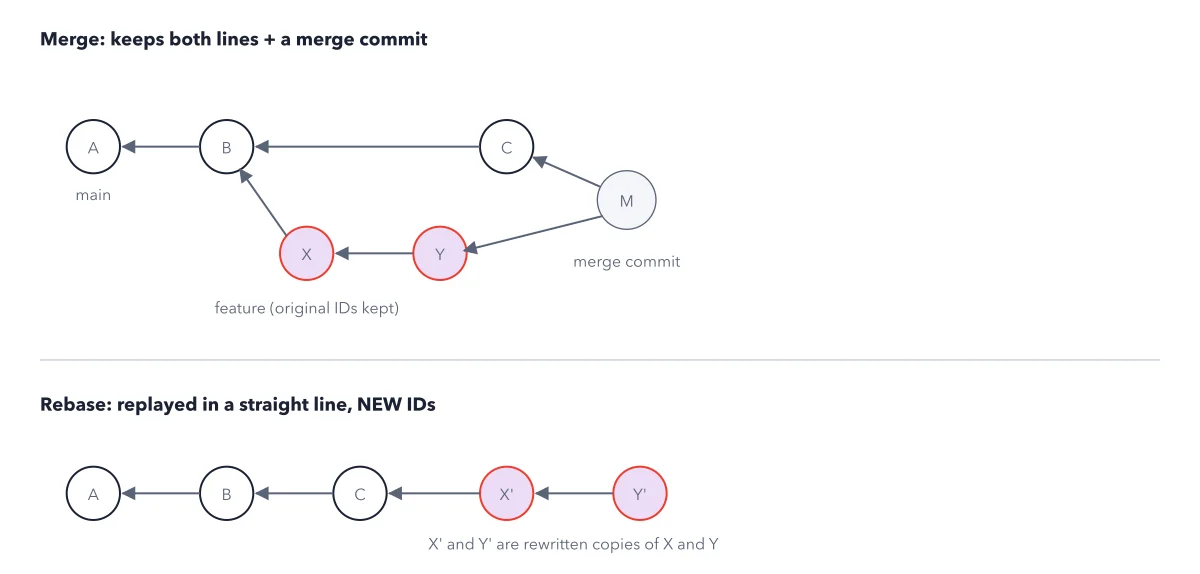
See the split in the top half. A, B and C are main. Your branch, feature, grew from B and holds X and Y. Main gained C while you worked, so the two lines diverged.
Read the merge. A merge joins the lines with merge commit M, whose parents are C and Y. Nothing is rewritten: X and Y keep their original IDs. The history shows both lines plus one extra commit.
Read the rebase in the bottom half. A rebase copies your commits onto a new base, here C. The result is one straight line: A, B, C, X', Y'. The changes in X' and Y' are the same as in X and Y.
Notice the primes. X' and Y' are copies with new IDs. A commit ID is computed from the commit's content, parent included. A new parent means a new ID. The old X and Y stay behind, and
git reflogstill lists them.
Key takeaways
- Merge a branch others share; rebase a branch that is yours alone.
- Never rewrite commits others may already have; on a shared branch, undo with
git revert. - Stuck mid rebase? Run
git rebase --abortto put the branch back as it was.
Worked example: a rebase that changes every ID
Your branch feature holds X, Add search box (8f00573), and Y, Style search box (6a24b58), on top of B. Main gained C, Update README (edd1ce2).
- Run
git switch feature, thengit rebase main. Git printsSuccessfully rebased and updated refs/heads/feature. - Run
git log --oneline -3. It listsa2ae426 Style search box,2a30c52 Add search box,edd1ce2 Update README. - Same messages, new IDs, on top of C.
git reflogstill lists the old6a24b58. - The failure case: Ben had pulled the old commits. After you pushed the copies, his
git pullmerged both lines, and his log showed Add search box twice.
Result: The rebase lost nothing, but it broke a teammate's copy because the branch was shared. Rebase only commits nobody else has. For the same choice on a pull request, see the pull request loop.
Questions readers ask
Is git rebase going to destroy my work?
No. A rebase copies your commits onto a new base as new commits. The old ones stay, and git reflog keeps them findable for a while. If a rebase stops and you feel lost, git rebase --abort restores the branch as it was before.
Should I rebase or merge?
Merge when the branch is shared: it keeps every commit ID. Rebase when the branch is yours alone and you want one straight line. The golden rule: never rewrite commits others may already have.
Is force push safe after a rebase?
On your own branch, push the rewritten commits with git push --force-with-lease. It refuses if the remote branch moved since your last fetch, so you never overwrite a teammate's push. Never force push main.
Sources: Pro Git: Rebasing; git rebase (official docs).
This figure is from Git Made Crystal Clear, chapter 6.
The chapter builds the idea step by step, with recipes you can follow, a Try it to check yourself, and every source.
Get the book