The Hugging Face cache folder: first run against second run
By Christophe Paka · Facts checked on 7 November 2026
You run a few lines of Python and wait. A 724 MB model crawls down the line for minutes. You run the same script again and it answers almost at once. Then one day a model you already had downloads all over again.
Each surprise has one cause: the hugging face cache folder. Not knowing it costs you disk space, and hours of waiting on big downloads you already had.
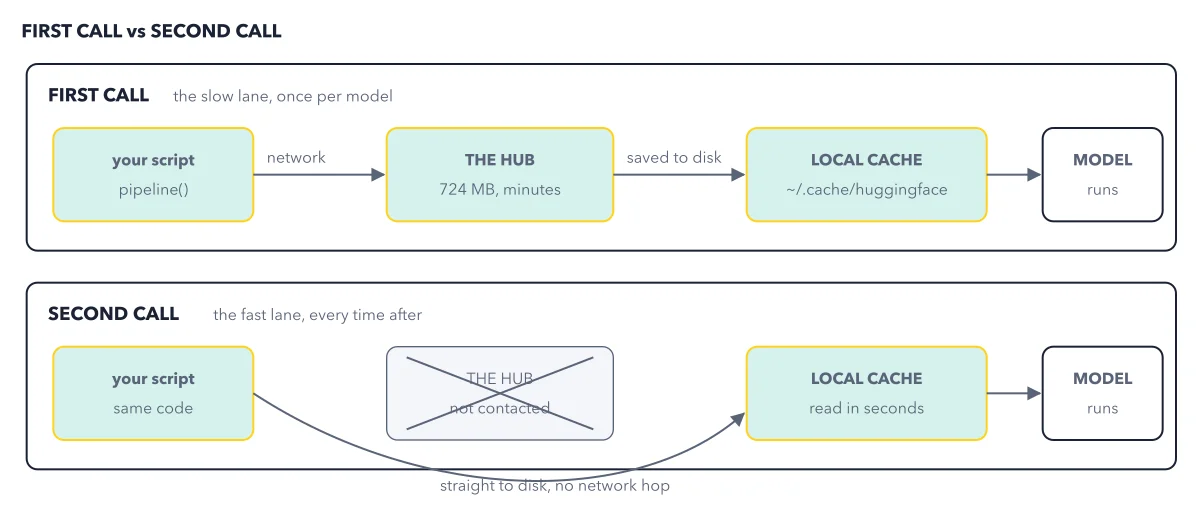
The figure sets the two runs side by side, so you can see which one touches the network.
How to read this figure
Start with the first call. The top lane is the slow lane, once per model. Your script calls
pipeline(), which goes over the network to the Hub. The model here is 724 MB, so on a slow line the wait takes minutes.See where the files land. Every file is saved to disk in the local cache,
~/.cache/huggingface, and only then does the model run. Here~means your home folder, the one with your user name, and the dot marks a hidden folder your file browser does not show by default. The cache is shared: Transformers, thehfcommand and the other libraries all use the same folder, as one cache, every tool shows.Now read the second call. The bottom lane is the fast lane, every time after. Your script holds the same code. The Hub box is crossed out: on this run it is not contacted at all.
Follow the arrow straight to disk. The script reads the model from the local cache in seconds, and the model runs. Nothing in your code changed. The only difference is that the files are already on your disk.
Key takeaways
- Run a model once to fill the cache, then expect every later run to start with no download.
- Copy model ids letter by letter, since an id changed by even one letter downloads the model again.
- Watch your free disk space, because the cache only grows; free it with the hf cache commands, never by hand.
Try this: see the cache with your own eyes
Use any pipeline script you have run once, such as the first script of the book's chapter 3.
- Run the script once and let the download finish.
- Run it again with no change. No download shows this time, so the answer comes far sooner.
- Open your terminal, the text window where you type commands: Terminal on a Mac, or PowerShell on Windows. Type
hf cache ls. - Find the line named after your model, with its size on disk.
Expected result: A line for HuggingFaceTB/SmolLM2-360M-Instruct and its size. On disk, every model you download gets its own folder under hub, named the same way from its owner and its name, such as models--HuggingFaceTB--SmolLM2-360M-Instruct.
Questions readers ask
Where does Hugging Face download models to?
Into the cache folder, ~/.cache/huggingface on your disk. Models sit under hub, one folder per model, named after the exact model id. Every Hugging Face tool uses the same folder, so a model you download with one tool is ready in the others.
Why is my model downloading again?
Its id changed, even by one letter, because each cache folder is named after the exact id. Check the capitals too: the id in your code must match the model's page on the Hub exactly.
How do I clear the Hugging Face cache to free disk space?
Never delete folders inside the cache by hand: that can leave a big file behind that still fills the disk. Run hf cache ls to see what uses the space, hf cache rm to remove one model, and hf cache prune for old versions and unfinished downloads. To move the whole cache to a bigger drive, set HF_HOME.
Do Ollama and LM Studio use this folder?
No. If you only chat in Ollama or LM Studio, those apps download their files for you, into their own folders. The Hugging Face cache holds the files you fetch yourself: with Python code, with hf download, or for a tool such as ComfyUI.
Sources: huggingface_hub quickstart (Hugging Face docs); Transformers quicktour (Hugging Face docs).
This figure is from Hugging Face Made Crystal Clear, chapter 3.
The chapter builds the idea step by step, with recipes you can follow, a Try it to check yourself, and every source.
Get the book