Which Jev version to use: aliases move, versioned IDs stay put
By Christophe Paka · Facts checked on 23 October 2026
Your help desk sends every ticket to Jev. You tuned one rule: when urgency is above your line, page someone. Weeks later, more tickets reach a person, and nobody touched the code. The runs are green. The log is the only clue.
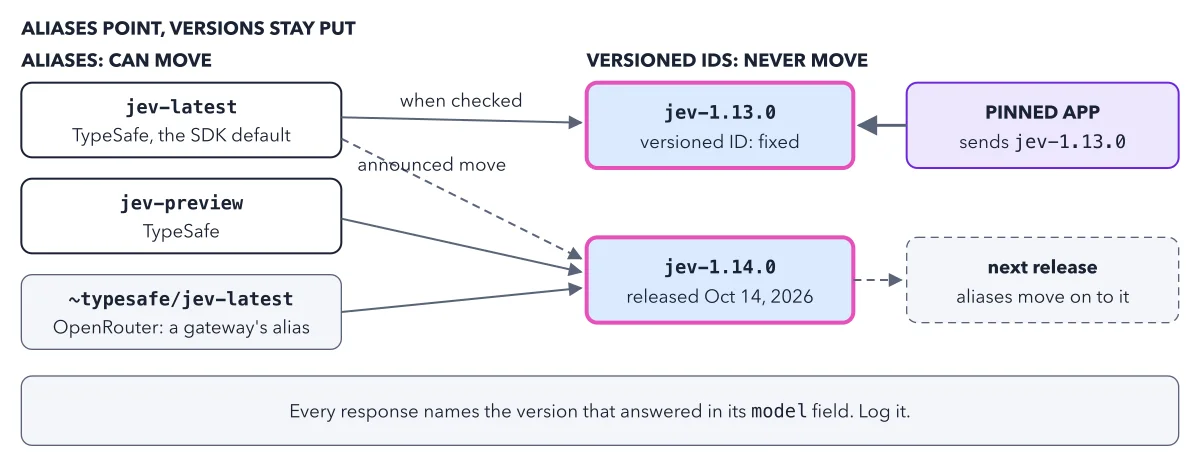
Readers ask which Jev version to use, and whether their tuned numbers survive a switch. The answer is a habit more than a version: explore on an alias, then pin a versioned ID. The figure below shows the difference in one picture.
Use this diagram on your site
Free to share in your blog post, docs, course or slides, as long as the credit link stays. Paste the code below where the figure should go.
How to read this figure
Read the two columns. The left column holds aliases: short model names that point to a versioned ID and can move to a newer one. The middle column holds versioned IDs, such as
jev-1.13.0. A versioned ID never moves, so it always means the same model.Follow the two arrows from the SDK default.
jev-latestis TypeSafe's moving alias, and the name the SDKs send unless you change it. The solid arrow shows where it pointed when the book was checked:jev-1.13.0. The dashed arrow is the move TypeSafe announced, tojev-1.14.0.Spot the two other aliases.
jev-previewpoints tojev-1.14.0. Below it,~typesafe/jev-latestis OpenRouter's own alias. A gateway is a service that resells many models behind one key. Its alias has the same name as TypeSafe's, but it moves on the gateway's schedule, not TypeSafe's.Look at the pinned app. On the right, a pinned app sends the versioned ID and goes straight to it, with no alias in between. The dashed box is the next release. When it ships, the aliases move on to it. The pinned app stays where it was.
Read the band at the bottom. Every response names the version that answered, in its
modelfield. Log it on every call. It is how you see the day an alias moves, even when you sent the same name as yesterday.
Key takeaways
- Explore on an alias, but pin a versioned ID before you tune any threshold.
- Log the model field on every call, so you see the day an alias moves.
- When a new version ships, run your own test examples on it first, then move the pin.
Worked example: the urgency line after an alias moves
The book walks through this failure with example values, not a measured run. A threshold is the number your code compares an answer against.
- The help desk sends
jev-latestand tunes its urgency line at0.8. - The alias moves. The log shows the
modelfield change fromjev-1.13.0tojev-1.14.0. - The share of tickets sent to a person shifts. Nobody changed the code.
- The fix: send the versioned ID you tuned on. Then run your own examples on the new version before you move the pin.
Result: Pinned, your line keeps the meaning it had on the day you tuned it. To undo an upgrade, send the old versioned ID again. The book's version change loop turns this into a routine.
Questions readers ask
Which Jev version should I use in production?
Send a versioned ID, such as jev-1.13.0 or jev-1.14.0, never the alias. TypeSafe lists the same price and the same limits for both. It describes the newer one as small improvements, with the largest gain expected in multilingual support, but it gives no accuracy numbers per version. So test both on your own examples and pin the one that wins.
Will my thresholds survive a version switch?
Not by default. Your threshold was tuned on one model. TypeSafe's Models page says an alias moves when a new release ships, so its answers can change without any change to your code. Rerun your test examples on the new version, check your line again, and only then move the pin.
Do old Jev versions disappear?
Not overnight. Versions get deprecated, which means marked for retirement, with notice. TypeSafe says it intends to give 60 days warning before jev-1.13.0 is formally deprecated, and 30 days for jev-1.14.0. It has promised to publish its rules before then.
Sources: Models (TypeSafe docs); Jev: For the builders AND dreamers (TypeSafe blog).
This figure is from Jev Made Crystal Clear, chapter 2.
The chapter builds the idea step by step, with recipes you can follow, a Try it to check yourself, and every source.
Get the book