Kimi Code Made Crystal Clear · chapter 4: The Core Workflow: Plan, Approve, Implement, Commit
The autonomy dial
2026-10-04
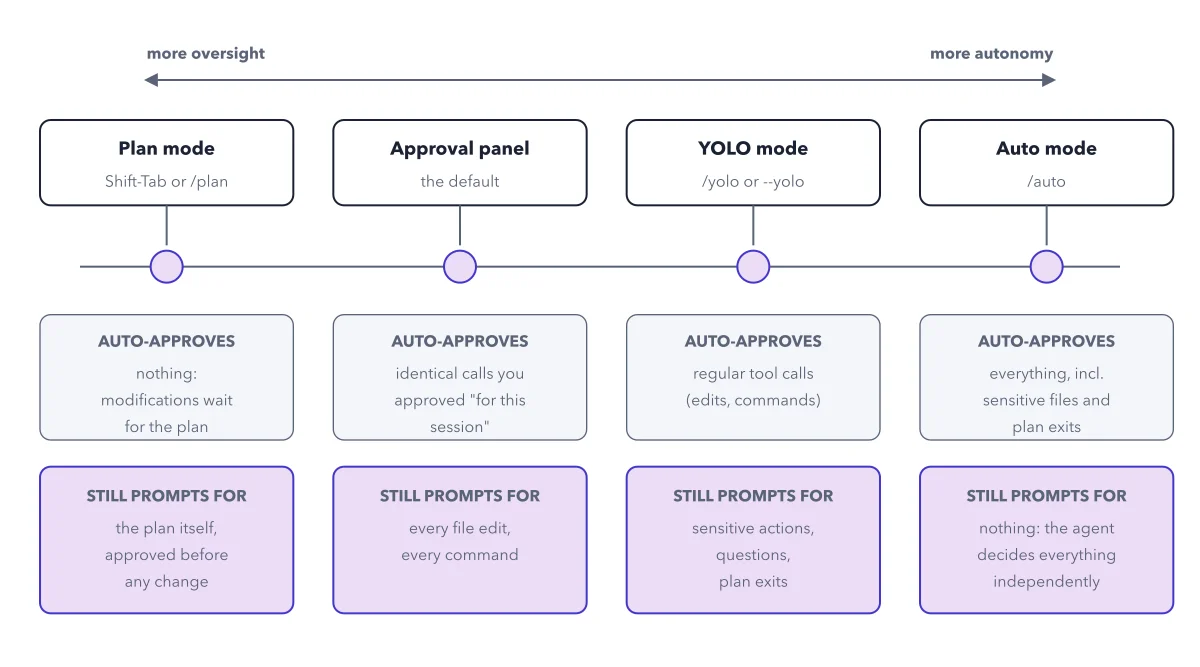
Left to right, what gets auto-approved grows and what still prompts shrinks. YOLO keeps three prompt classes alive: sensitive actions, questions, and plan exits. Only /auto silences all of them.
Below: the paragraph from the book that builds this idea, then the diagram itself (Figure 4.1), and a recap. About a minute of reading.
The four positions differ on exactly one axis: what gets approved automatically, and what still stops to ask you. The figure below lays out the whole dial; the rest of the chapter walks it left to right.
Recap
- The idea: Left to right, what gets auto-approved grows and what still prompts shrinks.
- The picture: Figure 4.1, from chapter 4 ("The Core Workflow: Plan, Approve, Implement, Commit") of Kimi Code Made Crystal Clear.
- Go deeper: the chapter builds this step by step, with recipes and sources at the end.
This diagram is one of many in Kimi Code Made Crystal Clear.
Every chapter opens with the gist, draws the hard ideas, and ends with recipes and sources.
Get the book