What the modal run command does, step by step
By Christophe Paka · Facts checked on 7 November 2026
A reader on r/MLQuestions asked where to learn how to deploy ML models. Their course ended at "model trained". So you install Modal, a serverless cloud for Python, and type one line: the modal run command. A moment later, numbers come back to your terminal.
But what ran where? If you cannot say, you cannot tell why a run waits, what it bills, or why it stops when you close the terminal.
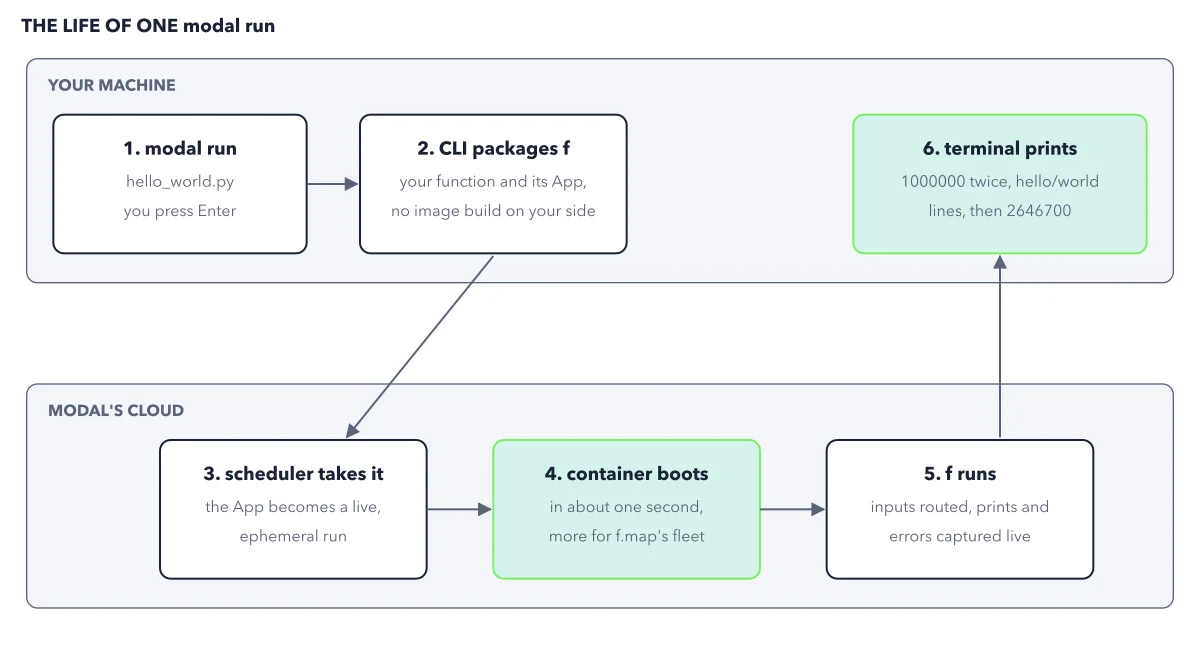
The figure below traces one run in six steps across two lanes: your machine and Modal's cloud.
How to read this figure
Steps 1 and 2: press Enter, then package. In step 1 you type
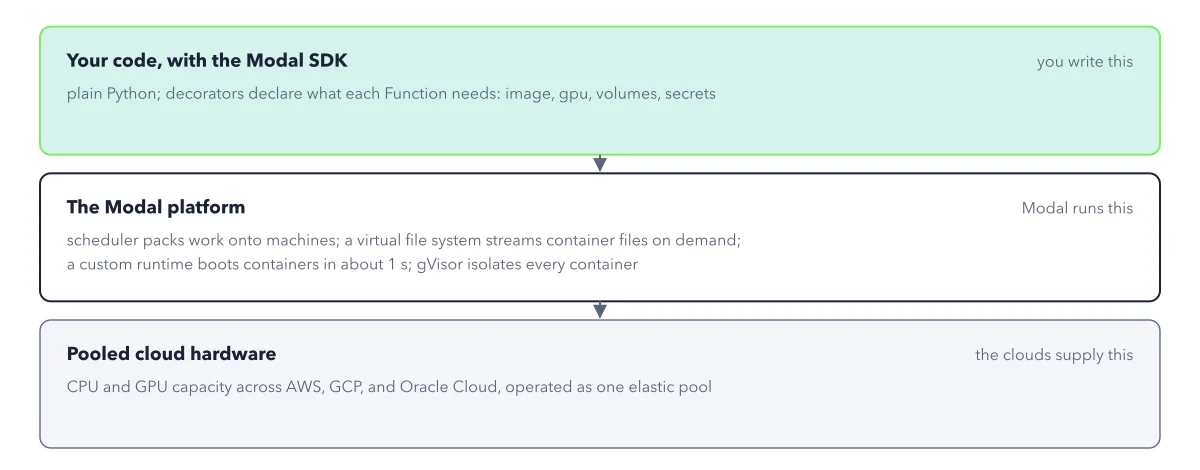
modal run hello_world.pyand press Enter. In step 2 the CLI, themodalcommand in your terminal, packages your functionfand its App, the named group that holds your functions. No image build happens on your side. Modal builds the environment in its cloud.Step 3: cross into Modal's cloud. In step 3 the scheduler takes the package. Your App becomes a live, ephemeral run: an App that lives only as long as your script. Close the terminal and it stops.
Step 4: watch the container boot. In step 4 a container boots in about one second. The
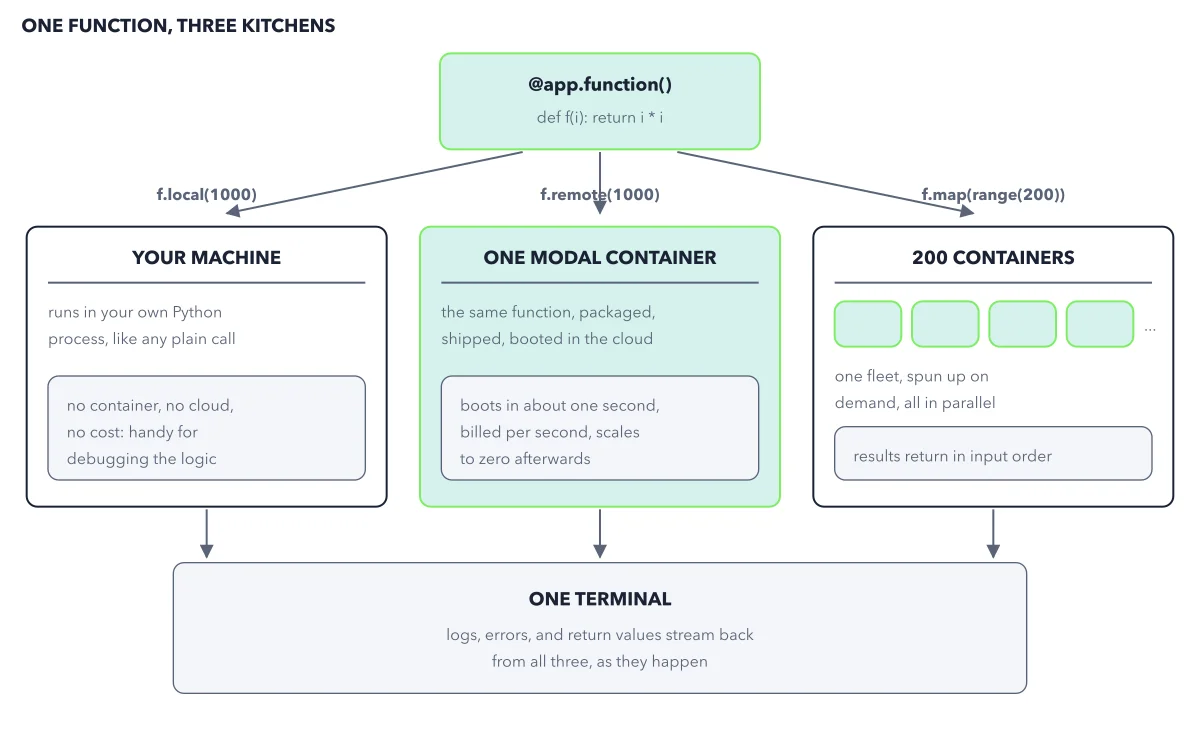
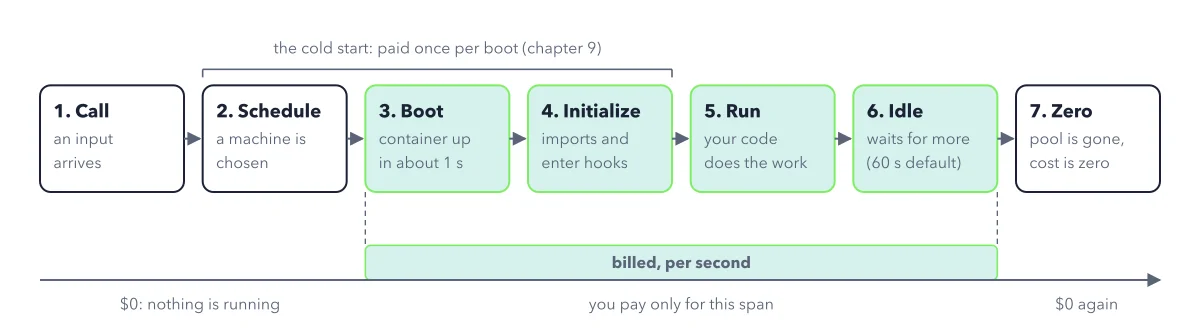
f.mapcall needs a fleet, so more containers start. Steps 3 to 5 happen in Modal's cloud, and only the container's seconds there bill.Step 5: let f run. In step 5 Modal routes the inputs to the containers and captures what f prints, live. The example prints hello for even numbers and world for odd ones, and your terminal shows both kinds of line. See the three ways to call
fin one function, three call styles.Step 6: read the terminal. Step 6 is back on your machine. You see 1000000 twice, once from
f.localand once from the cloud. Then come mixed hello and world lines, because the containers finish in any order. Last comes 2646700, the sum of the squares of 0 through 199.
Key takeaways
- Read every run as two lanes: your file loads on your machine, and only the function runs in Modal's cloud.
- Expect a bill only for container seconds in steps 3 to 5; a small run like this costs a few cents at most.
- Use modal deploy for work that must outlive your terminal, because modal run stops when the script ends.
Worked example: the same run, scaled from 200 inputs to 1170
Take Modal's hello world file. It calls one function, f, three ways, and sums f over 200 inputs. Now scale it without asking for a single machine. On the free Starter plan, the run's few cents come out of the $30 of compute credit each month.
- Run
modal run hello_world.py. The terminal prints 1000000 twice, the mixed hello and world lines, then 2646700. - Change
range(200)torange(1170). That is the only edit. - Run the same command again. In step 4 of the figure, more containers boot to cover the larger set of inputs.
- Read the end of the output. The results still come back in input order, so the sum is the same each time you run it.
Result: The total is now 533186745. When the run ends, the containers stop and bill nothing. That is scale to zero, seen in your own terminal.
Questions readers ask
What stops a runaway Modal job?
Two things. The function timeout stops one input that runs too long. For money, set a Workspace budget on the Usage & Billing page before your first run; by default the spend limit is that budget minus your credit, and at the spend limit Modal stops the work that would add charges.
Why does my Modal app stop when I close the terminal?
Because modal run starts an ephemeral App, which lives only as long as your script. Use modal serve while you edit a web address; it updates each time you save the file. Use modal deploy for anything that must run while your laptop is closed: it stays live until you take it down.
How long can one input run on Modal?
The function timeout is the most time one input may run. It is 5 minutes by default, and you can raise it to 24 hours with timeout=86400. An input that passes its timeout fails, and the seconds it ran still bill: Modal bills container time, not results.
Sources: Hello, world! example (Modal docs); Getting started with Modal (Modal docs); Timeouts (Modal docs).
This figure is from Modal Made Crystal Clear, chapter 3.
The chapter builds the idea step by step, with recipes you can follow, a Try it to check yourself, and every source.
Get the book