Social media API OAuth, explained with one connect
By Christophe Paka · Facts checked on 30 October 2026
A reader on r/Backend asked why Instagram's sign in flow is "super complicated". Behind the question sits a fear. Do I need my own Meta app, my own review and my own tokens for every customer?
With Zernio, you do not. The social media API OAuth step runs on Zernio's app, which the platforms already reviewed. Get the model wrong and you build token storage you never needed. The figure below follows one connect, box by box, and shows the one value your app keeps.
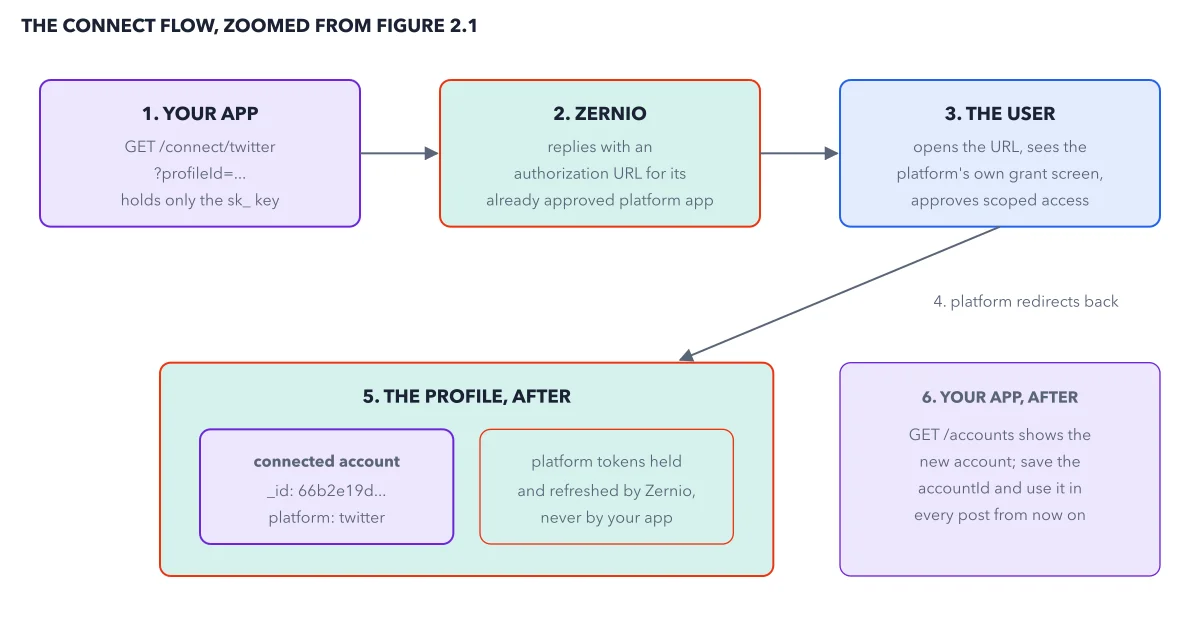
How to read this figure
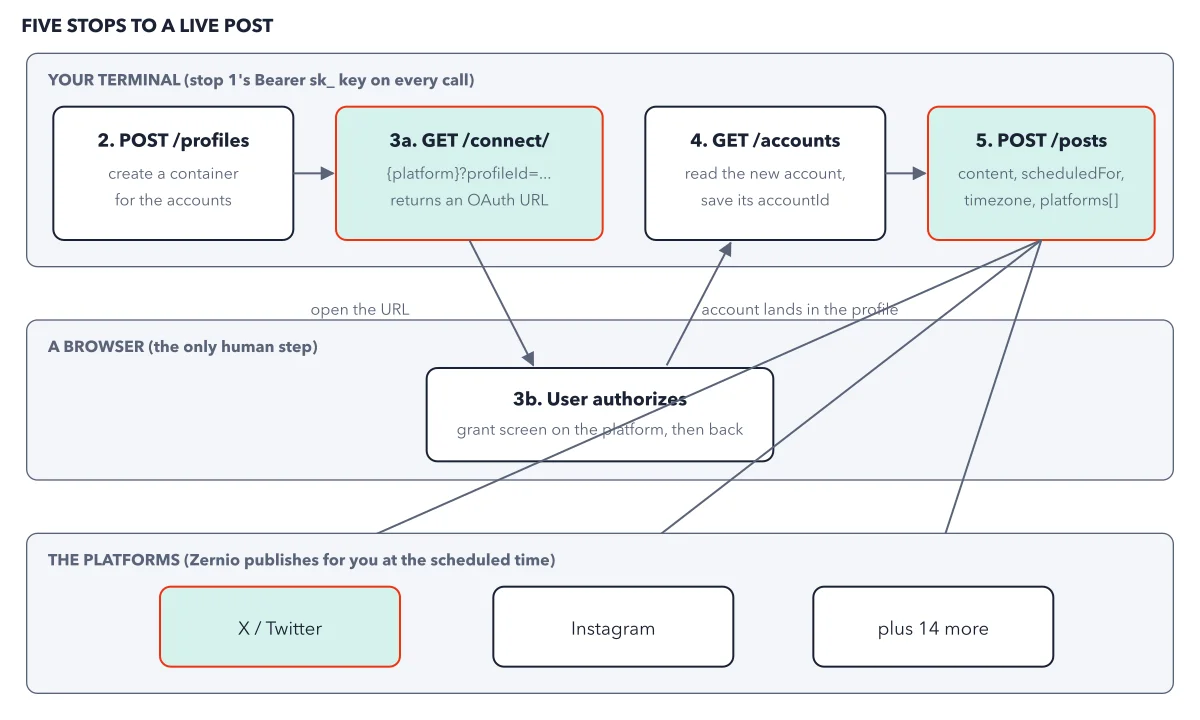
Box 1: your app asks for a link. Your app holds only the
sk_key. It callsGET /connect/twitterwith the profile id. Each link covers one platform and one profile.Box 2: Zernio sends back a URL. Zernio replies with an authUrl. The link points at Zernio's own platform app, which is already approved. That is why you skip the app review the platform would ask of you.
Box 3: the owner approves. The person opens the URL and sees the platform's own grant screen. It names Zernio's app and the rights it asks for. They approve scoped access: like a valet key that opens only some doors, it covers only the areas they agree to. Only the owner can consent, so code cannot do this step.
Arrow 4: the platform sends them back. The platform redirects the person back to Zernio. The new account now lands in the profile your app named in box 1.
Box 5: the profile holds the account. The profile now has a connected account, with an id starting 66b2e19d and platform twitter. The platform tokens sit beside it. Zernio holds and refreshes them, never your app.
Box 6: your app saves one id.
GET /accountsshows the new account. Save its accountId and use it in every post from now on. Your database holds no password and no platform token. Next, the five stop quickstart uses that id.
Key takeaways
- Store only the accountId after a connect, never a platform password or token.
- Send the connect link to the account's owner; no code can approve for them.
- When an account disconnects, send the owner the same connect link again.
Worked example: Launchpad connects its X account
Picture a valet. The owner hands over a key that opens only the doors they agreed to, and gets a claim ticket. Here the valet is Zernio, the limited key stands for a scoped token, and the claim ticket stands for the accountId.
- Your app calls
GET /v1/connect/twitter?profileId=66a1f0c2a4b9d3e8f1a2b3c4and gets back an authUrl. - You open it. X shows its own screen, naming Zernio's app and the rights it asks for. You approve.
GET /v1/accountsnow lists an account with_id66b2e19d8c3f5a7e9d0b1c2dand platform twitter.- Your database stores that one id. It holds no X password and no X token.
- Later you revoke Zernio's access in X's settings. The next post to that account fails, and Zernio tells your server the account disconnected.
Result: The fix is the same connect link, opened again by the owner. One more rule for X: X bills every API call, and Zernio passes that cost on (the X cost ladder). So Zernio asks for a card before it connects any X account. Without one, the connect call answers 402.
Questions readers ask
Whose Meta app and whose review do I need?
To publish through Zernio, none of your own. Your customer approves Zernio's app, which the platforms already reviewed, on the platform's own screen. Zernio holds and refreshes the tokens, and you keep the accountId. A unified API skips your app reviews and token plumbing. It does not skip platform rules, caps or bans.
How does each customer connect their own accounts?
Your app asks Zernio for a connect link for one platform and one profile, then hands it to the customer. They approve in their own browser. Add welcome=true to the connect call, with your brand name and logo, and a Zernio hosted screen shows your name first. With handoff=true they can finish on a phone with a QR code.
Can I ask for fewer permissions?
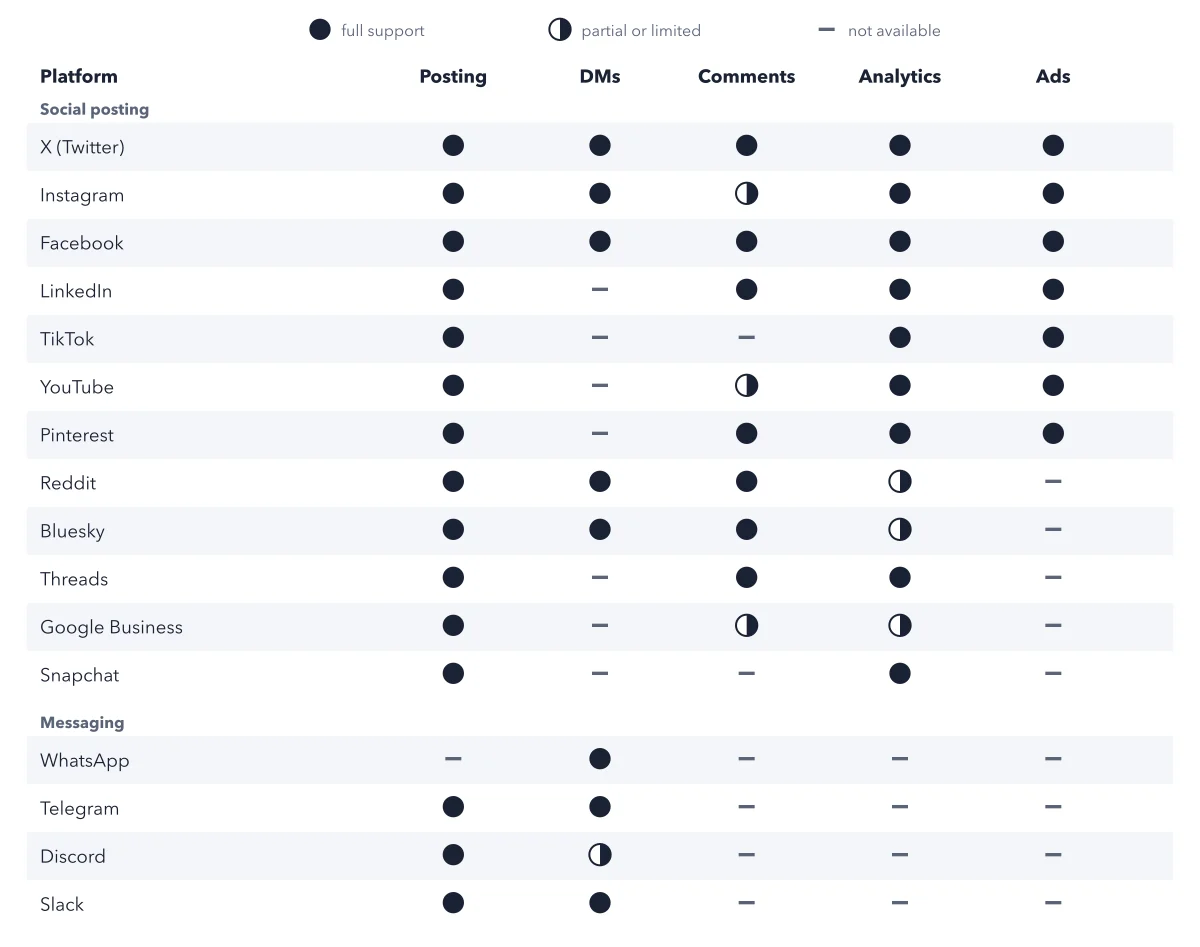
Yes. Add scopes to the connect call: posting, analytics, comments, messaging or ads. The consent screen gets shorter. But an account connected for posting only cannot read analytics or replies, and adding an area later means connecting again. Bluesky, Telegram, Discord, Snapchat and WhatsApp take no scopes, because they connect through their own flows; WhatsApp signs in to Meta and picks a business number (the WhatsApp setup chain).
Sources: Connecting accounts guide (Zernio docs); Connect an account in the dashboard (Zernio docs); X platform guide (Zernio docs).
This figure is from Zernio Made Crystal Clear, chapter 3.
The chapter builds the idea step by step, with recipes you can follow, a Try it to check yourself, and every source.
Get the book