How Claude Code works, on one map of the machine
By Christophe Paka · Facts checked on 23 October 2026
You read about CLAUDE.md, permissions, hooks, MCP and subagents. Each guide explains one piece. None says how the pieces fit, so every new feature feels like one more thing to learn. One of the most asked questions on the forums is simply: what is the real difference between them?
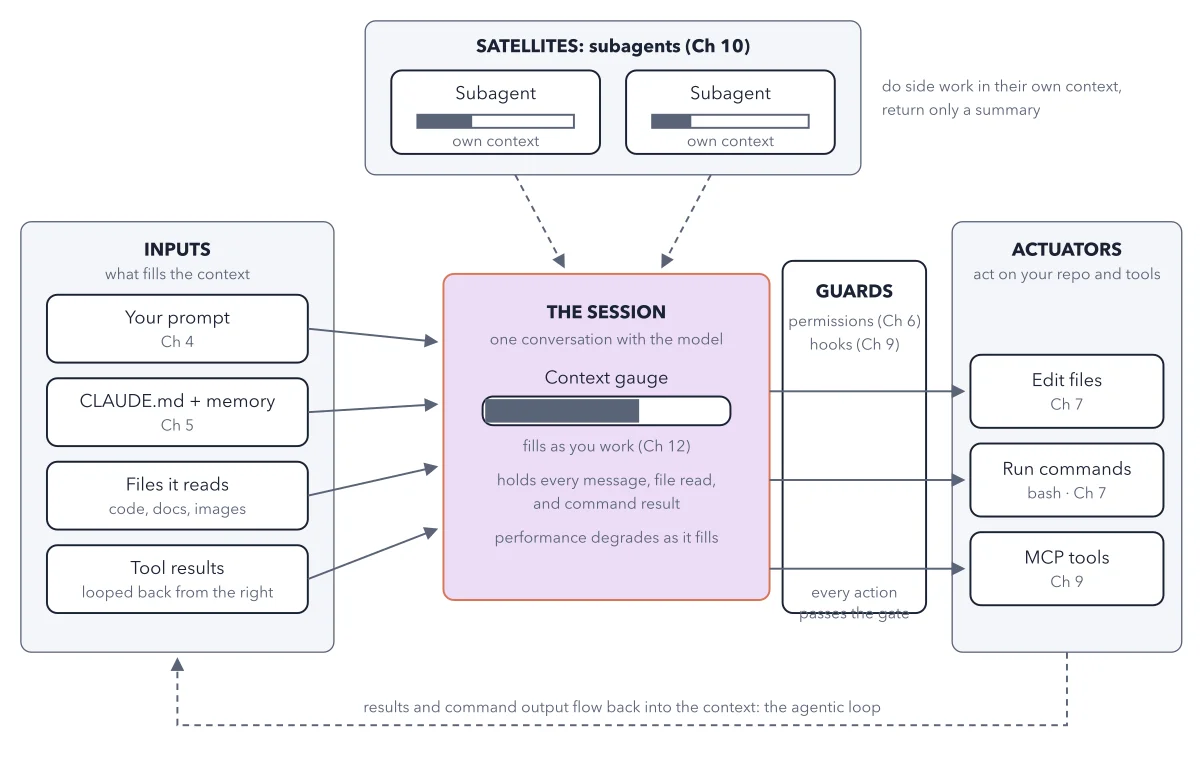
This post answers how Claude Code works with one picture. In one sentence: everything you give Claude fills one conversation, every action it takes passes a gate, and helpers keep side work out of the way. The figure below is the map, and you read it from the center out. Starting out? The book's path for readers who do not code begins with prompts, permissions and checks; hooks, MCP and subagents can wait.
How to read this figure
Start at the session in the center. The purple box is the session: one conversation with the model. Its context gauge is a bar that fills as you work. It holds every message, file read and command result. The small text under it warns: performance degrades as it fills. The small Ch labels on every box name the chapter of the book that covers that part.
Read the inputs on the left. Four boxes feed the gauge: your prompt, CLAUDE.md and memory, files it reads (code, docs, images), and tool results. CLAUDE.md is a plain text file of project notes that you write. Memory is notes Claude writes for itself, kept in files on your computer; the /memory command lets you read, edit or turn them off. Each arrow points into the session.
Cross the guards to the right. Between the session and the outside world stands a tall box: guards. It holds permissions, the rules on what Claude may do, and hooks. A hook is a command Claude Code runs on its own at a set moment, such as after every file edit, whatever the model decides. You write no code for one: you describe it and ask Claude to add it. The note at the bottom says every action passes the gate.
Read the actuators on the far right. Three boxes act on your repo and tools: edit files, run commands, and MCP tools. MCP, the Model Context Protocol, is a public set of rules that lets Claude Code use tools and data from other systems. An MCP server is a small program that lets Claude reach one outside service, such as an error tracker, and offers its actions as tools.
Look up at the satellites. At the top sit two subagents, helpers that Claude hands side work to. Each has its own small context bar. They do side work in their own context and send back only a summary, on the dashed arrows down into the session.
Follow the dashed line along the bottom. It runs from the actuators back to the inputs. Results and command output flow back into the context: that is the agentic loop. It is also why the gauge keeps climbing.
Key takeaways
- When a feature is new to you, place it on the map first: input, guard, actuator or satellite.
- CLAUDE.md is advice Claude usually follows; put a rule that must always hold in a guard, such as a permission.
- Send noisy side work to a subagent to keep your own context gauge low.
Worked example: one failing test, traced on the map
The book watches a session fix a failing test. Trace each move on the figure.
- Your prompt enters from the left: fix the failing test. The session's gauge rises a little.
- Claude runs the test. The command first passes the guards, then the run commands actuator runs it.
- The error comes back along the dashed line and lands in the inputs as a tool result. The gauge rises again.
- Claude edits one line through the edit files actuator, runs the test again, and reads the new result the same way.
Result: Every pass adds text to the session. That feedback is what lets an agent find out it was wrong, and it is also what fills the window.
Questions readers ask
What is the real difference between hooks, skills, plugins and CLAUDE.md?
On this map, CLAUDE.md is an input: notes Claude reads and usually follows. Skills are saved instructions Claude loads when a task needs them, so they are inputs too. Hooks are guards: commands that run every time, whatever the model decides. A plugin is a folder that bundles skills, hooks, MCP servers and subagents, so you install a whole setup in one step. The book's Claude Code guide sorts them by the pain each one fixes.
How do subagents work, explained simply?
A subagent is a helper with a context window of its own. It does noisy side work, such as searching many files, and sends back only a short summary. Your window stays small. Its tokens still count toward your usage.
What is an MCP server in Claude Code?
MCP, the Model Context Protocol, is a public set of rules that lets Claude Code use tools and data from other systems. An MCP server is a small program that links Claude to one outside service. On the map, MCP tools sit with the actuators, behind the guards. Connect only servers you trust: text they fetch lands in your session.
Sources: How Claude Code works (Anthropic docs); Explore the context window (Anthropic docs); Connect Claude Code to tools via MCP (Anthropic docs).
This figure is from Claude Code Made Crystal Clear, chapter 2.
The chapter builds the idea step by step, with recipes you can follow, a Try it to check yourself, and every source.
Get the book