Docker Made Crystal Clear · chapter 3: Images, Layers, and Where Containers Come From
The canonical Docker architecture, redrawn from the docs
2026-10-17
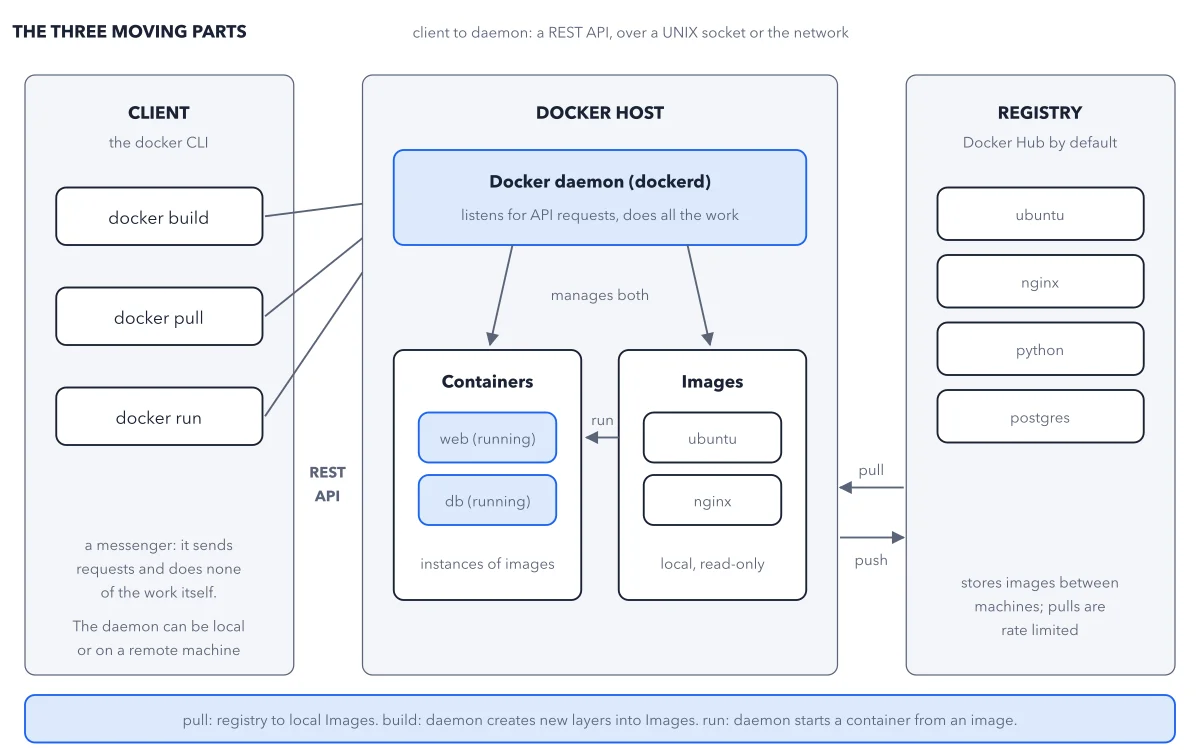
Every command you type travels from the client to the daemon over the REST API; the daemon pulls images from the registry into its local store, builds new ones there, and runs containers from them. The client never touches an image or a container directly.
Below: the paragraph from the book that builds this idea, then the diagram itself (Figure 3.3), and a recap. About a minute of reading.
Part one is the Docker daemon, dockerd: the long-running server process that does all the real work. In the docs' words, it "listens for Docker API requests and manages Docker objects such as images, containers, networks, and volumes". Part two is the Docker client, the docker command: "the primary way that many Docker users interact with Docker. When you use commands such as docker run, the client sends these commands to dockerd". The client does not build, run, or store anything itself; it is a messenger. The two talk over a REST API, across a UNIX socket or a network connection, which is why the client can just as easily drive a daemon on a remote machine, and why any program, not only the CLI, can drive Docker. Part three is the registry, which you just met. Figure 3.3 is the canonical picture, redrawn from the docs' architecture diagram.
Recap
- The idea: Every command you type travels from the client to the daemon over the REST API; the daemon pulls images from the registry into its local store, builds new ones there, and runs containers from them.
- The picture: Figure 3.3, from chapter 3 ("Images, Layers, and Where Containers Come From") of Docker Made Crystal Clear.
- Go deeper: the chapter builds this step by step, with recipes and sources at the end.
This diagram is one of many in Docker Made Crystal Clear.
Every chapter opens with the gist, draws the hard ideas, and ends with recipes and sources.
Get the book