How to write an ElevenLabs Voice Design prompt, slot by slot
By Christophe Paka · Facts checked on 30 October 2026
You need a calm, older narrator. You searched the Voice Library and nothing fits. So you type a few words into Voice Design, press Generate, and hear three voices that sound like someone else.
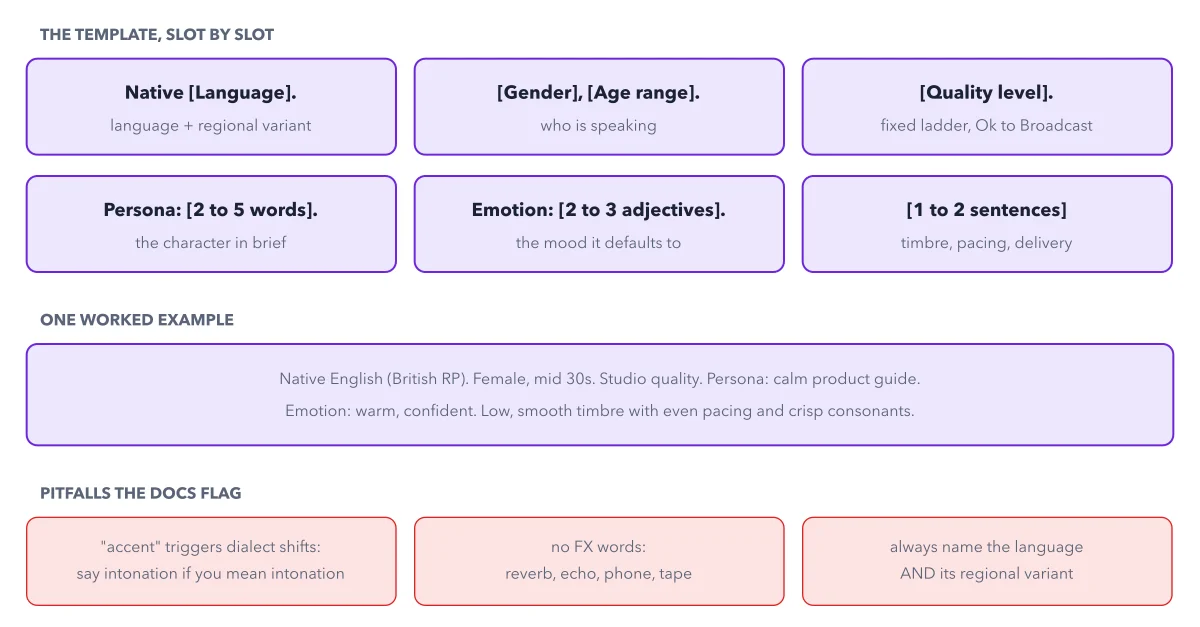
Each try costs credits, and a vague prompt can miss again and again. The fix is the way you write the ElevenLabs Voice Design prompt. The docs give a template with six slots in a fixed order. The figure below shows each slot, one worked example, and three mistakes that change the voice you get.
How to read this figure
Start with the language slot. The first slot reads Native, then the language and its regional variant, such as Native English (British RP). RP means Received Pronunciation, the standard British accent. Always name both. If you leave out the variant, the model picks a dialect for you.
Say who speaks, and at what quality. Slot two is gender and age range, such as Female, mid 30s. Slot three is the quality level, a fixed ladder of six phrases: Ok quality, Good quality, Very good quality, Excellent quality, Studio quality and Broadcast quality. Pick one phrase word for word. The figure's example uses Studio quality.
Add the persona and the emotion. Persona takes 2 to 5 words: the character in brief, such as calm product guide. Emotion takes 2 to 3 adjectives: the mood the voice goes back to when the text gives no cue.
End with one or two delivery sentences. The last slot describes timbre, pacing and delivery. Timbre is the color of a voice: low, smooth or bright. The example ends with a low, smooth timbre, even pacing and crisp consonants.
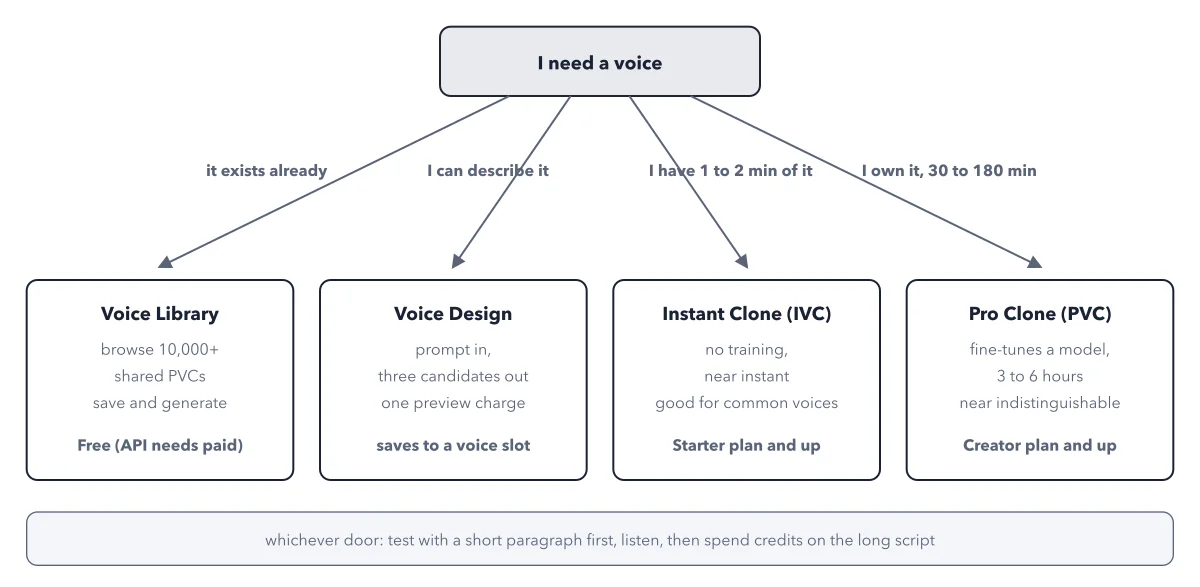
Check the red row of pitfalls. Write intonation, not accent, unless you want a new dialect: the word accent can shift it. Leave out effect words such as reverb, echo, phone or tape, or the effect is baked into the voice. Not sure a designed voice is the right way? See four ways to a voice.
Key takeaways
- Fill the six slots in order, language and regional variant first, before you press Generate.
- When all three candidates miss, change one slot at a time, so you know what fixed it.
- Test the saved voice on the model you will publish with, since designed voices can sound flatter, less acted, on Eleven v4.
Try this: design a brand voice in six slots
You need the dashboard, a free voice slot, and a plan that the Voice Design page lists.
- Go to Voices, then My Voices, click Add a new voice, and choose Voice Design.
- Write the prompt in six slots, for example: Native English (American). Female, mid 40s. Broadcast quality. Persona: patient pottery teacher. Emotion: warm, calm. Low, soft timbre with slow, even pacing.
- Write preview text like the real job, such as a welcome line for your shop. A very short preview can sound abrupt.
- Generate and listen to all three candidates. If they miss the brief, change one slot, or raise Guidance Scale, the dial that sets how strictly the result follows your prompt.
- Save the winner and give it a name.
Expected result: One charge, the characters of your preview text, for three candidates. The winner sits in My Voices with its own voice ID.
Questions readers ask
Should I use a designed voice or a Voice Library voice?
Search the Voice Library first when a voice that exists will do, and filter for the Studio Quality badge. Use Voice Design when you need a brand voice that does not exist yet, such as a calm narrator no Library voice matches.
Does one Generate cost three times as much for three voices?
No. One Generate gives three candidates for one charge: the characters of your preview text. A longer preview costs more, but you still get three voices. Saving one of them takes a voice slot.
Why does my designed voice sound flat on Eleven v4?
Designed voices work on Eleven v4 and earlier models, but the docs say that on v4 they may be less performative: flatter, less acted. Test one paragraph on the model you will use before you commit to it.
Why did my designed voice come out with the wrong accent?
Check the prompt for the word accent: the docs warn it can shift the dialect. If you mean the rise and fall of the voice, write intonation. Also name the regional variant in the first slot, such as Native English (American).
Sources: Voice Design (ElevenLabs docs); What is Eleven v4? (ElevenLabs help center).
This figure is from ElevenLabs Made Crystal Clear, chapter 4.
The chapter builds the idea step by step, with recipes you can follow, a Try it to check yourself, and every source.
Get the book