Fly.io stopped Machine cost, and what each state bills
By Christophe Paka · Facts checked on 7 November 2026
In August 2026 a user reported on Fly's forum an unexpected charge from 40 idle Machines left running. They served little traffic. Each one was started, so each one billed.
Idle is not a state, and it is not free. Fly has no billing alert and no spending cap, so the surprise arrives with the invoice.
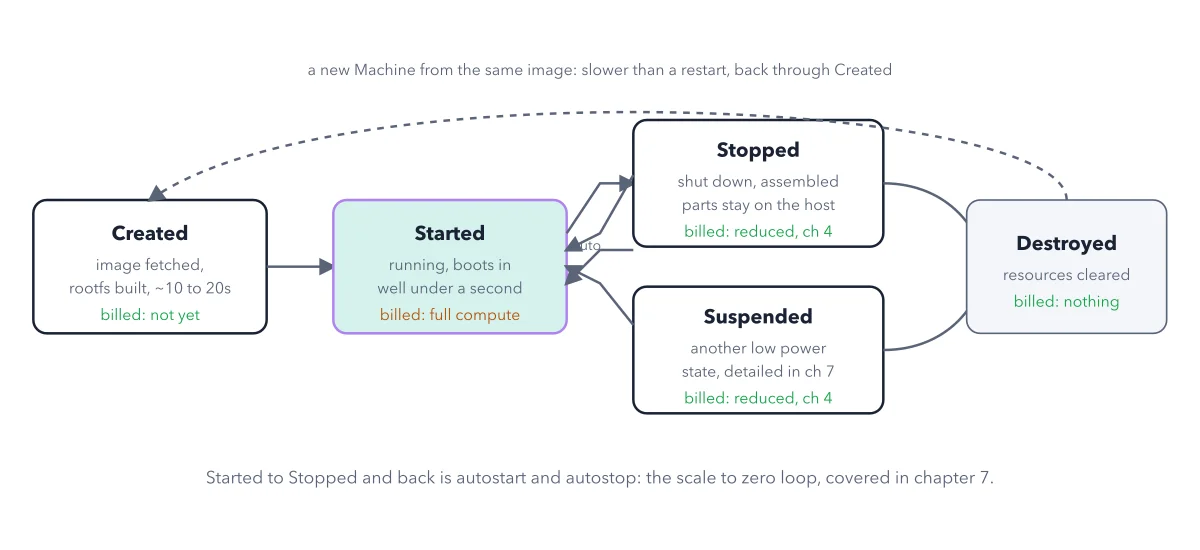
This figure settles the fly.io stopped machine cost question, and the four like it: five states, and what each one bills.
How to read this figure
Created: the slow step. Fly fetches your image and builds the rootfs (root file system): the disk a Machine boots from, made from your image. The figure calls it the assembled parts. This happens when a deploy or a scale up makes a Machine, never when a visitor arrives. The box says billed: not yet, so nothing bills for compute here.
Started: the highlighted box. The Machine runs. It boots in well under a second from created, and CPU and memory bill by the second. A started Machine with no visitors bills exactly like a busy one.
Stopped and Suspended: disk only. Stopped shuts the Machine down, but its rootfs stays on the host. Suspended also saves the Machine's memory, so it resumes faster and suits an app that is slow to boot; the figure leaves that detail to chapter 7. Both bill only the rootfs, at the same rate.
The loop between Started and Stopped. Autostop lets Fly stop an idle Machine. Autostart is the Fly Proxy starting a stopped or suspended Machine when a request arrives. Together they give scale to zero: compute bills nothing until the next request. See the cold start, drawn to scale.
Destroyed, and the dashed arrow back. A destroyed Machine is gone and bills nothing. Its volume, any address and any database are separate, and they keep billing. A new Machine from the same image goes back through Created, slower than a restart.
Key takeaways
- Treat every started Machine as billing, busy or not; idle never means free.
- Turn on autostop for a Machine that can sleep, so its compute stops billing when no one uses it.
- Delete a volume, address or database on its own when you stop using it: destroying a Machine leaves them billing.
Worked example: one Machine through one day
Follow the second Machine of Crystal Notes, the book's sample app, through one day in iad. The first Machine stays started.
- 9:00, serving readers: Started. CPU and memory bill by the second.
- 23:00, idle, with autostop on: Stopped. Only the rootfs bills.
- Or 23:00 with autostop set to suspend: Suspended. Only the rootfs bills, and the Machine wakes faster.
- That disk bills at $0.15 per GB a month, so a 1GB rootfs costs $0.15.
- You destroy it: nothing bills for that Machine. Its volume and any database still bill.
Result: The bill follows the states, not the traffic. After every change, run fly apps list and check each Machine's state yourself.
Questions readers ask
Does a stopped Machine cost money on Fly.io?
Yes, a little. A stopped Machine bills only its rootfs, the disk it boots from, which stays on the host. CPU and memory stop billing. To end that charge, run fly machine destroy on the stopped Machine, and delete its volume on its own.
Does destroying a Machine delete my volume and database?
No. Destroying a Machine ends its own charges, but its volume, any address and any database are billed on their own. They stay in place and keep billing until you delete each one.
How can I place a billing limit on my Fly.io account?
You cannot. Fly has no billing alert and no spending cap. So after every change, look yourself: run fly apps list, check what each Machine is doing, and remove what an assistant or an old test left behind.
Sources: Machine states and lifecycle (Fly.io docs); Autostop and autostart (Fly.io docs); Unexpected charge: 40 idle machines left running (Fly.io community).
This figure is from Fly.io Made Crystal Clear, chapter 2.
The chapter builds the idea step by step, with recipes you can follow, a Try it to check yourself, and every source.
Get the book