Fly.io Made Crystal Clear · chapter 3: Your First Deploy
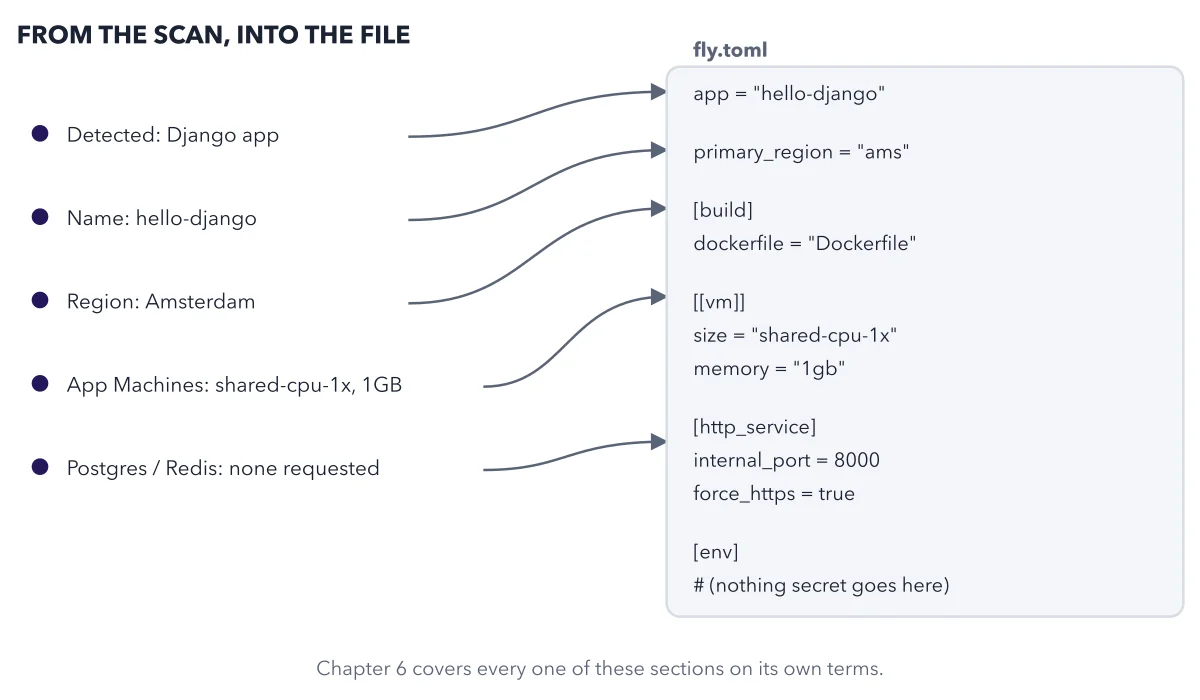
What fly launch writes for you, and where each scan result lands
2026-10-22
Nothing here is hidden; it is one plain text file you can open right after the scan finishes.
Below: the paragraphs from the book that build this idea, then the diagram itself (Figure 3.1), and a recap. About a minute of reading.
Run fly launch from the source directory of your project, and it does five things in sequence: scans your source code to detect the framework or language, generates a fly.toml with Fly.io-specific settings, builds or sources a Docker image (writing a Dockerfile for you if one does not already exist), provisions the resources it thinks you need, and then, before it commits to any of it, shows you an interactive confirmation prompt. Here is a real transcript, verbatim, from a Django app:
Notice the shape of that prompt: every field it guessed is right there, editable, before anything is created. Figure 3.1 shows where each of those guesses actually lands in the file it writes.
Recap
- The idea: Nothing here is hidden; it is one plain text file you can open right after the scan finishes.
- The picture: Figure 3.1, from chapter 3 ("Your First Deploy") of Fly.io Made Crystal Clear.
- Go deeper: the chapter builds this step by step, with recipes and sources at the end.
This diagram is one of many in Fly.io Made Crystal Clear.
Every chapter opens with the gist, draws the hard ideas, and ends with recipes and sources.
Get the book