GitHub stacked pull requests, drawn: three layers and one merge
By Christophe Paka · Facts checked on 30 October 2026
Some changes come in layers that depend on each other: first a data change, then the logic that uses it, then the screen on top. A pull request is a proposal on GitHub to merge one branch (a named line of saved work) into another. GitHub stacked pull requests split such a change into small proposals stacked like floors. Each one shows only its own floor, and they merge from the bottom up.
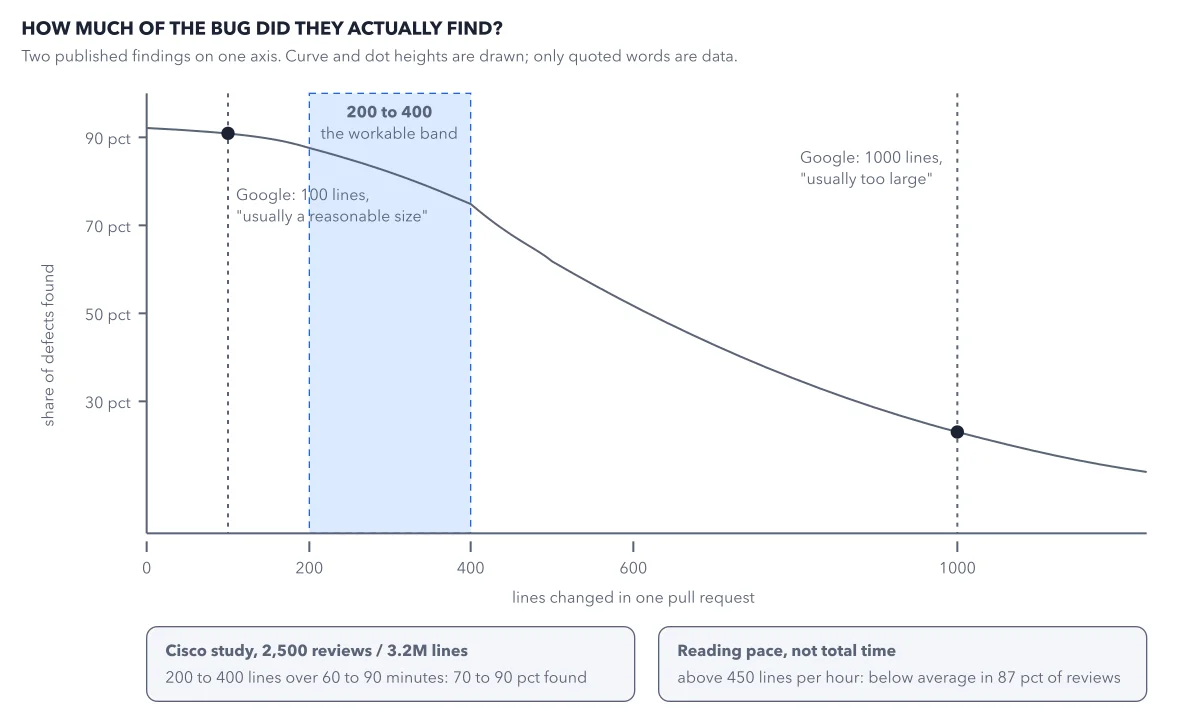
The change here is 830 lines; nobody reads that much closely, so the review turns into a skim. If you only review, you read one small floor at a time; the upkeep below is the author's job.
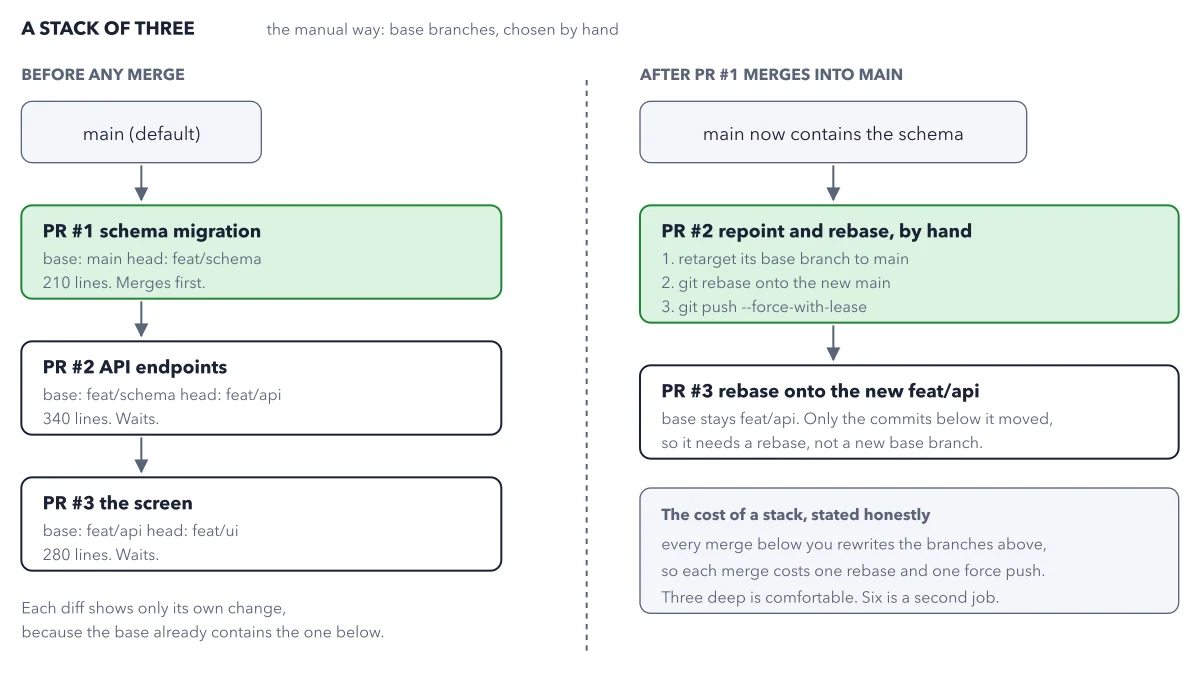
The figure shows a stack built by hand, and the step people forget: what happens after the bottom one merges. GitHub's built in stack does that step for you.
Use this diagram on your site
Free to share in your blog post, docs, course or slides, as long as the credit link stays. Paste the code below where the figure should go.
How to read this figure
Learn two words first: base and head. Every pull request names two branches. The base is the branch it wants to merge into. The head is the branch that holds the new work. At the top left, PR #1, the schema migration, has base
mainand headfeat/schema. It holds 210 lines and merges first.Follow the chain down. PR #2, the API endpoints, uses
feat/schemaas its base, notmain. PR #3, the screen, usesfeat/api. Each diff shows only its own layer, because its base already holds the layer below. That is why the reviewer of PR #2 sees only its own 340 lines.Cross to the right side. PR #1 has merged, so
mainholds the schema. By hand, you set PR #2's base tomain. Then you rebase it: git moves its commits (saved snapshots) so they start from the new main. Each commit has a unique ID, and moving it changes that ID. To GitHub, the branch now holds different commits.Use the safe force push. Because the IDs changed, a plain push is refused, so you force push: you overwrite the branch on GitHub with your copy. The figure's command is
git push --force-with-lease. It first checks whether anyone else pushed to that branch since you last downloaded it, and refuses if so. Plain force never checks.Check the layer above. PR #3 keeps its base,
feat/api. But the commits below it moved, so it needs a rebase too. It needs no new base branch, only a fresh copy of its commits on top.Read the cost box. Every merge below you rewrites the branches above, so each merge costs one rebase and one force push per layer. Three deep is comfortable. Six is a second job. Every layer stays under the 400 line size rule, so the work pays off in better reviews.
Key takeaways
- Stack a change only when its parts depend on each other; open independent parts side by side against main.
- Keep every layer under 400 changed lines, and say in each description which pull request it follows.
- If every branch lives in one repository, link them into GitHub's built in stack, which does the rebases for you.
Try this: build the first two layers of a stack by hand
You need a large branch, here feat/everything, which you leave untouched as a safety net, and the GitHub CLI signed in.
- Cut the first branch from main, not from the big branch:
git switch main,git pull, thengit switch -c feat/schema. - Copy only the schema files across with
git checkout feat/everything -- db/migrations/. It takes just that folder from the big branch. Then commit and push. - Open the first pull request against main as a draft:
gh pr create --base main --draft. - Build the second branch on top of the first with
git switch -c feat/api feat/schema, copy theapi/files, commit and push. - Open it with
gh pr create --base feat/schema --draft.
Expected result: The second pull request shows base feat/schema, and its Files changed tab lists only the files under api/. If you see the schema files too, you branched from main: recreate the branch from feat/schema.
Questions readers ask
What are stacked pull requests?
A chain of small pull requests in one repository, each built on the one below and merged in order from the bottom. The bottom one targets main. Each one above targets the branch below it, so its diff shows only its own layer.
Do I need stacked pull requests?
Only if the pieces depend on each other. If they are independent, open them side by side against main. If you do not write code, you do not build stacks; you may review one, layer by layer.
What does the built in stack do that the manual way does not?
When the bottom pull request merges, GitHub rebases the branches above and points the next one at main by itself. Approvals stay on code that did not change during that rebase. It works on every github.com plan, Free included, but every branch must live in the same repository.
Why do I have to force push after a rebase?
The rebase gave your commits new IDs, so a plain push is refused. Forcing is safe on a branch only you push to. Use the lease option, never plain force. The built in stack does these pushes for you.
Sources: About stacked pull requests (GitHub Docs); Stacked pull requests CLI commands (GitHub Docs); gh pr create (GitHub CLI manual).
This figure is from GitHub Made Crystal Clear, chapter 4.
The chapter builds the idea step by step, with recipes you can follow, a Try it to check yourself, and every source.
Get the book