Kimi Code Made Crystal Clear · chapter 5: Sessions, Context, and Memory
What loads into context at session start
2026-11-07
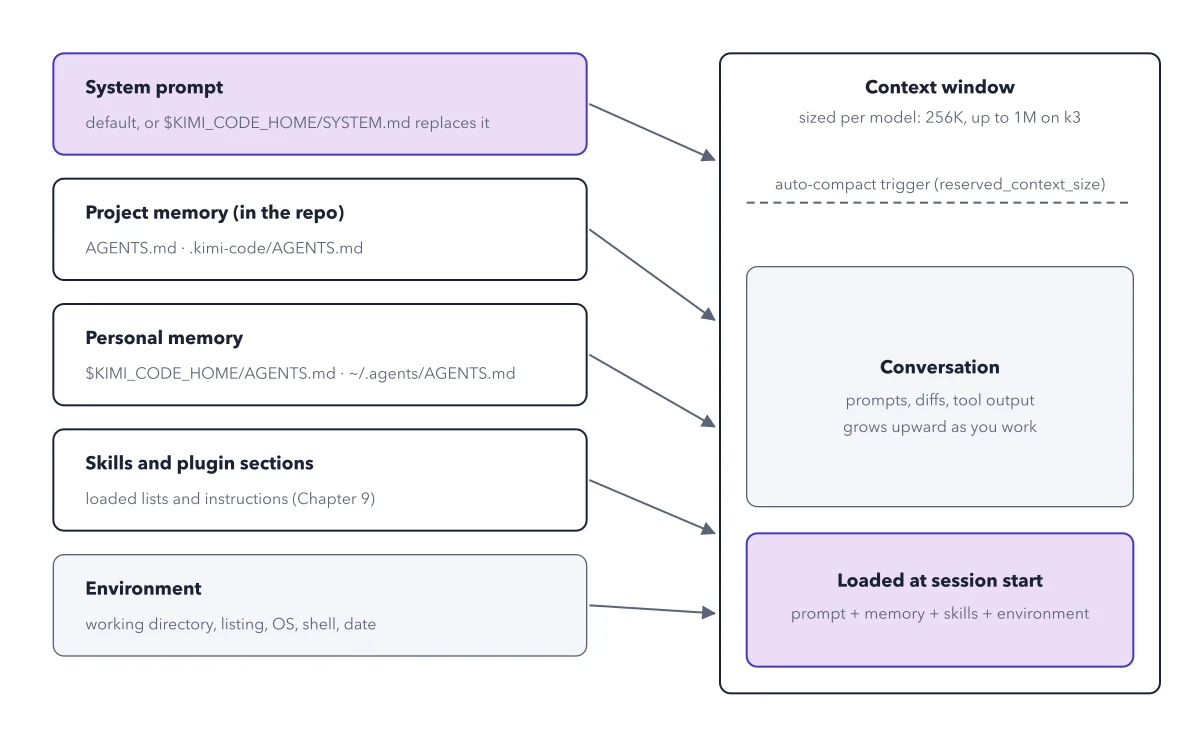
Memory files enter through the system prompt template; the conversation grows above them until it nears the compaction trigger.
Below: the paragraph from the book that builds this idea, then the diagram itself (Figure 5.2), and a recap. About a minute of reading.
Above the memory files sits a bigger lever. The agent's system prompt itself is a template, and $KIMI_CODE_HOME/SYSTEM.md permanently replaces the default main-agent prompt (the prompt only; tools and description are inherited). Inside it, template variables reassemble the pieces: ${base_prompt} embeds the entire default prompt so you can wrap rather than replace, and ${agents_md}, ${skills}, ${plugin_sections}, ${cwd}, and ${os} splice in the memory files, skill list, plugin instructions, and environment. The docs' minimal skeleton is exactly that: "You are Kimi, running at ${cwd} on ${os}." plus the three variables. Figure 5.2 shows how all of it assembles into the window at launch.
Recap
- The idea: Memory files enter through the system prompt template; the conversation grows above them until it nears the compaction trigger.
- The picture: Figure 5.2, from chapter 5 ("Sessions, Context, and Memory") of Kimi Code Made Crystal Clear.
- Go deeper: the chapter builds this step by step, with recipes and sources at the end.
This diagram is one of many in Kimi Code Made Crystal Clear.
Every chapter opens with the gist, draws the hard ideas, and ends with recipes and sources.
Get the book