Kimi Code hooks and what still stops the agent
By Christophe Paka · Facts checked on 7 November 2026
You write a script that blocks git push, and you feel safe. Then the script crashes. The agent pushes anyway.
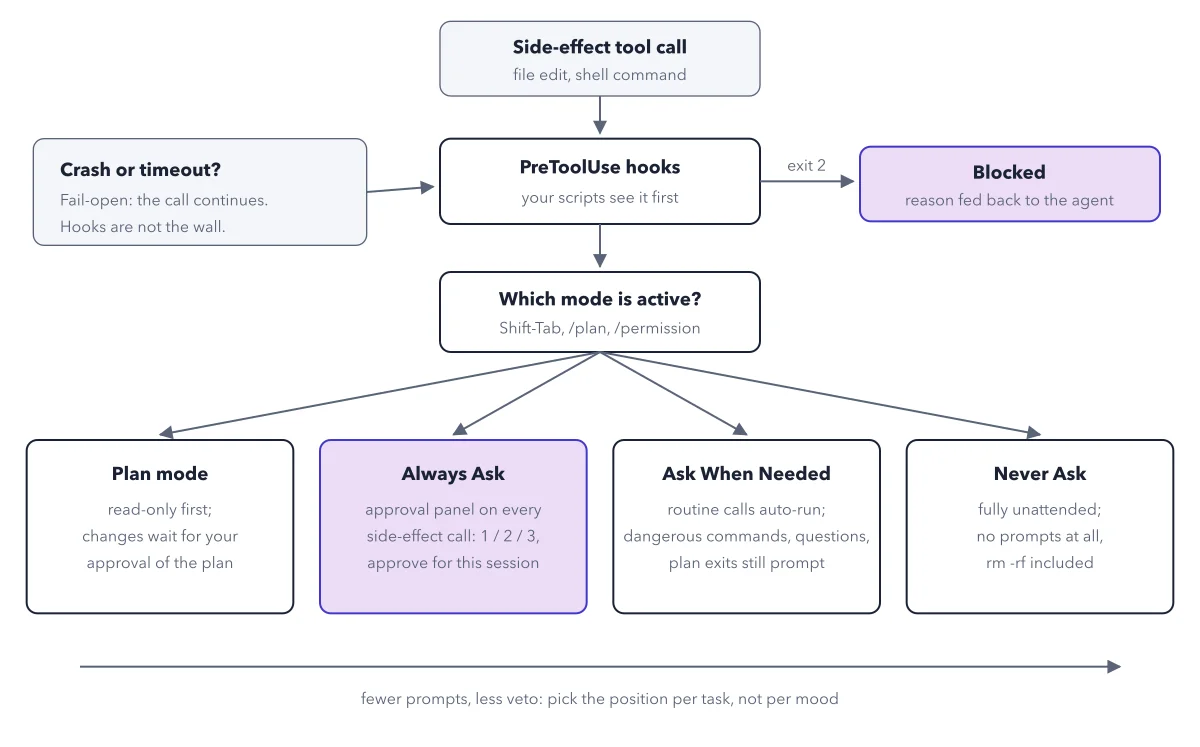
That is how Kimi Code hooks work: a hook is your own script that runs just before the agent acts. It can block the call, but a broken hook lets the call through. The figure below traces one file edit or shell command past the hooks and the permission mode, so you can see which layer really stops the agent. For the modes themselves, see the autonomy dial.
Use this diagram on your site
Free to share in your blog post, docs, course or slides, as long as the credit link stays. Paste the code below where the figure should go.
How to read this figure
Start at the top box. A side effect tool call is any action that changes something: a file edit or a shell command. Reading does not count. Every such call enters the flow here, whatever mode you are in.
Meet the hooks. PreToolUse hooks are your own scripts, small programs that run just before a tool call. They see the call first, before any question reaches you. A hook can inspect the call and decide to stop it. The script answers with an exit code, the number a program returns when it ends.
Follow the exit 2 arrow. When a hook exits with code 2, the call is blocked. The purple Blocked box says the reason is fed back to the agent, so it can try another way.
Read the crash box on the left. If a hook crashes or times out, it fails open: the call continues. The box says hooks are not the wall. A hook that never runs protects nothing, so test every hook before you trust it.
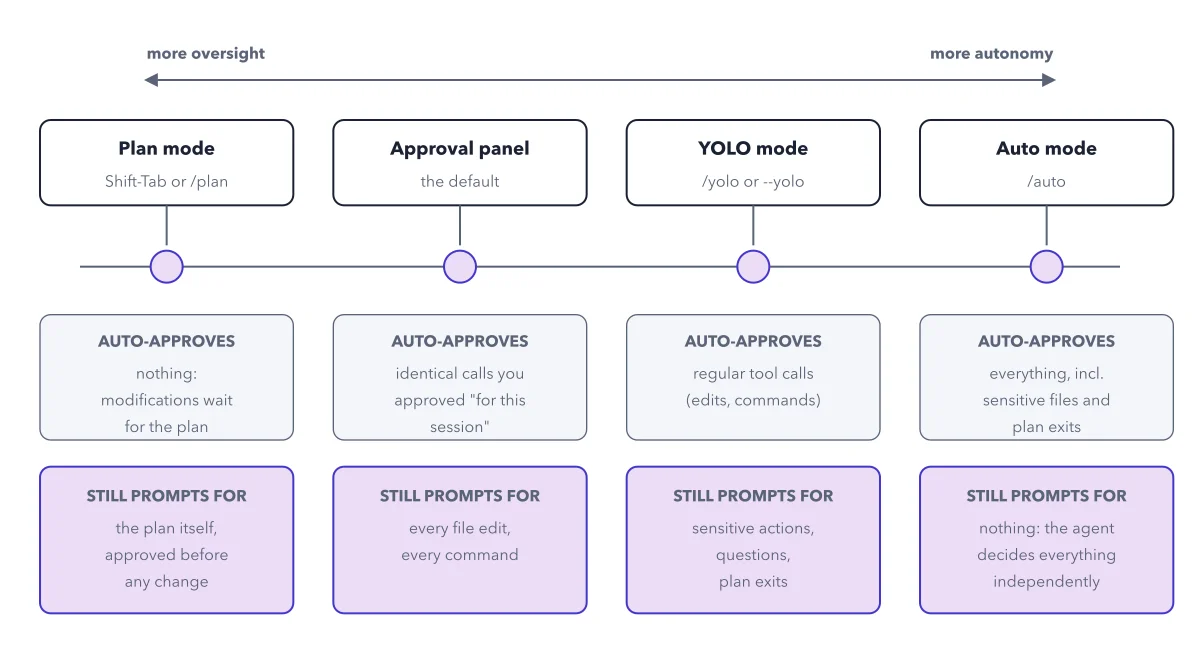
Read the four modes at the bottom. A call that passes the hooks meets the active mode. Plan mode waits for your plan approval. Always Ask shows the approval panel. Ask When Needed asks for dangerous commands. Never Ask shows no prompts at all, rm -rf included. That is no questions, not no limits: deny rules are not drawn here.
Add the layer the figure leaves out. Deny rules are lines in ~/.kimi-code/config.toml that refuse a call before anyone is asked, so they hold even in Never Ask. The figure does not draw them, and the docs do not say where they sit against hooks. Example: decision deny, pattern Bash(git push*). Rules are checked in order, first match wins.
Key takeaways
- Test every hook with a harmless probe before you rely on it, because a broken hook lets everything through.
- Add deny rules in ~/.kimi-code/config.toml for what must never run, such as git push, then check the file with kimi doctor config.
- Keep the dangerous command guard on: never accept a config line that sets dangerous_command_guard to false.
Try this: probe a hook before you trust it
A hook you never tested is a guess. Prove yours blocks something harmless first.
- Write a hook that blocks one harmless command, for example
echo probe, by exiting with code 2. - Ask the agent to run
echo probein Always Ask mode. - Check that the call is blocked and the agent receives your reason.
- Break the hook on purpose, for example by renaming its script, and ask again.
Expected result: With the working hook the call is blocked. With the broken one it goes ahead to the mode, which proves hooks fail open and are not your only wall.
Questions readers ask
Do Kimi Code hooks protect me from rm -rf?
Not by themselves. A hook can block a call, but if it crashes or times out the call continues. The built in dangerous command guard asks before rm -rf, shutdown and reboot in Always Ask and Ask When Needed. In Never Ask nothing asks, so those commands run unless a deny rule, which the figure does not draw, refuses them first.
What does exit code 2 do in a Kimi Code hook?
It blocks the call. The reason is fed back to the agent, so it can change its plan. Any other outcome, such as a crash or a timeout, fails open and the call continues to the permission mode.
What is the difference between a hook and a permission mode?
Hooks are your own scripts and look first. If a hook lets the call through, the permission mode decides whether you are asked. The mode is a setting; a hook is code you must write and test.
Sources: Hooks (Kimi Code docs); Config files (Kimi Code docs); Interaction and input (Kimi Code docs).
This figure is from Kimi Code Made Crystal Clear, chapter 6.
The chapter builds the idea step by step, with recipes you can follow, a Try it to check yourself, and every source.
Get the book