Which Llama model should I use? Four questions, in order
By Christophe Paka · Facts checked on 7 November 2026
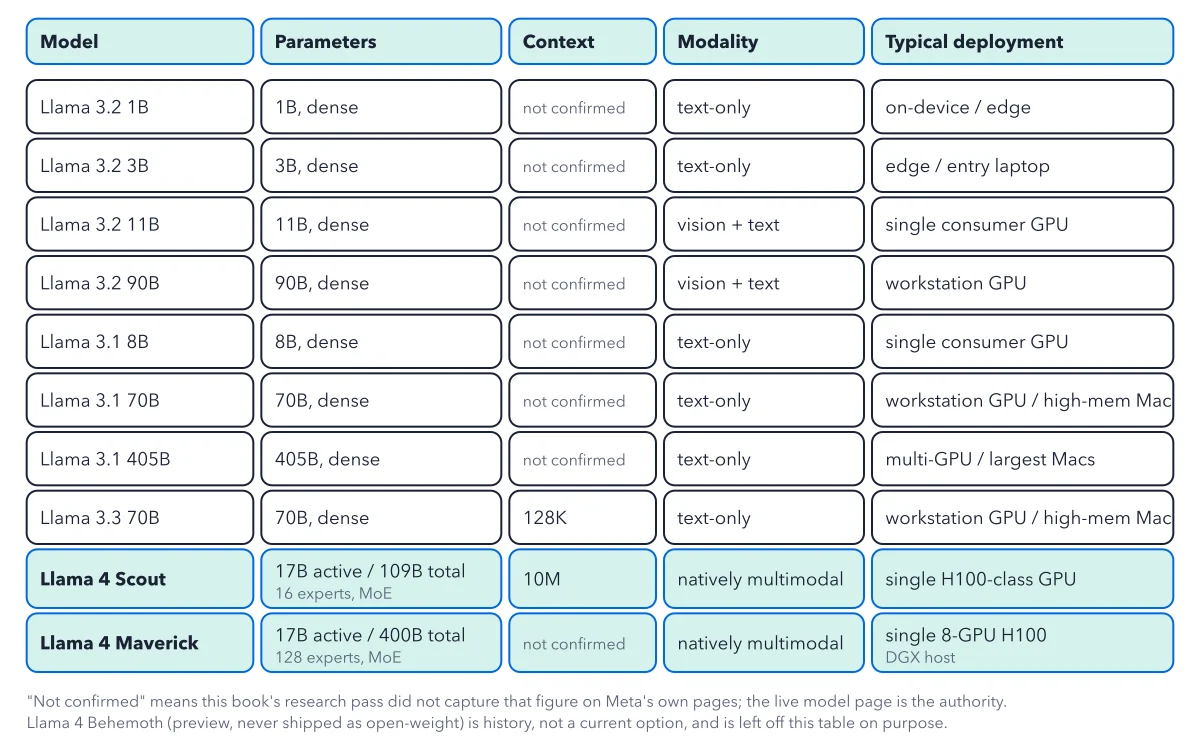
You install Ollama, a free app that runs models on your own computer with one command. You see ten Llama models and ask: which Llama model should I use? A leaderboard answers a different question, which model is strongest. You need the one that fits your job, your machine and your licence.
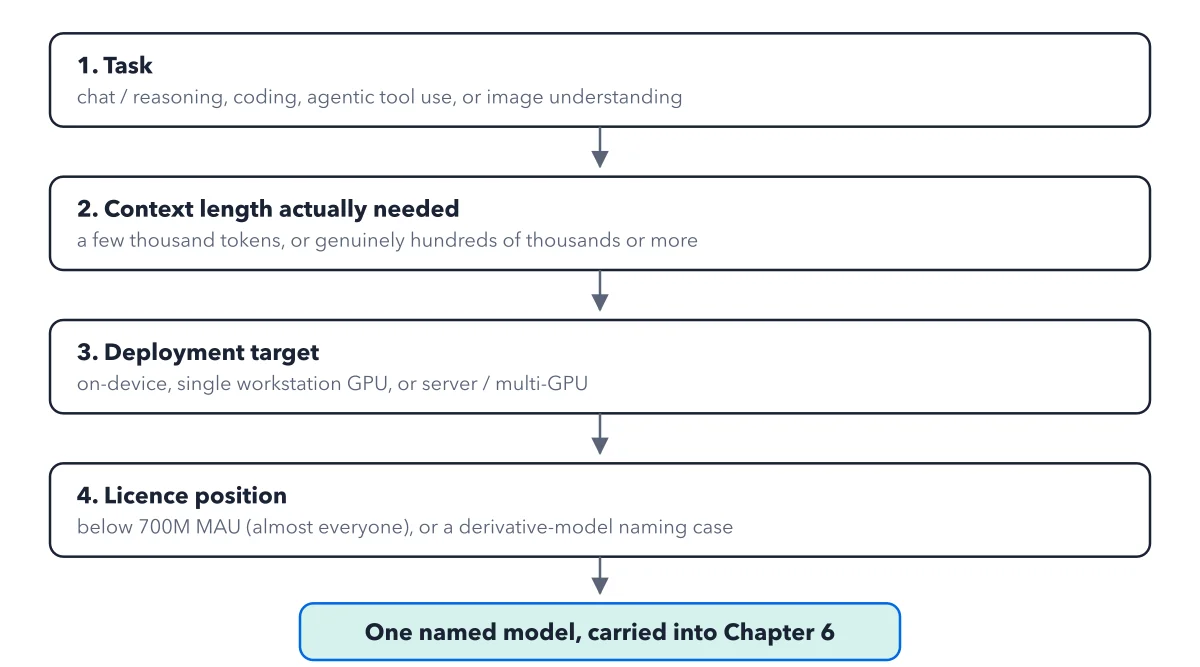
Pick wrong and the model does not load, or you pay for memory you never fill. The figure below asks four questions in order. Each one strikes rows from the lineup until one named model is left.
How to read this figure
Ask about the task first. The first box asks what the job is: chat and summaries, coding, agent work where the model calls other programs, or images. It goes first because one answer, no images, strikes four rows at once: Llama 3.2 11B and 90B, Scout and Maverick. The full list sits in the Llama lineup.
Size the context you need. The second box asks how much text the model must keep in view. Text is counted in tokens, pieces of about three quarters of a word. A chat needs a few thousand tokens; long documents need far more. A five page brief of about 2,500 words is about 3,300 tokens, well inside the window of every Llama 3 model.
Name the machine third. The third box asks where the model runs: on your own device, on one workstation graphics card, or on a server with several cards. This is the hardest filter, since a model that does not fit in memory cannot run. A 16 GB laptop holds Llama 3.1 8B, a 4.9 GB file; a 70B file is 43 GB and needs a 64 GB Mac.
Check your licence position last. The fourth box covers the licence. MAU means monthly active users. Below 700 million MAU, almost everyone, every row stays. The other case is naming: share a model you trained from Llama and its name must start with "Llama", with a "Built with Llama" credit, a Notice file and a licence copy. Not drawn: in the EU, the licence strikes the four image models. See the Llama licence.
Write down one named model. The flow ends in one model name, carried into the next step: picking a file. Write it as one line: the model, its context, text or images, the machine, and the need a smaller model would not meet.
Key takeaways
- Write your task, context, machine and licence position before you look at any model.
- Download the Instruct version for chat, and a base model only to train your own.
- Test any long context at the length you need, with your own documents.
Try this: pick your model in one pass
You need the lineup table, a pen and ten minutes. No terminal, no account and no download.
- Write your task in one sentence. "A helpful assistant" is too vague; "summarise five page briefs" works.
- Strike the image models if your task has no images: Llama 3.2 11B and 90B, Scout and Maverick.
- Write the longest context you need in tokens: the longest document plus the reply, because both share the window.
- Name your machine: a phone, a laptop, one GPU, a large Mac or a data center machine.
- Check your licence position. If you work in the EU, strike all four image models.
Expected result: One named model. A 16 GB laptop and a text job leave three rows: the 1B, the 3B and the 8B. Ridge writes "Llama 3.1 8B Instruct, 128K, text, for summaries on the 16 GB laptop".
Questions readers ask
Which Llama model should a beginner start with?
Llama 3.1 8B Instruct on a 16 GB laptop, or Llama 3.2 3B on 8 GB. Pick the Instruct version: it is tuned to follow instructions and chat. A base model comes straight from training and just carries on writing your text.
Should I pick Llama 4 Scout for its 10M context?
Not for short chats. A chat uses a few thousand tokens, but Scout still loads all 109B parameters, so you pay for memory you never fill. The book found no independent test of Scout at 10M tokens. Test any model at the length you need.
Why not just pick the top model on a leaderboard?
A leaderboard score from hard reasoning tests says little about a meeting summary. Hire the model the job needs, not the one with the longest résumé. A smaller model needs less memory and power, and it answers faster.
Sources: Llama 3 model page (Meta); Llama 4 model page (Meta); Llama 3.1 8B Instruct model card (Meta on Hugging Face).
This figure is from Llama Made Crystal Clear, chapter 5.
The chapter builds the idea step by step, with recipes you can follow, a Try it to check yourself, and every source.
Get the book