Mistral Vibe vs API: why one model comes with three bills
By Christophe Paka · Facts checked on 24 October 2026
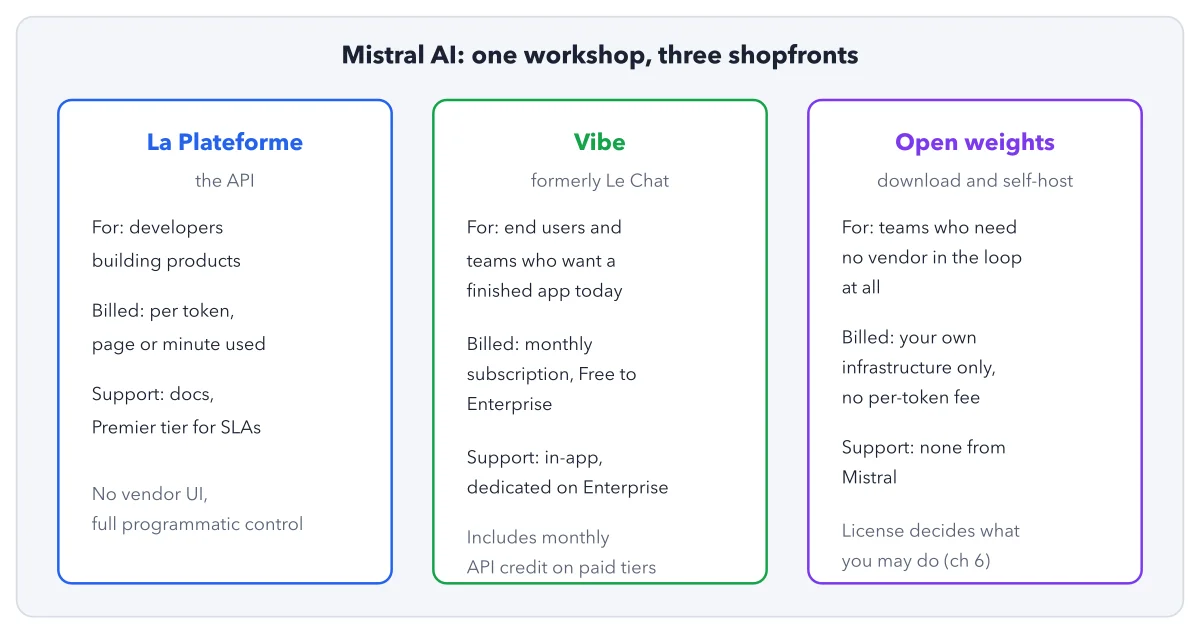
Mistral AI, a French AI company, sells its models through a chat app called Vibe and through an API, a paid service that other software calls. This page answers Mistral Vibe vs API: how each one bills, and who may train on your data.
A reader pays for the app and wants to start coding. The question: "What is the difference between Le Chat Pro and the Scale plan in AI Studio?" Another asks whether Vibe has "its own quota", separate from the API's limits.
Both picture one account with one allowance. That picture breaks the day a developer's key hits its limit while unused credit sits on a Pro plan. The figure shows the three doors and their meters.
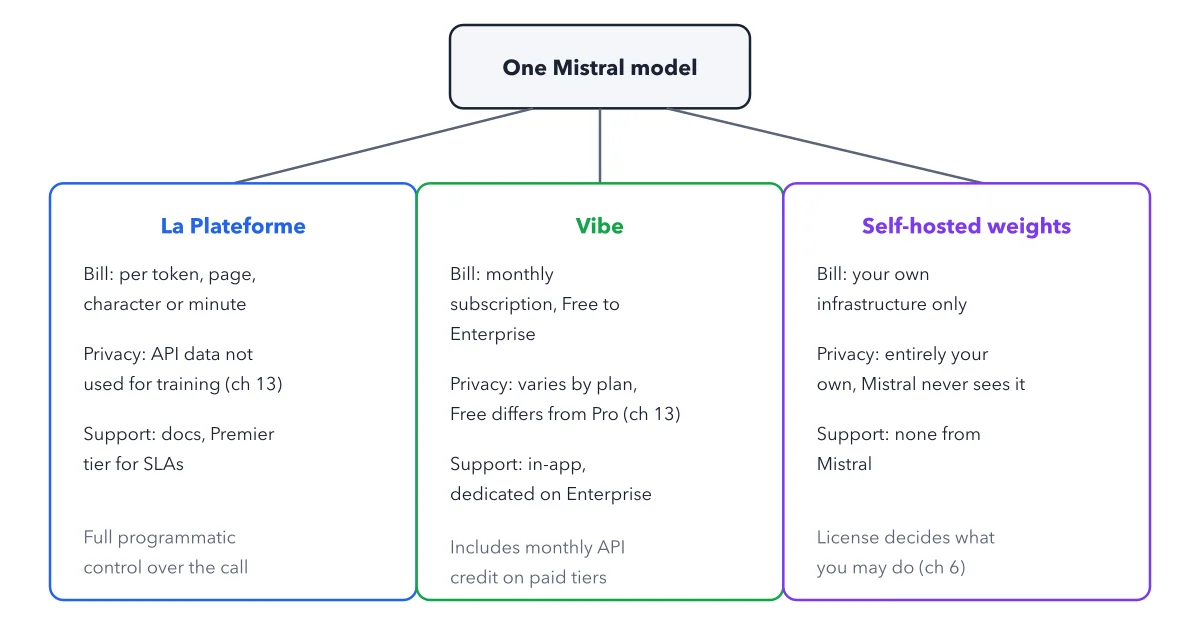
How to read this figure
Start at the top box. One Mistral model sits above three doors, three ways a model reaches you. The model is the same; the bill, the privacy default and the help differ. The numbers are not in drawing order: Door 2 sits on the left, Door 1 in the middle. Read the boxes left to right. The post on what Mistral AI is names the three products.
Left box, Door 2, Studio: pay per use. Studio is the API, for developers. It bills per token (a small chunk of text), page, character or minute, by model. Its limits belong to your whole organization, and every key shares them. Mistral may train on free use. On paid use the default is not stated, so assume training is on until you opt out, as the box says.
Middle box, Door 1, Vibe: a monthly plan. Vibe is the app. It bills a monthly subscription, from Free to Enterprise. Its limits come with each person's plan or seat, not with an API account. On Free and Pro, Mistral trains on your chats by default until you switch it off. On Enterprise it does not.
Right box, Door 3, your own hardware. You download the open weights and run them yourself. No Mistral meter runs: your bill is your own machines, their power and the hours to keep them working. Mistral never sees your data and gives no help.
Read the grey line under Vibe. Pro includes some API credit, a small allowance for Studio. It pays for API calls only. Once it runs out, Mistral bills more API use at the normal API rates. It never turns a Vibe plan into unlimited API use.
Key takeaways
- Name the door before you read a bill, a limit or a privacy promise.
- Budget Vibe seats and Studio use as two separate lines, even on one account.
- Switch training off in both places on day one: Vibe > Privacy for the app, and Anonymous improvement data for the API.
Try this: switch training off on both doors
Each box points to the book's chapter 12 for its training switch. Here are the two switches, so you can set them yourself. No code is needed, only a browser.
- Open admin.mistral.ai in a browser. It is the account site for every plan, Free included.
- For the app, go to Vibe > Privacy and turn off "Allow your interactions to be used to train our models".
- If you also use the API, go to Admin > Privacy and turn off "Anonymous improvement data". Despite its friendly name, on lets Mistral train on your API data.
- Reload both pages and check that both switches show off. On a Team plan, ask your admin to do it for everyone.
Expected result: Two switches off, one per door. One switch alone leaves the other door on its own setting. Past chats stay as they were; the switches protect only what comes after.
Questions readers ask
What is the difference between Le Chat Pro and the Scale plan?
Le Chat Pro, now Vibe Pro, is an app subscription. "Scale plan" is an older name readers use for paying for the API as a developer. It means pay as you go from prepaid credits, not a separate plan. The two bill separately and have separate limits.
Does Vibe have its own quota, separate from API rate limits?
Yes. Vibe's limits come with each person's plan or seat. Studio's limits belong to your organization and are shared by every key in it. Using one never uses up the other.
Does Vibe Pro give unlimited API use?
No. Pro includes a small API credit each month. Once it runs out, Mistral bills further API use at the normal API rates. The credit pays for API calls only, not for the subscription.
Sources: Usage and limits (Mistral Docs); Pricing (Mistral AI); Opting out of training (Mistral Help Center).
This figure is from Mistral Made Crystal Clear, chapter 2.
The chapter builds the idea step by step, with recipes you can follow, a Try it to check yourself, and every source.
Get the book