Mistral on Azure Foundry: who bills you, and whose contract applies
By Christophe Paka · Facts checked on 24 October 2026
Mistral AI is a French company that makes AI models. This page is for firms that already buy from Microsoft's Azure cloud. It answers who bills you and whose contract applies when you run Mistral on Azure Foundry. If you only use the chat app, you can skip it.
Your firm's compliance team approved the Azure contract. A colleague wants Mistral. Signing up with Mistral means a new vendor, a new bill and new data terms to approve, and many firms stall right there.
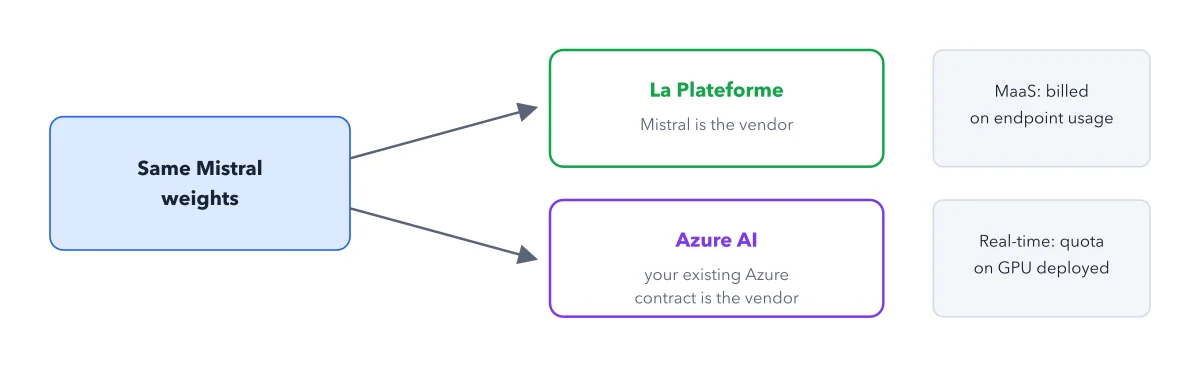
There is a side door. Microsoft calls it Microsoft Foundry: its cloud catalogue where some Mistral models run under your Microsoft contract. The figure shows who bills you on each path.
How to read this figure
Start with the same weights. The left box holds the same Mistral weights, the trained model files. The two arrows mean the same model can answer through two vendors. What changes is who bills you and whose contract sets the data terms.
Top path: Studio, Mistral is the vendor. Studio is Mistral's own API platform. Mistral bills you per token, page or minute, and Mistral's terms cover your data. Mistral's docs list the whole lineup on Studio. The post on one model, three doors, three meters covers Studio's other doors.
Bottom path: Microsoft Foundry. On Microsoft Foundry, your existing Azure contract is the vendor. Microsoft bills you, and that contract sets the data terms, including where data is processed. Check the contract itself, because Mistral's Foundry page does not say.
The right column: how Foundry bills. Two grey boxes stand in a column at the right. Together they list the two ways Microsoft Foundry bills you, stacked one above the other. They belong to the Foundry path only, so read them as one list, not as a label for the box on their left. Studio always bills per token, page or minute, as in step 2.
What each Foundry bill means. An endpoint is the web address a model answers at. The top box, MaaS, is Microsoft's Managed Services: you pay per request sent to that address, so you pay for use. The bottom box, real time endpoints, bills by how much computing power you reserve: a quota of GPUs, the chips AI models run on.
Key takeaways
- Use Microsoft Foundry only when your firm already holds an approved Microsoft contract.
- Read your Azure contract for where data is processed, because Mistral's Foundry page does not say.
- Check a cloud's own model list before you plan on a Mistral model there.
Try this: call a Mistral model through Foundry
Mistral's docs give setup in four steps. You need an Azure account under your firm's contract.
- Deploy the Mistral model you want in Azure.
- Copy the endpoint address and the secret key Azure gives you.
- Store both on your machine, outside your code.
- Call the endpoint from your code.
Expected result: A reply from the same Mistral weights, billed on your Microsoft invoice under your Azure contract, not by Mistral.
Questions readers ask
Is Mistral Medium on Azure Foundry or AWS Bedrock?
Mistral's Azure page lists Mistral Medium 3.5, and a deal with Microsoft also put it in Copilot Studio. For Amazon Bedrock, Amazon's service for running AI models, or another cloud, this book cannot say: the Mistral docs it uses cover Microsoft Foundry only. Check that cloud's own model list before you plan on it.
Which Mistral models are on Microsoft Foundry?
Mistral's docs list these on Foundry: Medium 3.5, Large 3, Small, Document AI with OCR 4 (reading text from scanned pages), Ministral 3B and Codestral. Studio carries the whole lineup. Lists change, so read Mistral's Foundry page before you plan. The book holds no price comparison between the two paths.
Do I need Microsoft Foundry to use Mistral?
No. Use it if your firm already buys Azure and its compliance team approved it. Without a Microsoft contract, Studio is the simpler start: you sign up with Mistral, and Mistral bills you directly.
Where is my data processed on Microsoft Foundry?
Your Azure contract decides, not Mistral. Mistral's Foundry page does not say, and this book has no answer either. Ask your Microsoft account team, or read the data terms of the contract your compliance team approved.
Sources: Mistral on Microsoft Foundry (Mistral Docs); Usage and limits (Mistral Docs).
This figure is from Mistral Made Crystal Clear, chapter 2.
The chapter builds the idea step by step, with recipes you can follow, a Try it to check yourself, and every source.
Get the book