Read your n8n first workflow before you build it
By Christophe Paka · Facts checked on 23 October 2026
You watched three videos, and each one started from an empty canvas. You copy the nodes, press run, and something comes out. But you could not say why the last node fired four times, or why one branch got nothing.
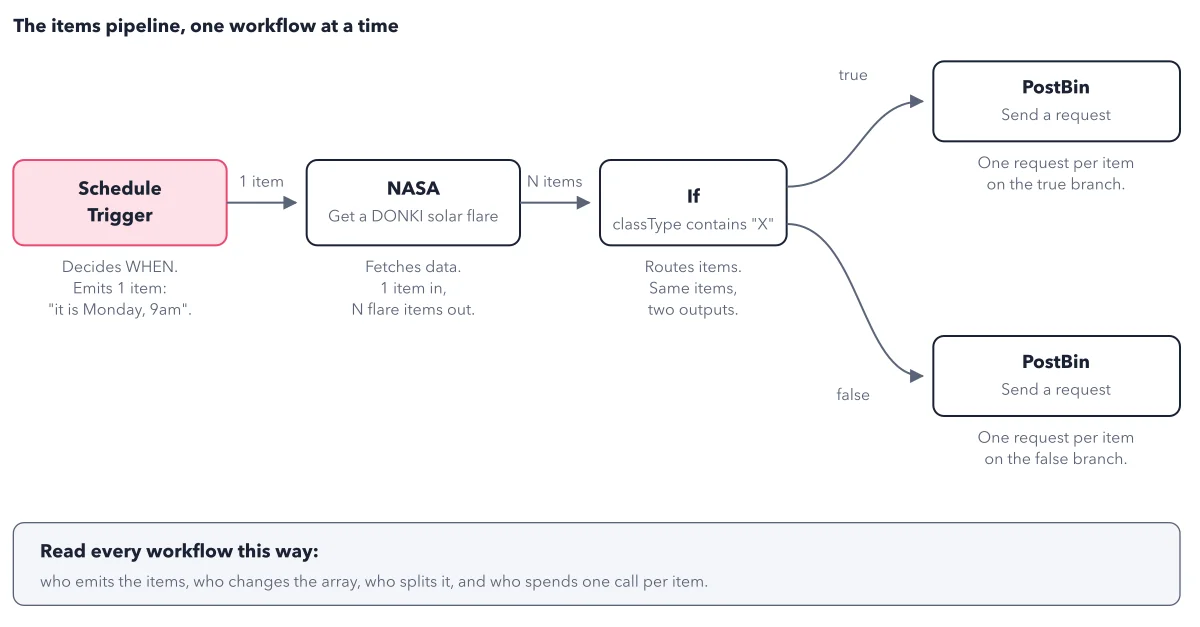
That gap costs you on the next build, when nobody is there to copy from. Your n8n first workflow sticks when you can read it, not only click it. The figure below takes a small solar flare monitor and labels each node by its job: who outputs the items, who changes them, who splits them, and who spends one call per item.
How to read this figure
Start at the Schedule Trigger. The trigger decides when. Each Monday at 9am it emits 1 item that says, in effect, it is Monday, 9am. That single item is all the next node gets.
Watch the NASA node multiply. The NASA node, Get a DONKI solar flare, fetches data. One item goes in, and N flare items come out, one per solar flare in the last seven days. N changes every week. While you build, you read it at the top of the node's OUTPUT view. After you publish, each run in the executions list shows the same counts.
Read the split at the If node. The If node tests classType contains X. Each item leaves by one output only: flares that match go out true, the rest go out false. Nothing is copied, so the two counts add up to N. For the full counting habit on branches, see count the items on every wire.
Count the calls at PostBin. Each PostBin node sends one request per item on its branch. Three flares on the true side mean three requests there. This is where items turn into calls to another service, so a big N means many calls. It is the step to count before you publish.
Use the rule in the grey box. The box at the bottom gives the habit for every workflow. Ask four things: who emits the items, who changes the array, who splits it, and who spends one call per item.
Key takeaways
- Before you build, label each planned node: emits items, changes them, splits them, or spends a call per item.
- Wire both outputs of every If node to somewhere, so no item is dropped without a decision.
- Check that the true and false counts add up to the count that came into the If node.
Try this: build the solar flare monitor
Solar flares stand in for your own data: the shape is that of most client jobs, fetch on a schedule, split into two branches, notify. You need an n8n instance and a free API key (a password a program uses) from the NASA APIs website. Results go to PostBin, a test website that shows each request sent to a bin (a temporary inbox).
- Add a Schedule Trigger set to every 1 week, on Monday, at 9am, minute 0.
- Add the NASA node and choose Get a DONKI solar flare. In the credential list, create a new credential (n8n's saved store for logins and keys), paste your key into API Key, and save.
- In Additional Fields, add Start date and type
{{ $today.minus(7, 'days') }}. In plain words: the date of the run, minus seven days, so each run asks for the last week of flares. Copy it as written. Select Execute step and note the item count. - Add an If node. From the INPUT view (the data that arrived from the NASA node), drag the field classType, each flare's class, into Value 1. Choose String, Contains, and set Value 2 to X.
- Send the true output to a PostBin node. Duplicate it for the false output too, so no item is dropped without a decision. Select Execute workflow.
Expected result: One message in your bin per flare item that reached a PostBin node. If the NASA node shows zero items, change 7 to 30 and run the step again.
Questions readers ask
If you started n8n with no automation background, what first workflow should you build?
Pick one with the shape of most client jobs: fetch on a schedule, split into two branches, notify. The solar flare monitor does that with a free key, no other accounts and about 30 minutes, so you learn triggers, credentials, expressions and the If node in one go. Once you can read it, swap in the services you really use.
Why did my If node send items to only one branch?
Every item goes down true or false, never both. If all items match the condition, the false side gets none. Look at the counts on both outputs: they must add up to what came in. If they do, the node works: an empty branch is data that did not match, not a broken node.
Where does my API key go in an n8n workflow?
Into a credential. A credential is a saved login or key for a service, stored once and used by nodes. In the NASA node, you create a new credential, paste the key into API Key and save it. The key then lives in n8n's credential store, not in the node.
Sources: Schedule Trigger (n8n docs); PostBin node (n8n docs); Build your first workflow (n8n docs).
This figure is from n8n Made Crystal Clear, chapter 3.
The chapter builds the idea step by step, with recipes you can follow, a Try it to check yourself, and every source.
Get the book