The n8n HTTP Request node, with pagination built in
By Christophe Paka · Facts checked on 23 October 2026
Your app has no n8n node, so you call its API by hand. An API is the address where one program asks another for data. The first call works. But you get 100 orders, and the shop has far more. A tutorial tells you to build a loop with Split In Batches and an If node.
That loop is extra nodes to wire, test and fix. With n8n HTTP Request pagination you do not need it.
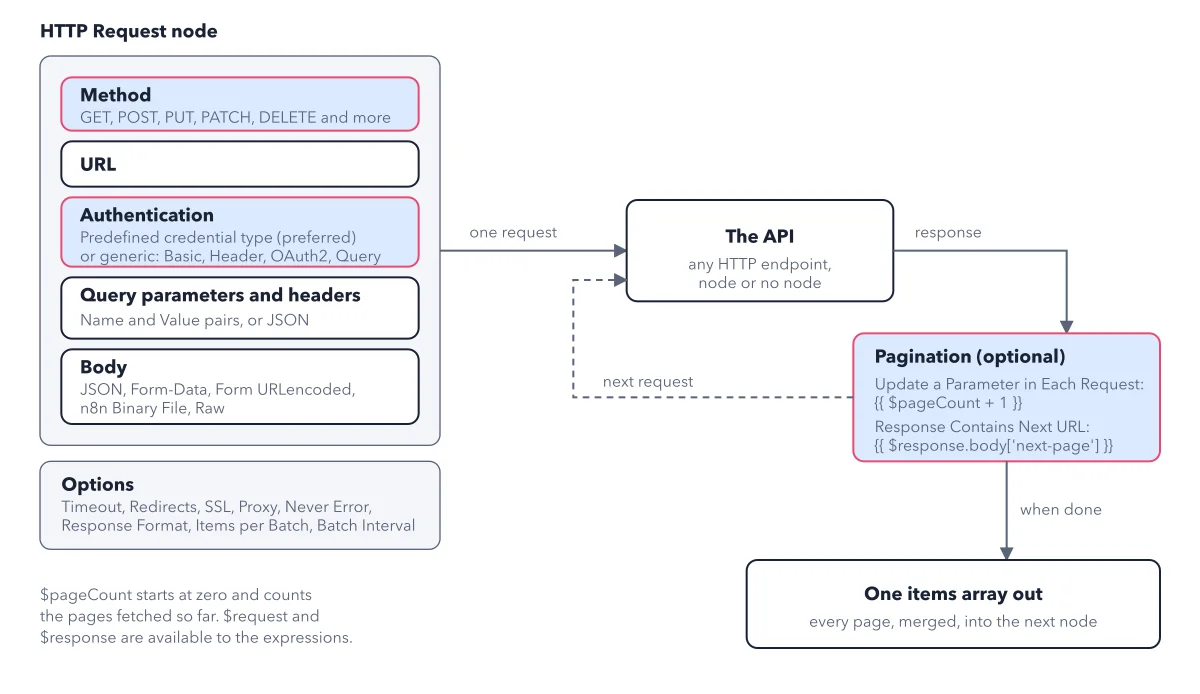
The figure below lays out the node's settings, and the loop that fetches page after page inside the node.
How to read this figure
Read the node box top to bottom. Method, URL, Authentication, query parameters and headers, and Body make one request. Method is the verb: GET reads data, POST sends new data. To fetch orders, you GET them. Use the method the service's API docs name. Most calls need only the method and authentication decided.
Look at Authentication. A predefined credential type is marked preferred, and n8n recommends it. If the service has none, pick the generic type its API docs describe, such as Basic, Header, OAuth2 or Query auth.
Note the Options box. Options holds Timeout, Redirects, SSL, Proxy, Never Error, Response Format, Items per Batch and Batch Interval. Many APIs have a rate limit, a cap on how many calls you may make in a period. Items per Batch and Batch Interval slow the node down to stay under it.
Follow the dashed loop. Pagination is one of those options: select Add Option, then Pagination. The response goes to this step, which builds the next request. For page numbers it uses
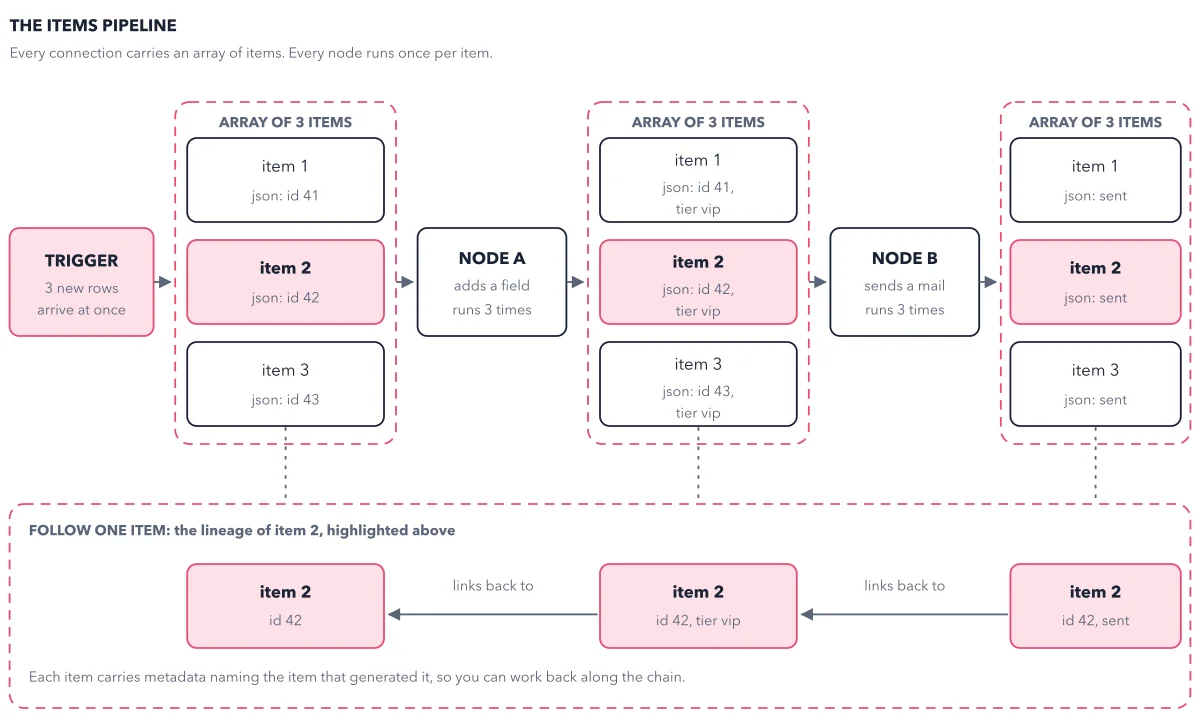
{{ $pageCount + 1 }}. For an API that sends the next page's address, it reads{{ $response.body['next-page'] }}: the next page field of the last answer the API sent; use your API's own field name. The dashed arrow goes back.End at one items array. When the pages run out, every page is merged into one items array for the next node. However many pages it fetched, it is still one node in one run, not one run per page. Each record becomes an item, as in the items pipeline.
Key takeaways
- Reach for the HTTP Request node when an app has no node, and pick a predefined credential type first.
- Turn on pagination in the node instead of building a loop, and start page numbers from {{ $pageCount + 1 }}.
- Set a stop condition that matches your API's last page, then count the items against the API's total.
Worked example: an offset API, 100 records per page
Some APIs do not take a page number. They want an offset: how many records to skip before the page starts. Use the same mode, Update a Parameter in Each Request.
- Set the parameter's Value to
{{ $pageCount * 100 }}: the pages fetched so far times your page size, 100. That number is how many records to skip. - First request:
$pageCountis 0, so it skips 0 records and gets records 1 to 100. - Second request: it skips 100. Third request: it skips 200.
- Tell the node when to stop. Community threads call the setting Pagination Complete When, with a choice such as Response Is Empty; the docs do not name it, so check in the node. Without it, the node keeps calling.
Result: Every page arrives in the node's output in one run. If you see only one page, pagination never fired: check the mode and the parameter name. If the node never stops, read what the last page returned.
Questions readers ask
How do I loop an API call with an offset until it returns nothing?
Do not build a loop. In the HTTP Request node, add the Pagination option and pick Update a Parameter in Each Request. Set the offset to {{ $pageCount * 100 }} for 100 records per page, and set the stop condition (Pagination Complete When, in community threads) to an empty response.
Why is it $pageCount + 1 and not just $pageCount?
$pageCount is the number of pages the node has fetched, and it starts at zero. Most APIs call their first page page one, so the first request needs 0 plus 1.
Why are my imported cURL numbers text?
Most API docs show examples as curl commands, typed in a terminal to send a web request. The node's Import cURL button fills the node from one, but it brings every value in as text, so a price arrives as words, not a number. To keep numbers as numbers, set the body to Using JSON and paste the JSON there.
Sources: HTTP Request node (n8n docs); Pagination cookbook (n8n docs).
This figure is from n8n Made Crystal Clear, chapter 5.
The chapter builds the idea step by step, with recipes you can follow, a Try it to check yourself, and every source.
Get the book