OpenRouter BYOK, and the line where a fee starts
By Christophe Paka · Facts checked on 7 November 2026
You already have a provider account, maybe with a discount. You also like OpenRouter's one key and its fallbacks. So you ask: can I plug my own account in, and what does that cost?
Misread the fee and you either skip a path that costs you nothing, or you budget a charge on your whole month that never comes.
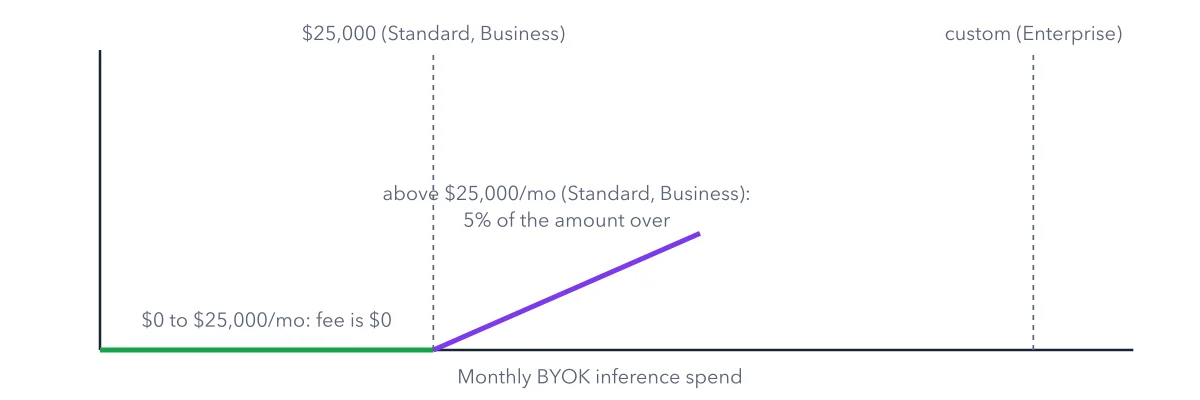
The figure below draws OpenRouter BYOK on one scale of monthly spend. A flat line shows where the fee is zero. A slope shows the fee past the line, on the amount over only.
How to read this figure
Read the bottom axis first. The axis is your monthly BYOK inference spend. BYOK means bring your own key: you plug an account you hold directly with a model company, such as OpenAI, into OpenRouter. That company bills you for the tokens. The spend is counted at what the same model and provider would cost normally on OpenRouter.
The green flat line. From $0 to $25,000 a month, the OpenRouter fee is $0. This allowance holds on the Standard and Business plans. A hobby budget of a few dollars sits far to the left, on the flat part.
The dotted line at the allowance. This is the point where the fee starts. Crossing it does not put a fee on the whole month. Spend below the line stays fee free, every month.
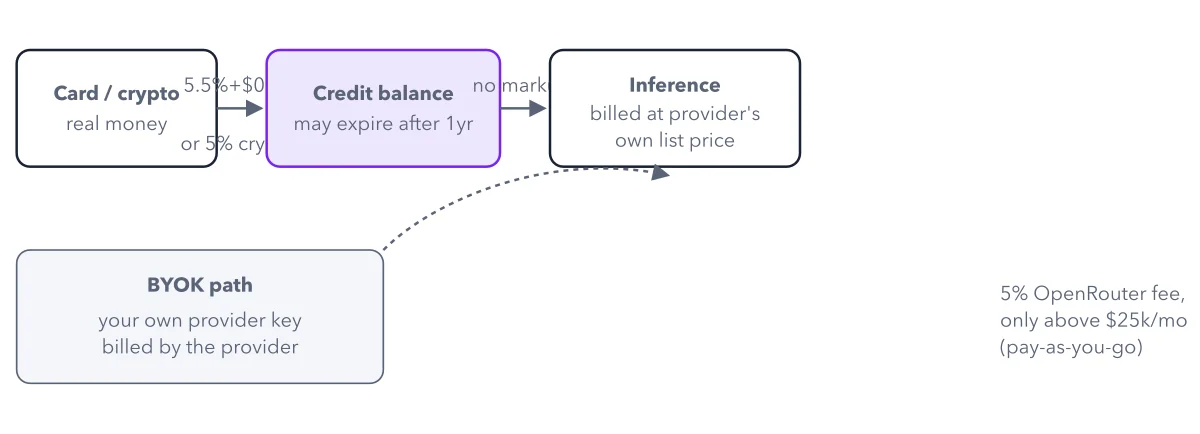
The purple slope. Above the line, OpenRouter takes 5% of the amount over. The slope starts at zero, so the fee grows only with the spend past the line. This side path sits on the same money map as credits, but it skips the credit balance.
The far line for Enterprise. Enterprise allowances are custom. Enterprise is the plan with a quoted contract and invoicing, so the line sits wherever that contract puts it. On that plan, ask for your number.
Key takeaways
- Use BYOK if you hold provider accounts or discounts; skip it otherwise.
- Work out the BYOK fee on the amount over the allowance, never on the whole month.
- Check the BYOK page for your provider before you plan a setup around it.
Worked example: a busy month past the allowance line
Take a team on the Standard plan that sends a large month through its own provider keys. Follow the figure from left to right.
- The month's BYOK spend is $30,000.
- The first $25,000 is fee free.
- The amount over the line is $5,000.
- The fee is 5% of $5,000: $250.
Result: The team pays OpenRouter $250 for that month, not a fee on all $30,000. The provider bills the tokens as usual, at the team's own rates and discounts.
Questions readers ask
What is BYOK on OpenRouter?
Bring your own key. You add an account you hold directly with a provider, and your requests through OpenRouter use it. The provider bills you. You keep your provider's rate limits and discounts. When your provider fails, OpenRouter can still fall back to its own capacity, so the request leaves your account: read the BYOK page for how that is billed.
Does OpenRouter BYOK work with Azure, AWS Bedrock or Google Vertex?
These three have their own sections on OpenRouter's BYOK page, so start there. For other providers, Anthropic direct included, check that page first, before you plan a setup around your own key.
Should I use BYOK or just buy credits?
Use BYOK if you already hold provider accounts or discounts. Skip it otherwise. Buying credits is the simpler path: you pay the platform fee once, when money comes in (5.5% on Standard, 8% on Business), and every request is billed at the provider's list price.
Sources: BYOK (OpenRouter docs); OpenRouter Pricing.
This figure is from OpenRouter Made Crystal Clear, chapter 4.
The chapter builds the idea step by step, with recipes you can follow, a Try it to check yourself, and every source.
Get the book