Stop Qwen overthinking with one reasoning setting
By Christophe Paka · Facts checked on 7 November 2026
You ask the 27B for something easy, and it thinks for minutes before it answers. Readers call it the most overthinking model ever. One reported a task that took 7 hours and made no progress.
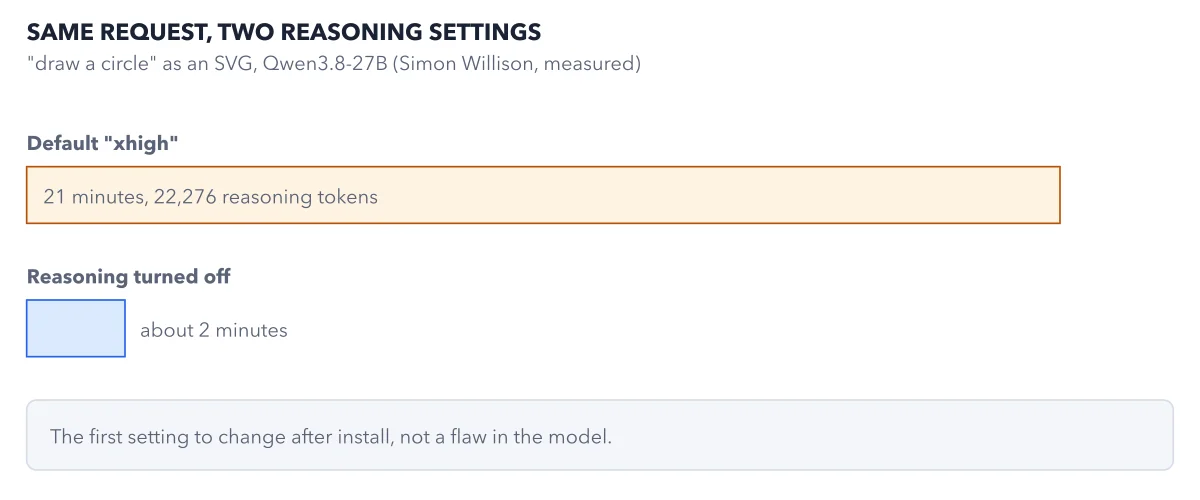
The model is not broken. By default it thinks at its highest level on every question, easy ones included. The figure shows what Qwen overthinking costs on one easy request, and the setting that fixes it.
How to read this figure
Read the request. The test is about as easy as a coding request gets: draw a circle as an SVG drawing, a picture written as code. Simon Willison ran it on the 27B and timed both runs.
Read the long orange bar. At the default setting, xhigh, the request took 21 minutes. The model wrote 22,276 reasoning tokens before its answer. Every one of those tokens is waiting time, and on the hosted API it is billed as output.
Read the short blue bar. With reasoning turned off, the same request took about 2 minutes. That is about ten times faster, on a task where the thinking added nothing.
Read the note at the bottom. The grey box gives the lesson. Reasoning effort is the first setting to change after install. The slow default is not a flaw in the model.
Weigh the price of less thinking. Less thinking costs quality on hard work. Artificial Analysis scored the 27B at 34 on xhigh, 28 on medium, 26 on low and 20 with reasoning off. So pick the level per task, as cost per task does for money.
Key takeaways
- Set reasoning effort per task: low for routine work, xhigh for hard problems.
- For a coding agent, start at medium or low and keep xhigh for the hard steps.
- Time one prompt at two settings before you judge how fast a local Qwen feels.
Try this: turn reasoning down and time it
You need the 27B running on your machine or through the hosted API, plus a stopwatch.
- Pick one routine prompt, such as a customer who asks for a refund on an unopened item.
- Run it at the default setting. Time it and note the length of the answer.
- Set
reasoning_efforttolowin the request, where your engine's page shows it. In Ollama's API, thethinkfield takesfalseor a level name. - Run it again, time it the same way, and read both replies side by side.
Expected result: The low run finishes faster and writes fewer tokens, while the reply stays usable. No change at all means the setting did not reach the model: check the parameter name and where your engine expects it.
Questions readers ask
How do I stop Qwen from overthinking?
Lower the reasoning effort. On the 27B, the reasoning_effort parameter takes xhigh, the default, medium or low. A separate switch, enable_thinking set to false, turns thinking off for a request. Use low for routine work.
Should I turn Qwen thinking off completely?
Not for hard tasks. More thinking does not help on easy tasks, where it only costs time. But on hard tasks the thinking pays, and test scores drop as you turn it down. Keep a higher level where a wrong answer is costly.
Medium or xhigh for coding tasks?
For a coding agent, start at medium or low and keep xhigh for the hard steps. The failure to avoid is a run that thinks for hours on a route that never improves, like the reader whose task took 7 hours.
Sources: Qwen3.8-27B model card; Thinking (Ollama docs); Simon Willison: Qwen 3.8 27B defaults to overthinking.
This figure is from Qwen Made Crystal Clear, chapter 6.
The chapter builds the idea step by step, with recipes you can follow, a Try it to check yourself, and every source.
Get the book