Supabase Next.js setup in six steps, with RLS on from the start
By Christophe Paka · Facts checked on 23 October 2026
"What do you test before launching a Supabase app?" a reader asked on r/Supabase. Another asked: "Is RLS enough to secure a vibecoded SaaS or am I screwed????" Both ask about safety after the build.
That order is the trap. A table made in SQL starts with RLS off; only the Table Editor turns it on for you. With a grant and RLS off, anyone with your publishable key gets every row.
This Supabase Next.js setup puts the lock in step 2, before any app code exists. You need a Supabase account, Node.js 22 or later and a terminal. Node.js is the program that runs JavaScript on your computer. No terminal? Steps 1 and 2 run in the Dashboard alone. AI built app? See the last FAQ: five checks, no code.
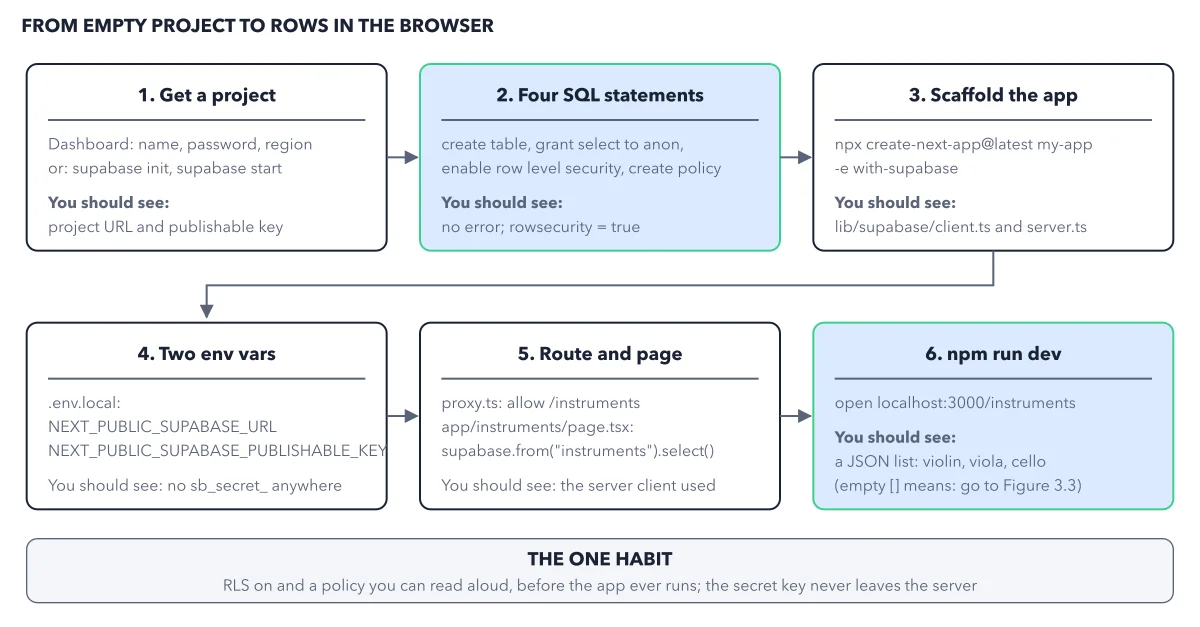
How to read this figure
Step 1: get a project. In the Dashboard, give the project a name, a database password and a region. Or run
supabase initandsupabase startto get a local copy, for development only. You should see the project URL and a publishable key.Step 2: run four SQL statements. This green box is where security happens. In the SQL Editor, run four statements. In plain words: make the table, let strangers (the role anon) read it, switch the row lock on, then write the rule that lets anon read its rows. You should see no error, and
rowsecurity = true, which means the lock is on.Step 3: scaffold the app. Next.js is a popular framework for web apps. In a terminal, the text window where you type commands, run
npx create-next-app@latest my-app -e with-supabase. It copies the official template, which already holds the Supabase clients. You should seelib/supabase/client.tsandserver.ts.Step 4: set two env vars. Put the project URL and the publishable key in
.env.local. These are the two settings your app reads when it starts. You should see nosb_secret_anywhere in the folder.Step 5: allow the route, add the page. The template sends visitors with no sign in to the login page. To let a stranger see the list, open
lib/supabase/proxy.ts, find theifthat sends visitors to/login, and add the linerequest.nextUrl.pathname !== "/instruments" &&to it. Then add a page that reads the table on the server.Step 6: run it and check. Run
npm run devand openlocalhost:3000/instruments. You should see violin, viola and cello. This green box is where you check step 2. An empty list with no error means RLS let no rows out. One question splits the first day failures walks each fix.
Key takeaways
- Give every new table four statements, in order: create, grant, enable RLS, policy.
- Leave Automatically expose new tables off, and grant each table on purpose.
- Read the error code first: 42501 means a grant, 401 a key, an empty list a policy.
Try this: prove the door is locked
A query in the SQL Editor proves nothing, because it skips policies. Ask the way your app asks: with the publishable key and no user.
- In the SQL Editor, create a second table, composers, with two rows. Grant select to anon and enable RLS, but write no policy.
- Call it with curl and only the publishable key:
curl 'https://<PROJECT_REF>.supabase.co/rest/v1/composers?select=*' -H "apikey: <PUBLISHABLE_KEY>". You should get[], an empty list, and no error. - Add one policy for reading, for anon only, with
using (true). - Run the same curl command again.
Expected result: The two rows come back as JSON. Only the policy changed. So RLS on with no policy is a safe start, not a finished state. If you see code 42501 instead, the grant line did not run.
Questions readers ask
Why is my Supabase query returning an empty array?
RLS is on and no policy matched this role and operation. Either no policy exists for it, or the policy's using test filtered every row out. Write or fix the policy. Never switch RLS off to test.
What do error 42501 and HTTP 401 mean in a new Supabase app?
Error 42501, permission denied for table, means the role has no grant: add one, such as grant select on public.instruments to anon;. HTTP 401 from the browser means a secret key reached the browser, and the platform refused it on purpose. Put the publishable key in the client, then replace the secret key.
Should I start with a hosted project or the local stack?
Both give you the same platform. Start local if you have Docker running: it costs nothing and uses none of your project's quota, and supabase stop --no-backup wipes it clean. Start hosted to put the app online this week. Not a developer? Use the hosted Dashboard.
An AI tool built my app. Do these steps apply?
The lock does; skip the app code. Run five Dashboard checks. Security Advisor: no error. Database > Policies: every table shows RLS on. No policy reads user_metadata. RLS Tester, a feature preview: as anon, a private table returns no rows. Settings > API Keys: the app holds only the publishable key. On Lovable Cloud, ask Lovable: "Does every table have RLS on, with one policy per operation that names its role?"
Sources: Use Supabase with Next.js (Supabase docs); Tables and data (Supabase docs); Database advisors (Supabase docs).
This figure is from Supabase Made Crystal Clear, chapter 3.
The chapter builds the idea step by step, with recipes you can follow, a Try it to check yourself, and every source.
Get the book