Nextjs vs Vercel: the line between framework and host
By Christophe Paka · Facts checked on 23 October 2026
A thread on r/nextjs asks a plain question: anyone running Next.js outside Vercel in production? Another reader fears losing the nice things Vercel gives out of the box.
Guess wrong and you move a site, then find pages that run code on every visit, or pictures that no longer resize. The search nextjs vs vercel mixes up two things. Next.js is a framework, a ready made toolkit for building websites. Vercel is a host that runs the site for you.
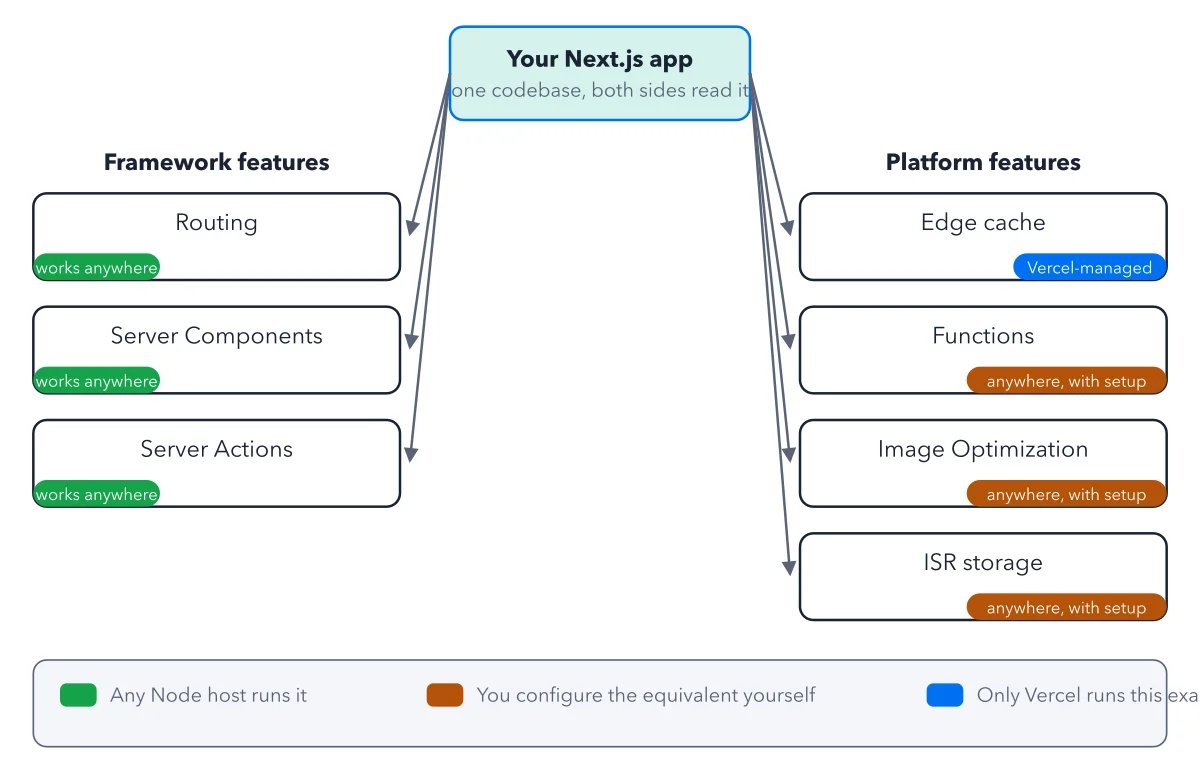
The plain answer: no, you do not need Vercel to run a Next.js site. Your pages, routing and forms move to any server that runs Node.js. Caching, image resizing and server code move with setup work. Only Vercel's own network stays behind. The figure sorts these three groups.
How to read this figure
Start at the app on top. One Next.js app sits at the top: one codebase that both sides read. You do not write two versions. The question is only who does the work around your code.
Read the left column: framework features. Routing, Server Components and Server Actions carry a green works anywhere tag. A framework feature is something your framework's code does by itself. Server Components run on the server and send finished pages. Server Actions are code a form or button runs on the server. Node.js is the engine that runs JavaScript on a server. Any host that runs it, even one rented server, runs all three as written.
Read the orange boxes on the right. Functions, Image Optimization and ISR storage say anywhere, with setup. These are platform features: what the host adds around your code. Functions are your server code. ISR keeps pages ready and remakes them on a timer. Vercel gives all three ready made. Elsewhere you set up a server process, an image library and a shared store.
Find the one blue box. The Edge cache says only Vercel. It is the stored copies on Vercel's network of servers around the world, the CDN, which answers visitors from near them. A new host can give you a CDN of its own. What you cannot take with you is Vercel's own network.
Use the legend band. The band at the bottom reads the colors: any Node host runs it, you configure the equivalent yourself, only Vercel has it. The right column is what you lose, or rebuild, if you leave.
Key takeaways
- Ask your developer to search the code for revalidate and next/image: each hit is a setup box you would rebuild.
- Sort your app's features into the three groups before you compare hosts or prices.
- If your app uses none of the three with setup boxes, any Node.js host will run it as written.
Worked example: sort the book's sample blog into the three groups
The book ships one small app, Crystal Notes: a blog with an AI ask box. Here is how its parts sort.
- Works anywhere: the post pages at
/posts/[slug], drawn by Server Components, and the contact form, sent by a Server Action. - Anywhere, with setup: posts kept ready and remade every few minutes (ISR), pictures shown with
next/image, and the/api/askanswer box, a Vercel Function. - Only on Vercel: the CDN in front of all of it.
- Now copy the app to one server with no shared store and no CDN. Every post visit runs code on that machine.
Result: The site works, but each visit waits on code, and distant visitors wait longer. The move is possible; the right column is the work you take on.
Questions readers ask
Is self hosting Next.js worth it?
It depends on the right column. If your app uses none of the with setup boxes, any Node.js host runs it as written. If it keeps pages ready on a timer (ISR), resizes images or runs server code, you set those up yourself. The book prices that work in engineer hours, once to build and then each month to run. See what is portable when you leave.
What do I lose if I leave Vercel?
The edge cache on Vercel's own network, plus the ready made Functions, Image Optimization and ISR storage, which you rebuild or get from your new host. Previews, one click undo of a release and automatic releases are platform features too; the figure leaves them out. The book prices both sides with your engineer hours counted. For a light project, those monthly hours cost far more than the Vercel bill; at heavy traffic the two come close. See Vercel vs self hosting cost for the numbers.
Does Next.js only work well on Vercel?
No. Routing, Server Components and Server Actions work on any Node host. Next.js also has an Adapter API: a published plug that lets another host run ISR, Image Optimization and the rest. OpenNext, an open source project, runs Next.js builds on AWS, Cloudflare and Netlify. For a plain server, readers name Coolify on a VPS, a tool that runs your deploys for you.
Sources: Frameworks on Vercel (Vercel docs); Next.js Across Platforms: Adapters, OpenNext, and Our Commitments (Next.js blog); Next.js: output (Next.js docs).
This figure is from Vercel Made Crystal Clear, chapter 1.
The chapter builds the idea step by step, with recipes you can follow, a Try it to check yourself, and every source.
Get the book