Vercel Instant Rollback: production is only a pointer
By Christophe Paka · Facts checked on 23 October 2026
A release goes out, the checkout page breaks, and users start to notice. The reflex is to push a fix in a hurry and hope the build passes. Many readers also assume every old deployment is always there to go back to.
A rushed fix can break the site twice, and a missing old version leaves you nothing to return to. Vercel Instant Rollback takes seconds because it builds nothing.
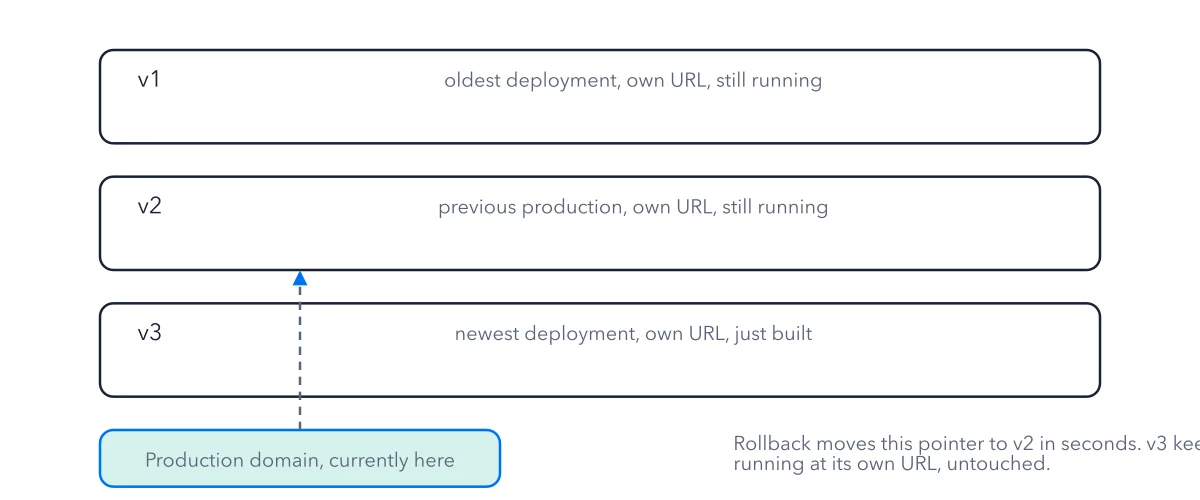
In an emergency: open the project's overview page, click Instant Rollback on the Production Deployment tile, then Confirm Rollback. The figure shows why that is safe: three deployments and the one pointer that moves between them.
How to read this figure
Read the three stacked deployments. Each box is one deployment: one finished version of the project, never edited after it is made. v1 is the oldest, v2 the previous production, v3 the newest. Each one runs at its own URL.
Find the production domain. The box at the bottom is the production domain, the name your visitors type. It is a pointer. It sits in exactly one deployment at a time, here v2.
Follow the dashed arrow. The dashed arrow starts at the production domain, runs up past v3 and ends on v2. It shows the rollback: the pointer moved from v3 back to v2 in seconds. Instant Rollback points production back at an older deployment without a rebuild, so no build runs.
Read the note on the right. v3 still runs at its own URL. A rollback deletes nothing and rebuilds nothing. Because each deployment is whole, the site can never end up half old and half new.
Key takeaways
- Undo a bad release by promoting the last good deployment, not by pushing a fix in a hurry.
- Undo the rollback once your fix is ready, or new pushes will not go live.
- Check how long your old deployments are kept before you count on rolling back to one.
Try this: roll back and roll forward on a test project
Use a project with at least two Ready production deployments.
- Open the project's overview page and find the Production Deployment tile. Click Instant Rollback. On Pro, click Choose another deployment if the one offered is not your target. Then Confirm Rollback.
- Load your production domain. It shows the older version within seconds, and no build ran.
- Open the newer deployment's own URL. It still loads, unchanged.
- Push a small change to the production branch. It does not go live while the rollback is in place.
- Click Undo Rollback so new pushes reach production again.
Expected result: You saw that production is a pointer: it moved, every deployment stayed whole, and pushes waited until you undid the rollback.
Questions readers ask
How can a rollback take only seconds?
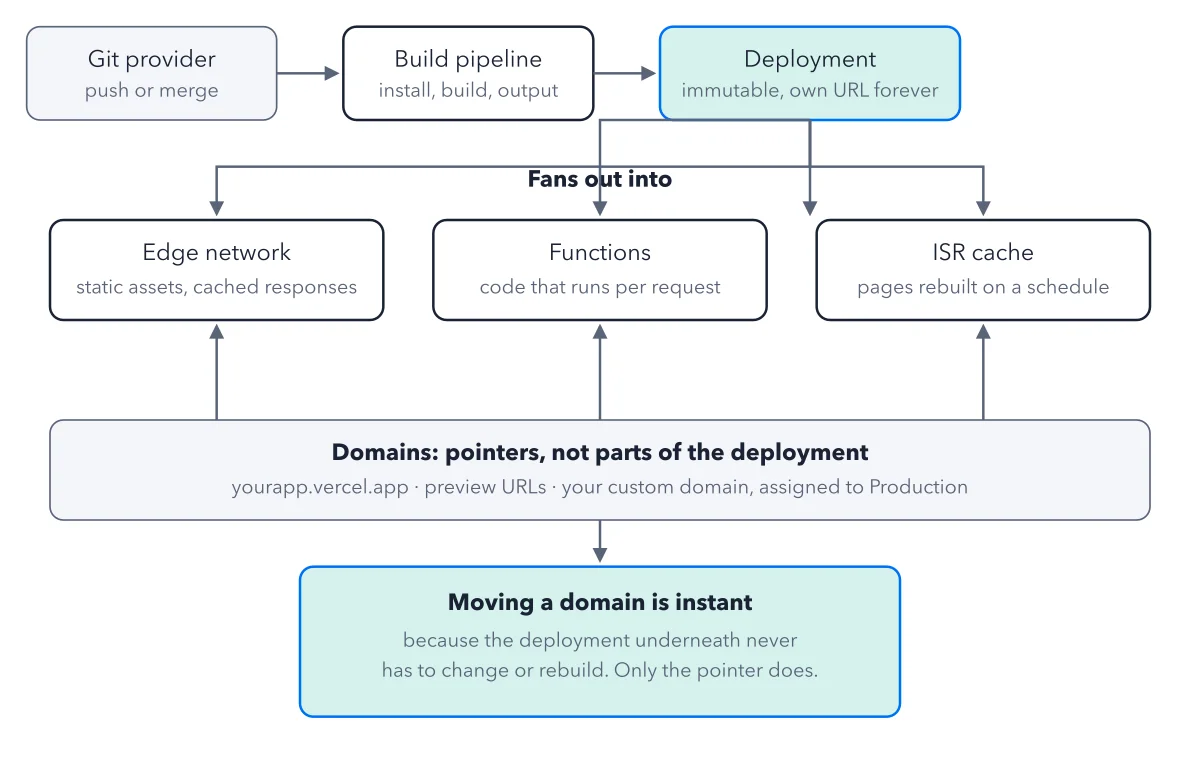
Because nothing is built. Vercel only changes which deployment the domain points at. The older deployment is already whole and ready, so the switch is a pointer move. For the full path from push to page, see how Vercel deployments work.
What goes back with a rollback?
The old deployment comes back whole, with the variable values baked into its build and its Cron Job schedule. Your current settings do not apply to it. New pushes stop going live until you click Undo Rollback, so the next merge cannot undo your recovery by accident.
Are old deployments always there to roll back to?
No. Vercel deletes old deployments after a keeping period, and a deleted one cannot be rolled back to. On a new Pro team, the default keeping period is 30 days. On the free Hobby plan, a rollback can only go to the previous production deployment. You set the period in the project's Settings, on the Security page, under Deployment Retention Policy. The deployment that holds your production domain is always kept.
Is my preview link permanent?
Only while that deployment exists. A preview deployment is one built from a branch or a pull request, with its own address for review. Once the keeping period deletes it, the link stops working.
Sources: Instant Rollback (Vercel docs); New Pro teams now default to 30 day deployment retention (Vercel changelog); Hobby projects now retain fewer deployments to free up storage (Vercel changelog).
This figure is from Vercel Made Crystal Clear, chapter 2.
The chapter builds the idea step by step, with recipes you can follow, a Try it to check yourself, and every source.
Get the book