How Vercel deployments work: one push, one fixed deployment
By Christophe Paka · Facts checked on 23 October 2026
"As a vibecoder, I expected weeks of headaches," one reader wrote after his first app went live. He pushed his code, and a minute later he had a web address that worked. The speed is real. But when something breaks, "it just works" gives you nothing to debug with.
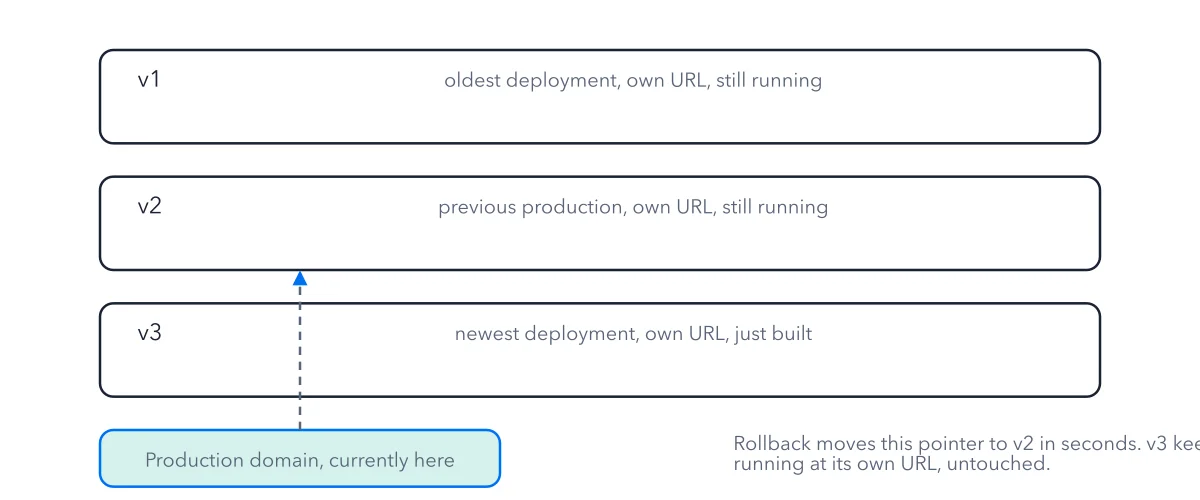
Then the first worry hits: I pushed a fix, did it overwrite the live site? Here is how Vercel deployments work, in plain words. Each push builds a new, fixed copy of your site next to the old ones. Your domain is only a pointer, and it moves to the new copy. Nothing live is overwritten. The figure traces one push, left to right, from your code to the page a visitor sees.
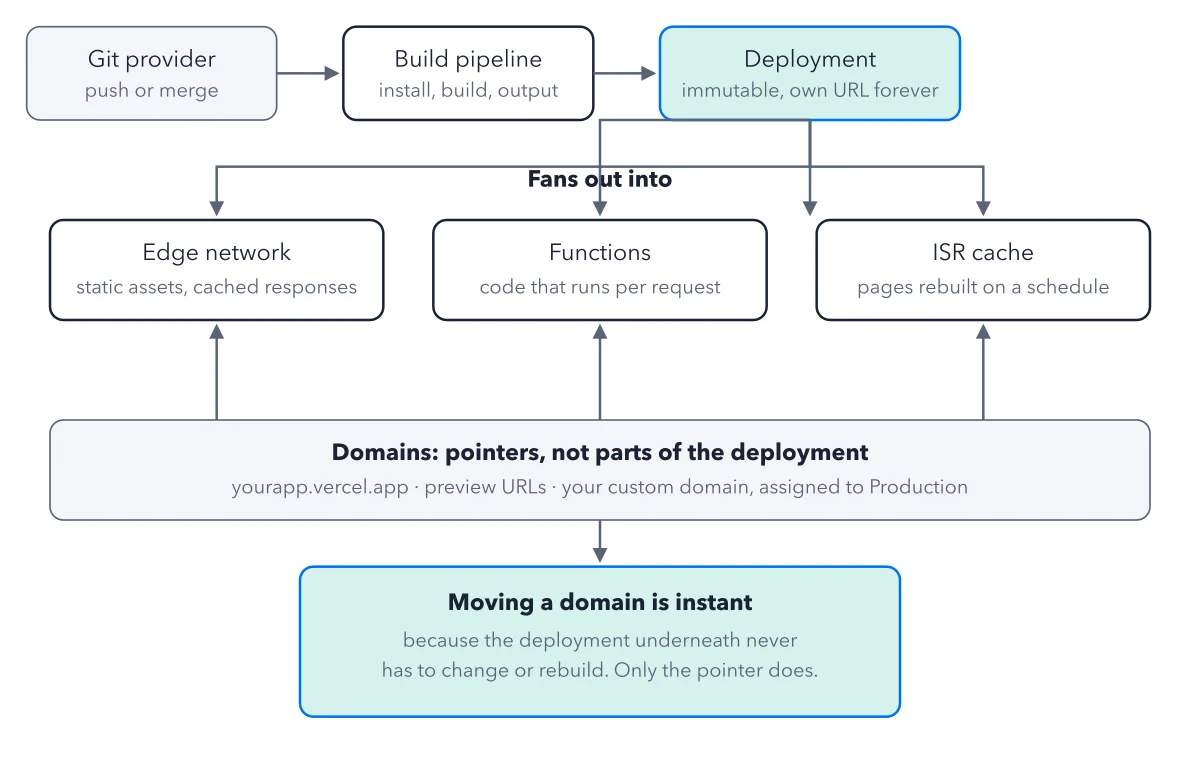
How to read this figure
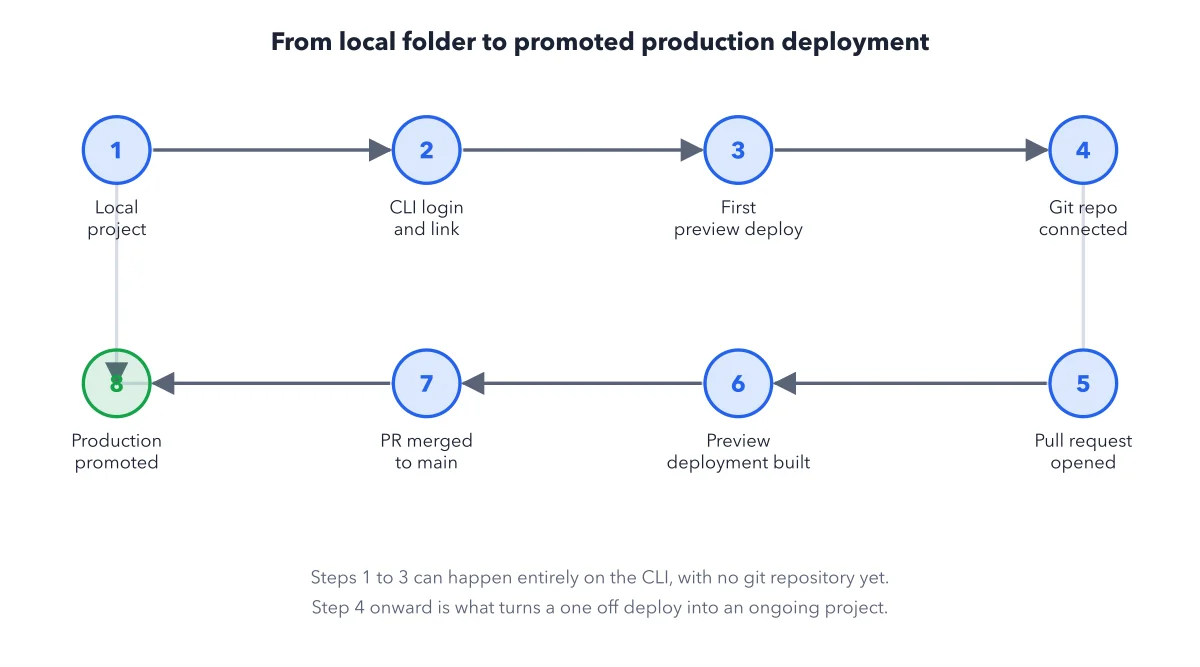
Start at the Git provider. Your code lives in a repository, a project folder tracked by Git, on a host such as GitHub. A push or a merge hands it to Vercel. Git is the usual way in. Other doors, such as dragging a folder onto a Vercel web page (Vercel Drop), end at the same place.
Follow the build pipeline. The build has three parts: install the outside code your app relies on, run the build command of your framework (Next.js, for example), then collect the finished files and upload them. Each build runs on its own fresh machine, wiped afterward, so one project cannot touch another. If the build fails, no deployment is made.
Stop at the deployment box. A deployment is one finished version of your project. It is fixed: never edited after it is made. It has its own URL for as long as Vercel keeps it. A new push makes a new deployment next to the old ones.
Read the three serving parts. Three arrows land on three boxes; one stray arrow stops in the gap, so follow the outer ones. The edge network is Vercel's servers around the world, which send files and saved pages from near the visitor. Functions run your code for each request. The ISR cache holds pages made once and remade on a timer. Only Functions run code, so they feed the bill most.
End at the domains band. The band holds the names visitors type: yourapp.vercel.app, preview URLs and your custom domain, assigned to Production. Domains are pointers, not parts of the deployment. That is why moving a domain is instant: only the pointer changes.
Key takeaways
- Treat every push as a new deployment; never expect it to patch the live one.
- Change a stored value, then redeploy: the live deployment keeps reading the old one.
- Name the stage first (build, routing, serving or bill) before you start debugging.
Worked example: two pushes, two deployments, one live site
You push a fix to the production branch of Crystal Notes, the book's sample blog. Follow it through the figure.
- The push starts a build. Install runs, for example
pnpm install, thennext build, then the output is uploaded. - The build succeeds and makes a new deployment with its own address. The old deployment is still there, at its own address.
- The production domain moves to the new deployment. Nothing was edited in place.
- You push twice in a row to the same branch. Vercel skips the older queued build and keeps the newest.
Result: Your live site changed by a pointer move, and every earlier deployment that Vercel still keeps is one click away.
Questions readers ask
Does pushing a fix overwrite the live site?
No. Each push starts a build, and a good build makes a new deployment with a new address, next to every deployment before it. The production domain then points at the new one. Nothing is edited in place, so the old version is still there to go back to. See how a rollback moves the pointer.
Where do I see my old versions?
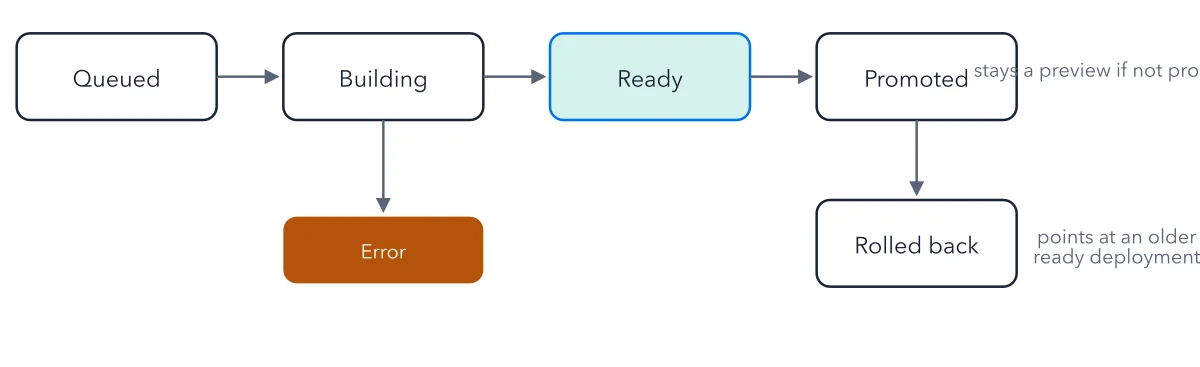
In the project's Deployments list in the dashboard. Every deployment Vercel still keeps sits there with its own address and its state, such as Ready or Error. Old ones are deleted after a keeping period, and a deleted one cannot be rolled back to. The deployment that holds your production domain is always kept. The rollback button sits on the Production Deployment tile.
I'm not a web developer: what does deploy mean here?
To deploy is to put a version of your site online. On Vercel, a deploy is one push from Git: Vercel builds your code into files it can serve and gives the result an address. A first timer should use Git as the way in. On the free Hobby plan, builds cost nothing within its limits; on the paid Pro plan, they bill as build minutes.
Why does my site still use the old API key after I changed it?
A deployment never changes after it is made. New stored values reach only new deployments, so the live one keeps the old value. Redeploy after you change an environment variable.
Sources: Deploying to Vercel (Vercel docs); Builds (Vercel docs); Deploying Git Repositories with Vercel (Vercel docs).
This figure is from Vercel Made Crystal Clear, chapter 2.
The chapter builds the idea step by step, with recipes you can follow, a Try it to check yourself, and every source.
Get the book