Vercel Active CPU billing: one request, old model and new meters
By Christophe Paka · Facts checked on 23 October 2026
"Can I tell if Fluid Compute will reduce or increase my costs before enabling it?" a reader asked. Another thread called the Active CPU price way too high. Both are trying to read a meter they cannot see.
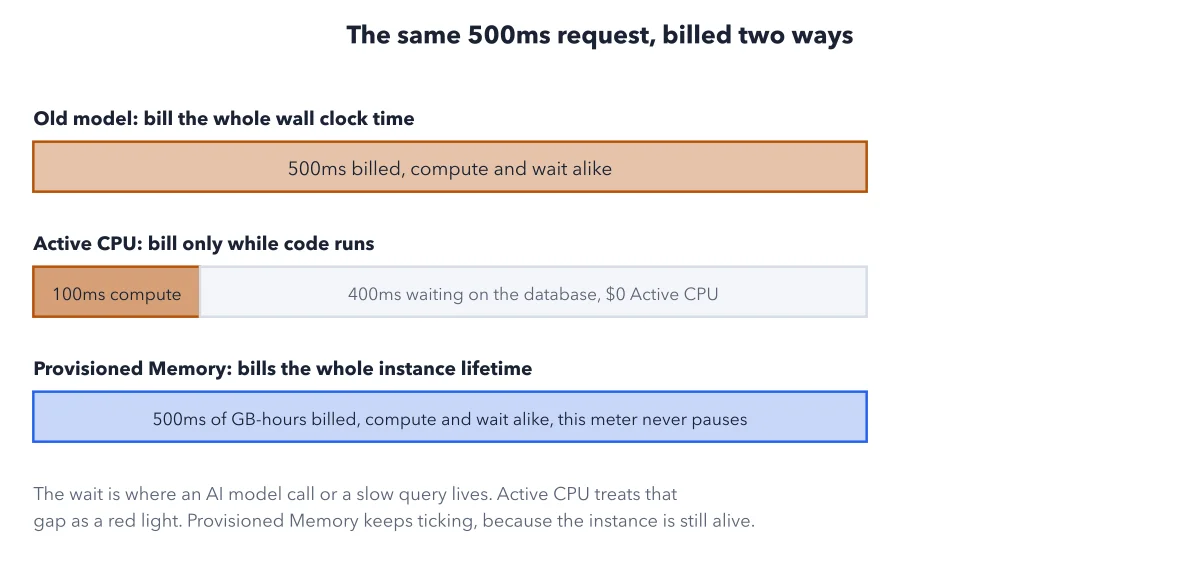
Guess wrong and an AI feature that mostly waits looks free, until the memory line grows. The short answer: Vercel Active CPU billing charges only while your code computes, so code that waits on a database or an AI model costs less CPU. The wait still bills memory. The figure takes one 500 ms request, 100 ms of computing and 400 ms of waiting, and bills it the old way, then the new way with its two meters.
How to read this figure
Top bar: the old model. The title says two ways: the old way, and the new way. The new way is two meters, so it takes two bars. The top bar is the old model. It billed the whole wall clock time: all 500 ms, compute and wait alike.
Middle bar: Active CPU. Active CPU is the time the processor spends working on your code. Here that is the dark 100 ms block. The pale 400 ms spent waiting on the database costs no Active CPU. It is billed per CPU hour.
Bottom bar: Provisioned Memory. Provisioned Memory is the memory your function holds, billed for as long as the function instance lives, waits included. All 500 ms count, in GB hours: the memory size times the time alive. This meter never pauses.
Read the note at the bottom. The note calls the wait a red light. Active CPU stops at it, like a taxi's fare meter. Provisioned Memory keeps ticking, like a parking meter, because the instance is still alive. An AI model call or a slow query is a long red light.
Key takeaways
- For an AI feature, watch Provisioned Memory: a long wait costs memory, not CPU.
- Compare a function's Active CPU hours with its Provisioned Memory GB hours on the usage page.
- Run functions near your users and your database, since the region changes the rate.
Worked example: a month of questions to an AI box
The plain result first: the wait is four fifths of each request, yet it adds no CPU hours. The book's sample blog answers 1,000,000 questions in one month, one at a time. Each is alive 500 ms, computes 100 ms, and uses 1 GB of memory.
- Active CPU counts only the computing: 100 ms a question, 27.8 hours in the month.
- Provisioned Memory counts the whole 500 ms alive, times 1 GB: 138.9 GB hours.
- Invocations count the calls: 1,000,000.
- In iad1 (Washington, D.C.), Active CPU costs $0.128 an hour, Provisioned Memory $0.0106 per GB hour, and invocations $0.60 per million: $3.56 + $1.47 + $0.60 = $5.63, inside the Pro usage credit.
Result: Most of each request is waiting, and waiting adds memory, not CPU. Code that never waits, such as a loop that resizes images, bills nearly its whole running time as Active CPU.
Questions readers ask
Will Fluid Compute reduce or increase my costs?
If your functions wait on a database or an AI model, it lowers the CPU line: Active CPU pauses during the wait, and one instance can serve other requests meanwhile. If they never wait, little changes. Fluid compute is the default for new projects; its switch sits on the project's Functions settings page. See how Fluid compute shares one instance.
Why does a slow LLM call still cost money if CPU is idle?
Because the function is still alive while it waits for the model. Active CPU pauses, but Provisioned Memory bills for the full time the instance lives. A long wait is cheap on CPU and not free on memory.
Does the region change what Active CPU costs?
Yes. Active CPU in gru1 (São Paulo) costs about 1.7 times as much as in iad1 (Washington, D.C.). Run functions near your users and your database.
Sources: Vercel Functions usage and pricing (Vercel docs); Vercel Pricing.
This figure is from Vercel Made Crystal Clear, chapter 4.
The chapter builds the idea step by step, with recipes you can follow, a Try it to check yourself, and every source.
Get the book