Docker Made Crystal Clear · chapter 4: Running Containers: the Everyday Ten Commands
The container lifecycle
2026-10-28
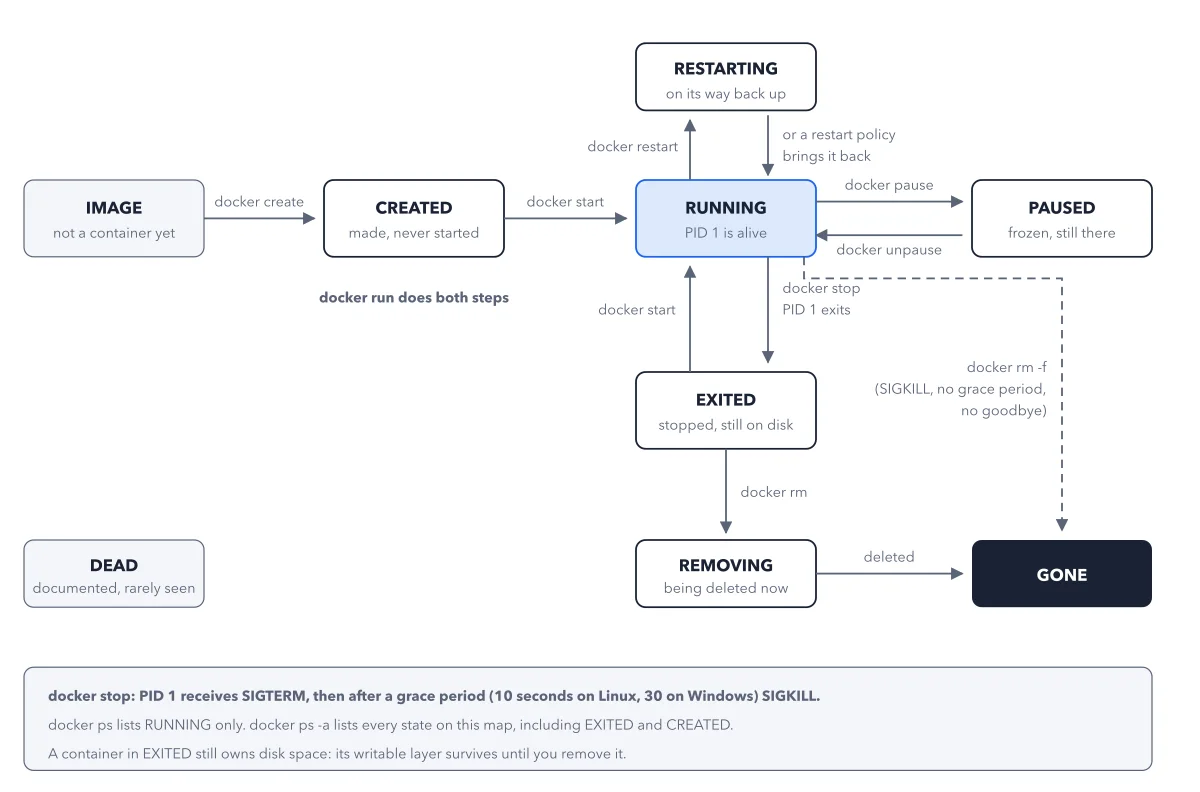
The seven states are the exact values Docker accepts for docker ps --filter status=. Note the two halves of docker run (create, then start), the round trip through PAUSED, and the dashed shortcut: docker rm -f skips the polite shutdown entirely and kills a running container with SIGKILL. DEAD sits off to the side because no everyday command takes you there deliberately.
Below: the paragraph from the book that builds this idea, then the diagram itself (Figure 4.1), and a recap. About a minute of reading.
That last point deserves its own line, because it causes more panic than any other default in Docker: docker ps shows running containers only. The flag is -a, --all: "Show all containers (default shows just running)". A container that exited two minutes ago has not been deleted, it is simply not on the default list. Figure 4.1 shows the whole territory, so you always know which part of it a given command is looking at.
Recap
- The idea: The seven states are the exact values Docker accepts for docker ps --filter status=.
- The picture: Figure 4.1, from chapter 4 ("Running Containers: the Everyday Ten Commands") of Docker Made Crystal Clear.
- Go deeper: the chapter builds this step by step, with recipes and sources at the end.
This diagram is one of many in Docker Made Crystal Clear.
Every chapter opens with the gist, draws the hard ideas, and ends with recipes and sources.
Get the book