What is Grok Bot, and how is it different from the tools beside it?
By Christophe Paka · Facts checked on 24 October 2026
One reader on r/GrokBot asked what "regular" people use it for. Another wrote that he had never found a need for an agent at all. Under both sits a simpler question: what is Grok Bot, and how is it not the Grok chatbot?
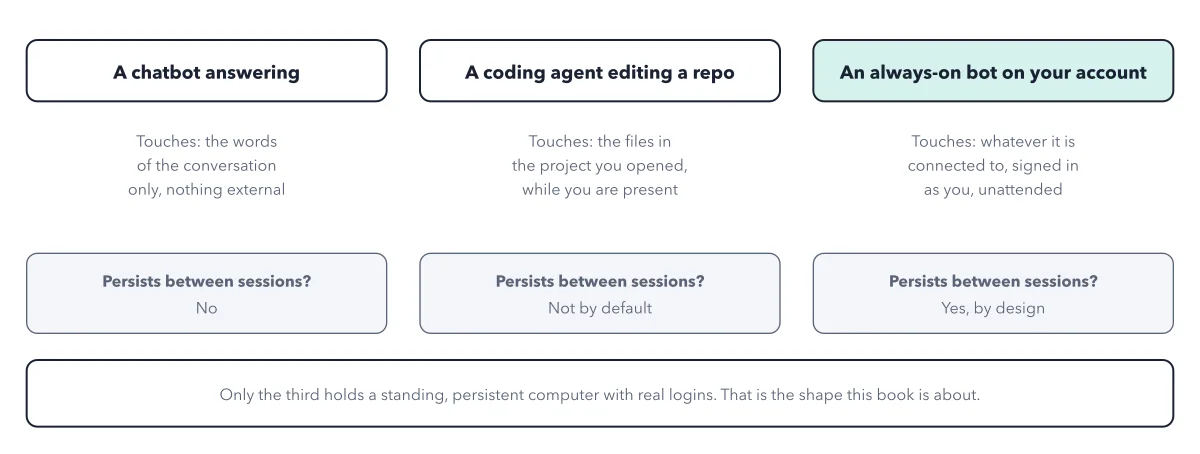
The name trips people up. It sounds like a chat plan, but a Bot is closer to new staff with a desk and your keys. Get the label wrong and you guess wrong about risk, because a Bot can act in your name while you sleep.
The figure sets Grok Bot beside three neighbors and asks two questions of each: what does it hold, and what can it reach?
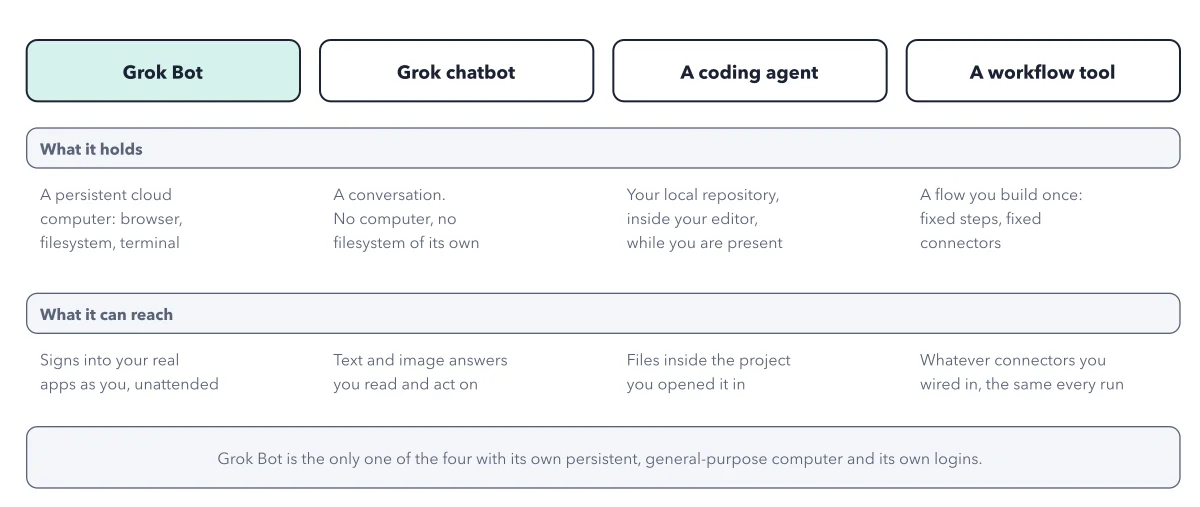
How to read this figure
Read the four column heads. Grok Bot sits on the left, shaded. Beside it stand the three tools people mix it up with. The Grok chatbot answers you in a chat. A coding agent, such as Codex or Claude Code, is a tool programmers use to write code. A workflow tool, such as n8n, chains your apps into fixed steps that run the same way every time.
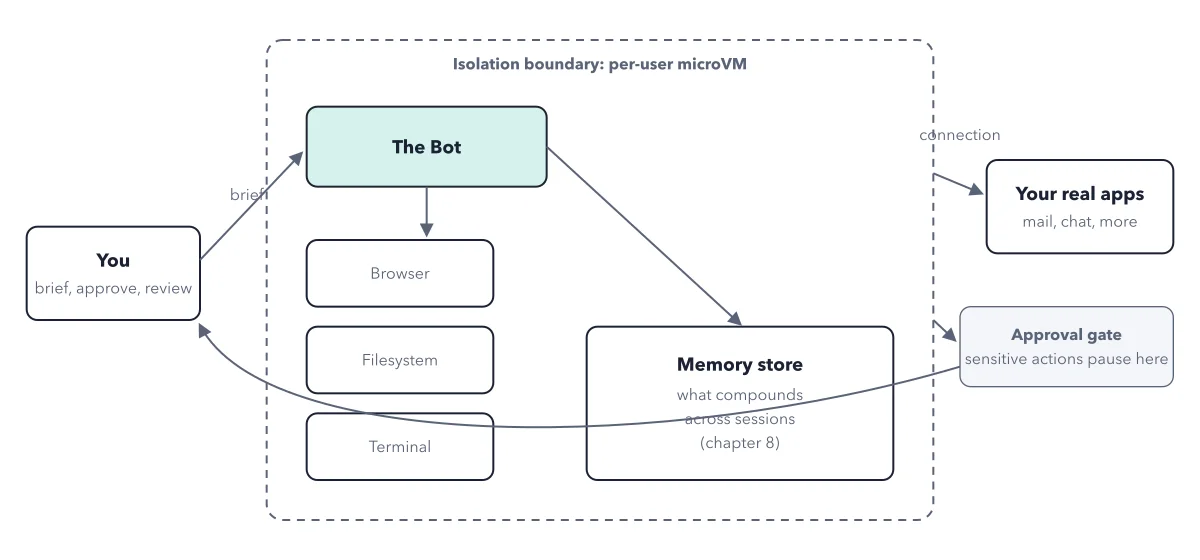
What Grok Bot holds. Grok Bot holds a persistent cloud computer: a computer you rent over the internet. It has a web browser, a place to keep files, and a terminal, where commands are typed as text instead of clicked. The Bot uses all three itself. Persistent means nothing resets between tasks. Files and sign ins wait for the next job.
What the neighbors hold. The chatbot holds only a conversation, with no computer or files of its own. A coding agent holds your local repository, which is simply the folder of code on your own machine, and only while you are there. A workflow tool holds a flow you build once, with fixed steps.
Read the reach row. This row is where the risk lives. Grok Bot signs into your real apps as you, with nobody watching. The site sees you, not a robot, so its acts count as yours. The chatbot gives answers you read and act on. A coding agent reaches files in the project you opened. A workflow tool reaches the same wired connectors every run.
Read the footer last. Grok Bot is the only one of the four with its own general purpose computer and its own logins. That is the whole difference: not a smarter model, but a machine and your keys. Why that computer persists is the next thing to learn.
Key takeaways
- Describe Grok Bot in one line before you buy: Bots with their own cloud computer that sign into your apps and work while you are away.
- When you compare it with Codex, Claude Code or n8n, ask who holds the machine and who holds the logins.
- Treat a new Bot like new staff, not a search box: one job, few logins, and no sending at first.
Try this: sort your own jobs into the four columns
Take three jobs you want help with. Ask the figure's two questions of each one.
- Write each job in one line, such as "file this week's receipts in a sheet" or "answer a question about my budget".
- Ask what the job needs to hold. If it needs files or a login that stay between days, only Grok Bot fits.
- Ask what it needs to reach. If it must sign into a real app with nobody watching, only Grok Bot fits.
- If it only needs an answer you act on yourself, the Grok chatbot is simpler and holds none of your logins.
- If it is code in a project you have open, a coding agent fits. If it is the same fixed steps every time, a workflow tool fits.
Expected result: Each job lands in one column. Only the jobs in the Grok Bot column need a Bot, and those are the jobs that need care with logins.
Questions readers ask
Is Grok Bot the same as the Grok chatbot?
No. Grok is the family of AI models and the name of the chat app. The chatbot answers in a conversation and has no computer or logins of its own. If you type in the Grok app or tag @grok on X, that is the chatbot. Grok Bot is a separate app.
What do you use GrokBot for that Codex or Claude can't do?
One reader's answer: it logs into web software on a virtual machine of its own, so he can keep using his own computer. A coding agent works beside you in your files. A Bot works on its own machine, in your accounts, without you.
What are regular people using Grok Bot for?
Household readers on r/GrokBot describe small jobs: reminders to change the water filters, one view of a dozen family calendars, a job search digest three times a week. The official use cases page lists work roles, such as an Expense Manager Bot that does weekly expense reconciliation.
How do I get Grok Bot, and what does it cost?
It comes with The X Subscription from Premium up. Premium, the cheapest plan that includes it, costs $30 a month. Free and Plus do not include it. Some older SuperGrok and Cursor plans reach it too, and a 7 day free trial lets you test one small job first. You sign in with a Cursor account.
Sources: Introducing Grok Bot (x.ai); Grok Bot: overview (docs.x.ai); Grok Bot: Get Started (docs.x.ai).
This figure is from Grok Bot Made Crystal Clear, chapter 1.
The chapter builds the idea step by step, with recipes you can follow, a Try it to check yourself, and every source.
Get the book