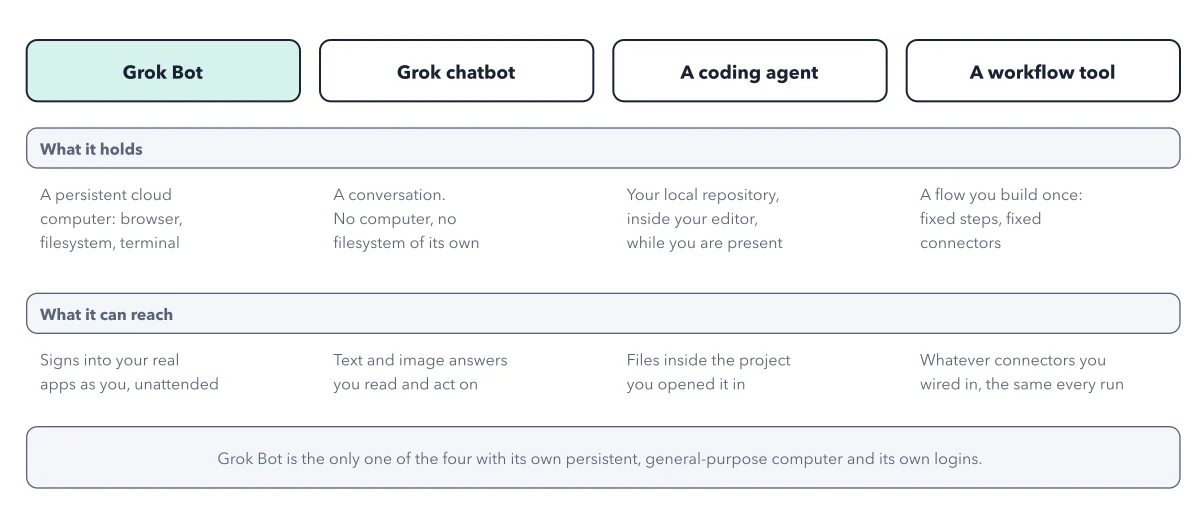
Grok Bot vs Codex and a chatbot: what each one keeps
By Christophe Paka · Facts checked on 24 October 2026
Codex and Claude Code users on r/GrokBot ask: "What do you use GrokBot for that Codex / Claude can't do?" Another reader asked if a Bot quits when he goes offline. Both want to know where Grok Bot vs Codex really differ.
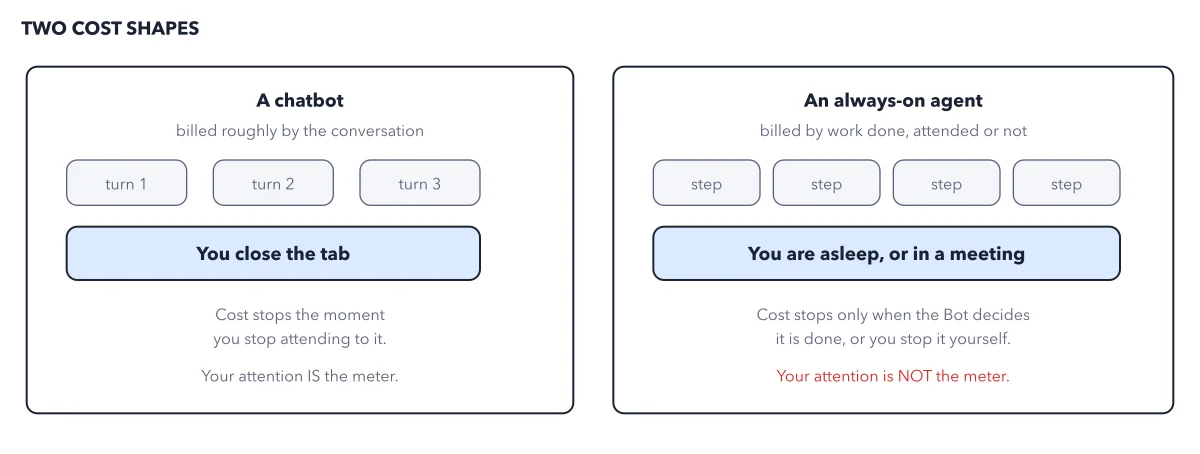
Most comparisons argue about which model is smarter. That misses the part that changes your risk: a Bot keeps a signed in session open for days while nobody watches.
The figure compares three shapes of AI help on what each touches and what each keeps.
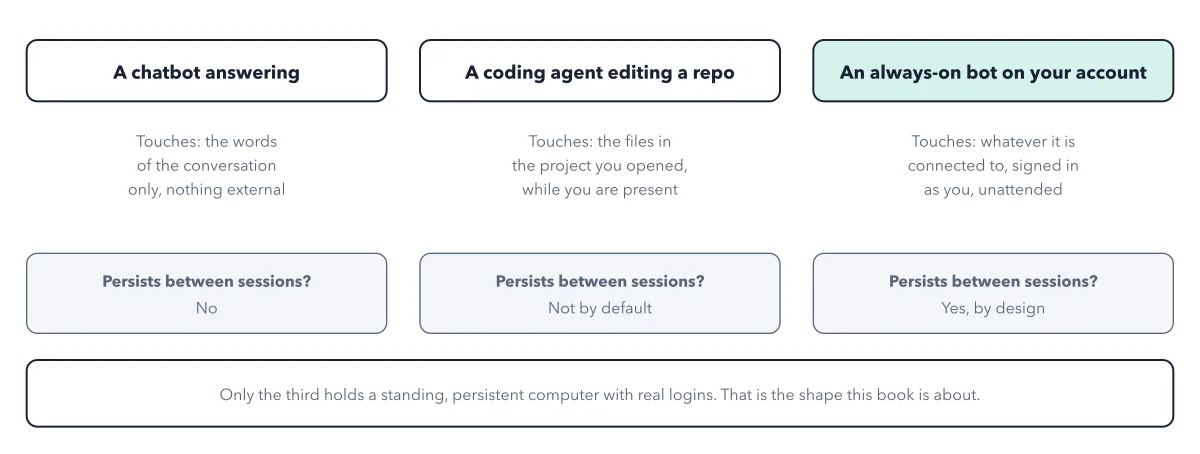
How to read this figure
Read the three column heads. A chatbot answering, a coding agent editing a repo, and an always on bot on your account. A coding agent is a tool programmers use to write code; Codex and Claude Code are two of them. A repo is the folder that holds one project's code. If you do not write code, skip the middle column. Grok Bot is the third column.
Compare what each touches. The chatbot touches only the words of the conversation. The coding agent touches the files in the project you opened, while you are there. The always on bot touches whatever it is connected to, signed in as you, with nobody watching.
Compare what each keeps. The middle row asks: does it persist between sessions? The chatbot does not. The coding agent does not by default. The bot does, by design. A file it saved on Tuesday is still there on Friday, and a site it signed into stays signed in.
Read the footer. Only the third holds a standing computer with real logins. The gap is not how clever the model is. It is what stays open after you leave. The whole product on one page shows that computer from the inside.
Key takeaways
- Pick by the job, not the model: Grok Bot for work that repeats or runs while you sleep.
- Use a coding agent for code in a project you have open, and the Grok chatbot for answers you act on yourself.
- Ask a Bot which sites its browser is signed into, then have it sign out of the ones no job needs.
Worked example: one receipts job in each column
Take one weekly job: file last week's receipts in a sheet. Run it through each column of the figure.
- The chatbot: you paste the receipts in and get a table back. Next Monday you paste them again, because it kept nothing.
- The coding agent: it edits files in a project you opened, while you are there. It is built for code, not for your inbox.
- Ledger, the Bot: it reads the inbox and files the receipts in the sheet. You close your laptop and the work goes on.
- Next Monday, Ledger finds last week's spreadsheet where it left it, so the second Monday needs less explaining than the first.
Result: Only the Bot gets easier each week, and only the Bot holds a signed in session while nobody watches. Both come from one fact: it persists.
Questions readers ask
What do you use GrokBot for that Codex or Claude can't do?
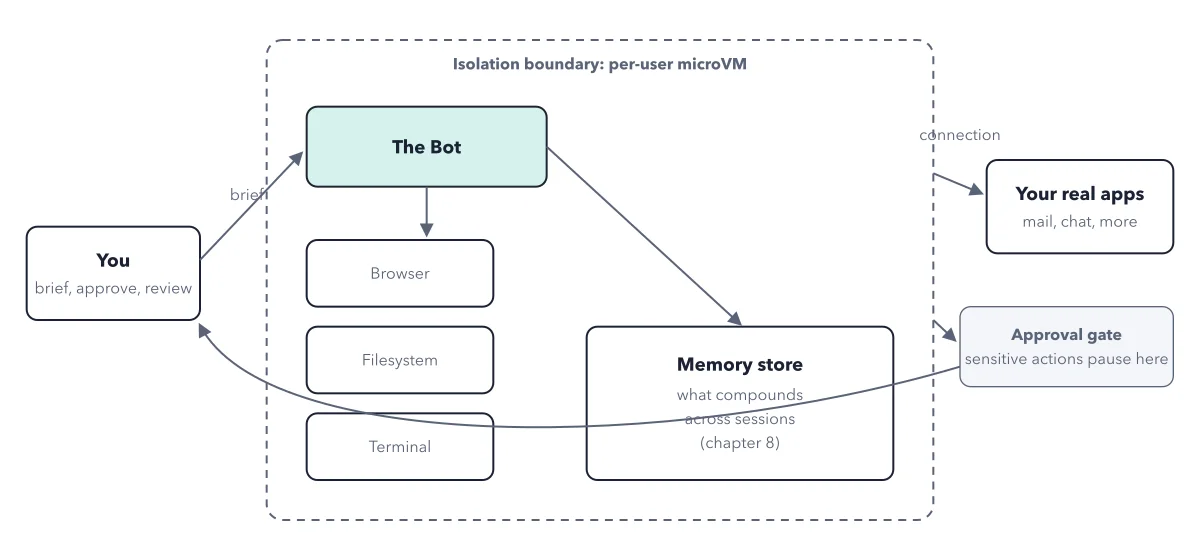
One reader's reply: it logs into web software on a virtual machine of its own, "so I can keep doing what I need on my computer". A coding agent works beside you in your files. A Bot works on its own machine, in your accounts, without you.
Does Grok Bot keep working when I close the app?
Yes. Closing the app or your laptop leaves the cloud work running. The computer lives in a data center, a building full of servers, not on your desk. Nothing resets when a piece of work ends.
Which one should I use if I am not a programmer?
Pick by the job. If you only want answers to questions, the Grok chatbot is simpler and holds none of your logins. If the job repeats, or runs while you sleep, such as filing receipts every Monday, that is Grok Bot's column. A coding agent is for code.
How do I close the sessions a Bot left open?
Ask any Bot which sites its browser is signed into. All your Bots share one computer, so one answer covers them all. Then ask it to sign out of the sites no job needs, and watch it do so on its screen. Deleting a Bot does not sign it out of anything.
Sources: Grok Bot: Apps and the cloud computer (docs.x.ai); Grok Bot: overview (docs.x.ai); Grok Bot: Bots (docs.x.ai).
This figure is from Grok Bot Made Crystal Clear, chapter 2.
The chapter builds the idea step by step, with recipes you can follow, a Try it to check yourself, and every source.
Get the book