How Grok Bot works, drawn on one page
By Christophe Paka · Facts checked on 24 October 2026
Two readers on r/GrokBot drew two pictures. One wrote that all the bots share your credentials, because they share the same computer: "nothing is siloed". Another praised "the persistent VM per bot", as if each Bot had its own. Both cannot be right.
The wrong picture is costly. Believe each Bot is sealed off, and you hand your mail to one Bot and think the others cannot reach it. They can.
The figure shows how Grok Bot works: you, the Bot, its computer, its memory, its connections and the gate.
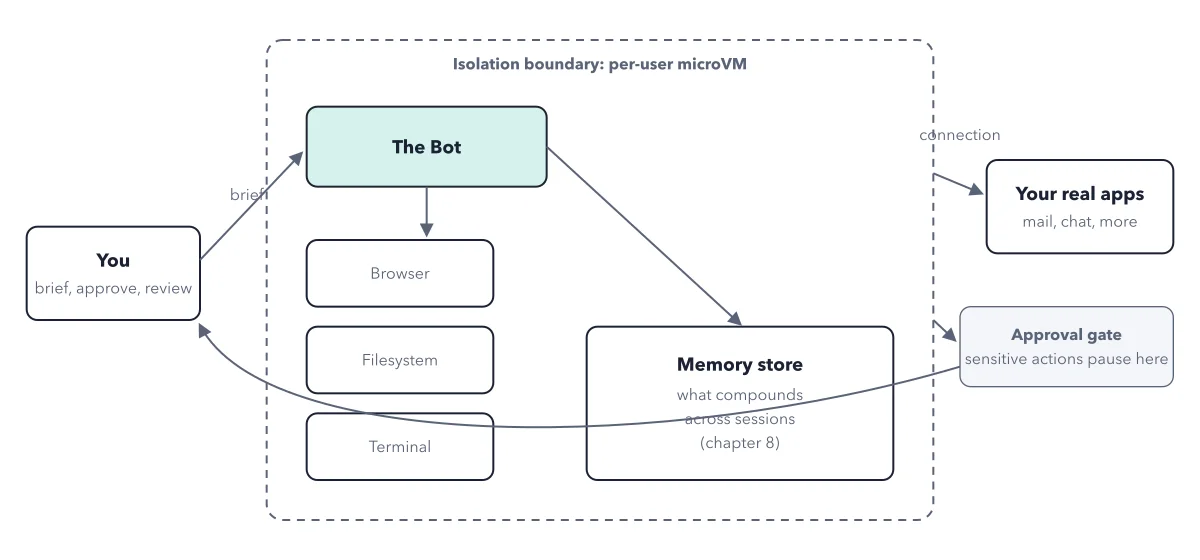
How to read this figure
Start with you, on the left. You do three things: brief, approve, review. The brief is the job in words. Later you approve the actions that need you and check the work. You stand outside the dashed line, because you are not on the Bot's computer.
Cross the dashed line. The dashed line is a microVM: a small sealed computer made in software, one per user. Its wall keeps other users out. It does not keep your own Bots apart. Every Bot on your account uses this same computer.
Look at the three tools. Inside, the Bot works with a browser for websites, a filesystem for files and folders, and a terminal for typed commands. They keep their state between tasks, so a site the Bot signed into stays signed in.
Find the memory store. The Bot writes what it learns about you to a memory store. The figure draws one Bot, but each Bot keeps a store of its own. So memory is personal, while files and sign ins are shared.
Follow the two arrows out. One arrow is a connection to your real apps, such as mail and chat. There the Bot acts as you, and the site sees you, not a robot. The other arrow goes to the approval gate, where sensitive actions pause until you say yes. A gate exists only where your rules set one.
Key takeaways
- Treat any login you give one Bot as given to all your Bots.
- Connect only accounts you would sign for, because a site logs the Bot's actions under your name.
- Add an Ask first rule on sending before you connect mail, and assume a new Bot has no rule.
Worked example: three Bots on one computer
The book follows a small back office team: Scout researches, Ledger files receipts, Desk sorts the studio inbox. All three live on one computer.
- You tell Ledger "receipts go in the Receipts folder". Ledger remembers it. Scout does not, because each Bot keeps its own memory.
- Ledger saves a receipt in that folder. Scout can open it, because the files are shared.
- You sign Desk into the studio inbox. That signed in session now sits on the shared computer, open to every Bot.
- Desk sends a reply. The customer sees it from the studio, not from a robot.
Result: Memory stays with one Bot. Files and sign ins belong to the whole account. To keep Bots fully apart, you need separate member accounts, each a paid seat with a computer of its own.
Questions readers ask
If I give one bot my email, do all of them have it?
Yes. Browser sessions, files and the logins saved for the terminal are shared by every Bot on your account. Each Bot keeps its own role, chat and memory. So you cannot give your mail to one Bot only. Bots kept fully apart need separate member accounts.
Does each Grok Bot get its own VM?
No. The docs say every Bot on your account uses the same computer. The wall that does exist is between users. Each user has a separate microVM, and one user cannot reach another user's computer.
Will a Bot ask before anything that matters?
Only where a pause is set. Gates come from Auto Review rules that you write. The docs name no default rule. So until you add an Ask first rule, treat every outbound action as one a new Bot may take alone.
Sources: Grok Bot: Apps and the cloud computer (docs.x.ai); Grok Bot: approvals, security, and privacy (docs.x.ai); Grok Bot: Teams and enterprises (docs.x.ai).
This figure is from Grok Bot Made Crystal Clear, chapter 2.
The chapter builds the idea step by step, with recipes you can follow, a Try it to check yourself, and every source.
Get the book