Grok Bot overnight usage: the meter that runs while you sleep
By Christophe Paka · Facts checked on 24 October 2026
A reader's friend told a Bot to "keep making revisions until I say stop", then left it overnight. Nobody said stop. Readers say loops like that, left alone, are where Grok Bot overnight usage costs the most.
The habit comes from chatbots: close the tab and the cost ends. A Bot is more like a taxi left running outside all night. The meter counts whether or not anyone sits in the seat.
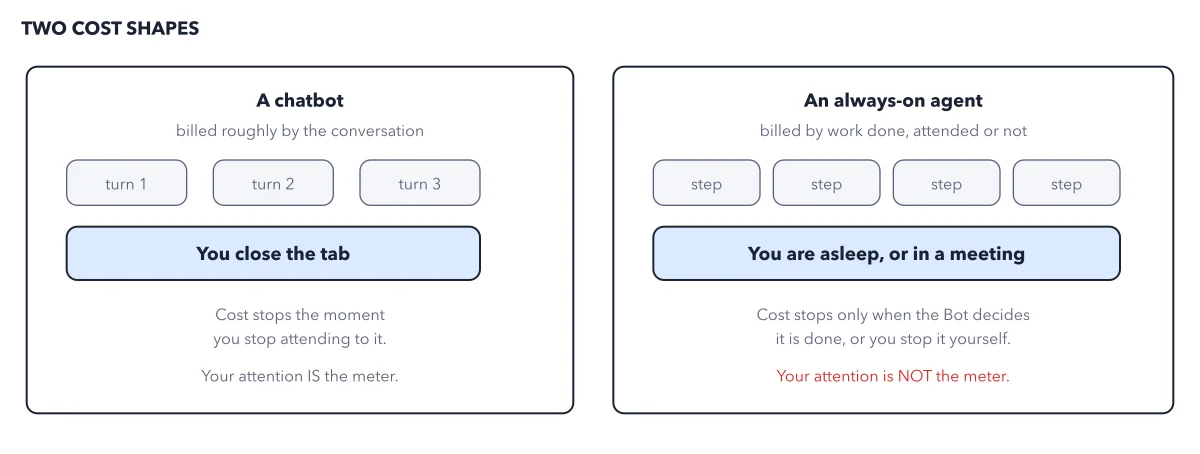
The figure puts the two cost shapes side by side.
How to read this figure
Start with the chatbot. On the left, a chatbot is billed roughly by the conversation: turn 1, turn 2, turn 3. Each turn is you typing and it answering. Nothing happens between your turns.
See where the chatbot stops. You close the tab, and the cost stops the moment you stop paying attention. Your attention is the meter. That is the habit most people bring to Grok Bot.
Move to the agent. On the right, an always on agent is billed by work done, whether you watch or not. Its boxes are steps, not turns, and no step waits for you to type.
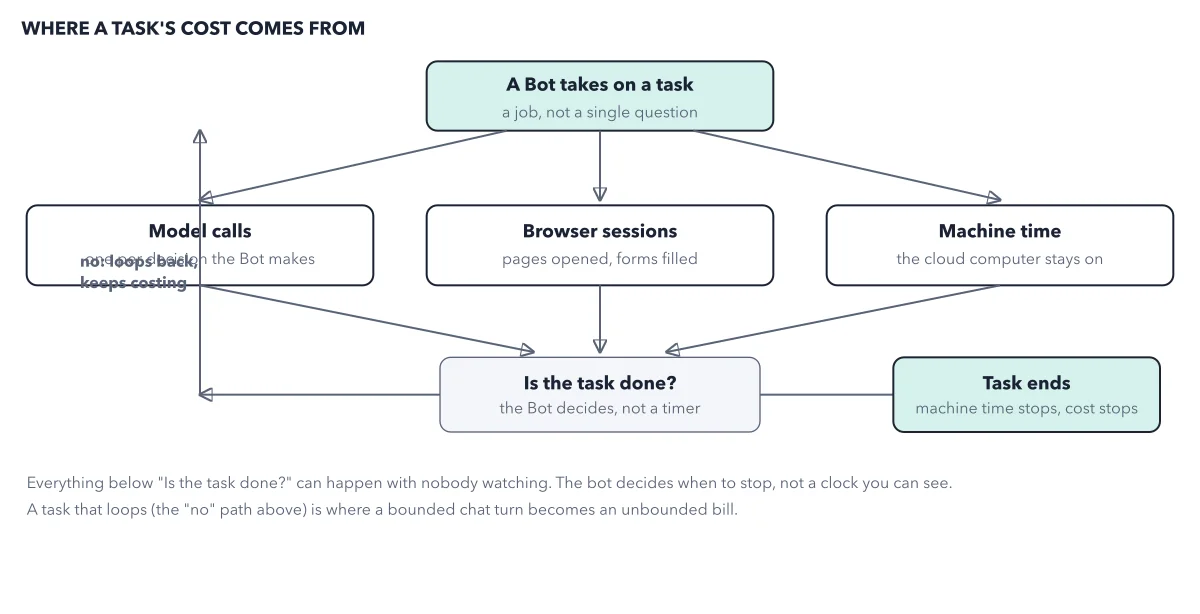
See where the agent stops. You are asleep, or in a meeting, and the steps go on. Cost stops only when the Bot decides it is done, or when you stop it. Your attention is not the meter. The loop behind each task shows why it may not stop.
Key takeaways
- Before you leave a Bot alone, give the job a stopping point it can check.
- Set a monthly ceiling, and know that a limit does not stop a run midway.
- Read the meter the next morning after any job that ran overnight.
Worked example: what happens when the pool runs out mid week
Ledger runs a long job on a legacy Cursor Pro plan. The weekly allowance runs out on Thursday.
- With on demand usage off, Ledger waits for the weekly reset.
- With on demand usage on, Ledger keeps working, and the extra use lands on your next Cursor bill.
- A monthly ceiling caps that extra spend, but a run that has already started can finish above it.
- Neither kind of extra spend comes back: spent prepaid credit and used on demand usage are not refundable.
Result: A Bot keeps going as long as something pays. Your brakes are a stopping point in the brief, a ceiling set below what you can afford, and Stop now when the meter drops fast.
Questions readers ask
Do Grok Bot jobs keep running when I close the app?
Yes. Closing the app or your laptop leaves the work running on the Bot's cloud computer. Jobs that run on a timetable draw on the pool each time they run, even when they find nothing.
Does a spending limit stop a Grok Bot run?
No. The plans page says "A limit is not a hard stop in the middle of a run." A long job started just under your limit can finish above it. So set the ceiling below what you can afford, and give long jobs a stopping point.
Can a team overspend without anyone switching anything on?
Yes, on legacy self serve Cursor Teams. There, on demand usage is on by default. Set the Monthly Limit under Spending on the web before any Bot works alone.
Sources: Grok Bot plans, usage, and billing (Cursor help); Cursor pricing (cursor.com).
This figure is from Grok Bot Made Crystal Clear, chapter 4.
The chapter builds the idea step by step, with recipes you can follow, a Try it to check yourself, and every source.
Get the book