Grok Bot instructions that work: the four parts of a brief
By Christophe Paka · Facts checked on 24 October 2026
One reader told a Bot it could write drafts but never send. Then came the worry: "mistakes happen and instructions get broken at times". Another asked a Bot to buy one thing, and it "bought some else too".
Weak Grok Bot instructions leave gaps, and the Bot fills each gap with its own guess. A guess about what to buy or whom to email can cost money.
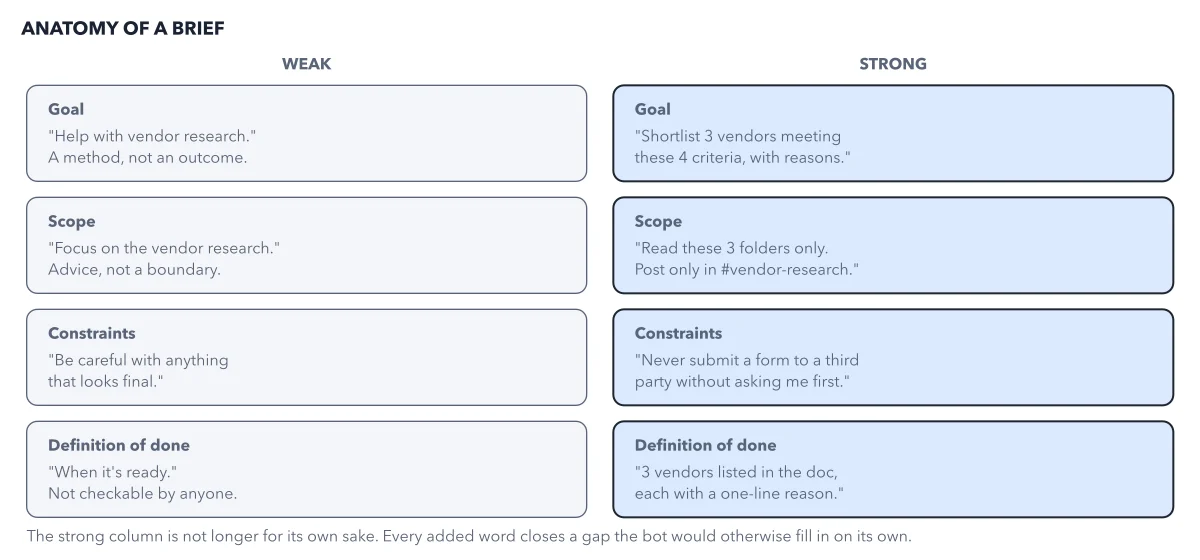
The figure shows the four parts of a brief, each written weak and strong.
How to read this figure
Read the goal row. Weak: help with vendor research. That is a method, not an outcome. Strong: shortlist 3 vendors meeting these 4 criteria, with reasons. One sentence, one outcome the Bot can aim at.
Read the scope row. Weak: focus on the vendor research. That is advice, not a boundary. Strong: read these 3 folders only, and post only in
#vendor-research. Name what it may touch, and everything you did not name sits outside.Read the constraints row. Weak: be careful with anything that looks final. Strong: never submit a form to a third party without asking me first. A constraint is a prohibition. It tells the Bot where to stop and ask.
Read the done row. Weak: when it's ready. Nobody can check that. Strong: 3 vendors listed in the doc, each with a short reason. Done is a state you and the Bot can both check before it reports.
Compare the two columns. The strong column is not longer for its own sake. Each added word closes a gap the Bot would fill on its own. Even so, every word is a request. Scope drawn as a boundary shows why.
Key takeaways
- Write every brief in four parts, and keep your own copy outside the app.
- Forbid the three actions you cannot take back: sending, paying and deleting.
- For each worst outcome, ask what still stops it if the Bot ignores your words, and add a lock.
Worked example: Ledger's brief, written in four parts
Ledger is the receipts clerk for a small studio. Here is its brief, part by part.
- Goal: every Monday, list last week's receipts from the studio inbox in the Receipts sheet, one row each.
- Scope: the studio inbox, read only; a receipts folder on Ledger's own computer for copies; the Receipts sheet, add rows but never remove them.
- Constraints: never send an email or a message; never pay, buy or sign up for anything; never delete an email, a file or a sheet row.
- Done when: each receipt has one row with date, vendor, amount, currency and file name, and Ledger posts a summary of rows added and receipts it could not read.
- When stuck: stop and ask me. Do not guess.
Result: A brief you can check line by line. Back the "never send" line with a lock or an Ask first rule, because words alone can fail.
Questions readers ask
Where do Grok Bot instructions go?
In two places. The lasting rules go in the Bot description, the text on the Bot's profile, which you write when you create the Bot. The details of one task go in the chat. Keep a copy of the brief in a document of your own as well.
Why can't I see my Bot's instructions on desktop?
Readers found they could not see each Bot's instructions in the desktop app. A Cursor staff member called the simpler details pane an intentional redesign. So keep your brief in your own document. If the app view changes again, your copy does not.
Are my Grok Bot rules enforced, or just instructions?
Anything in the brief is a request the Bot usually follows, and a Safety Bot is a request watching requests. A lock is what the Bot cannot get past: an account never connected, a draft that waits for your Send, an admin switch. Ask first rules sit between: they usually hold.
Sources: Grok Bot: approvals, security, and privacy (docs.x.ai); Grok Bot: Bots (docs.x.ai).
This figure is from Grok Bot Made Crystal Clear, chapter 5.
The chapter builds the idea step by step, with recipes you can follow, a Try it to check yourself, and every source.
Get the book