How Make scenarios work: every mark on the canvas, in one picture
By Christophe Paka · Facts checked on 23 October 2026
You open a scenario someone else built. Circles, a clock, a funnel, a dotted line, two branches. You cannot tell what runs when, or what it will cost. A reader on r/Integromat asked if anyone else was "getting killed" by Make's costs, and many of those bills start with a drawing nobody read.
This is how Make scenarios work, in one picture. Make draws every scenario the same way: circles for the work, lines for the data, and a few marks that each mean one thing. Learn them once and you can read any scenario in a minute.
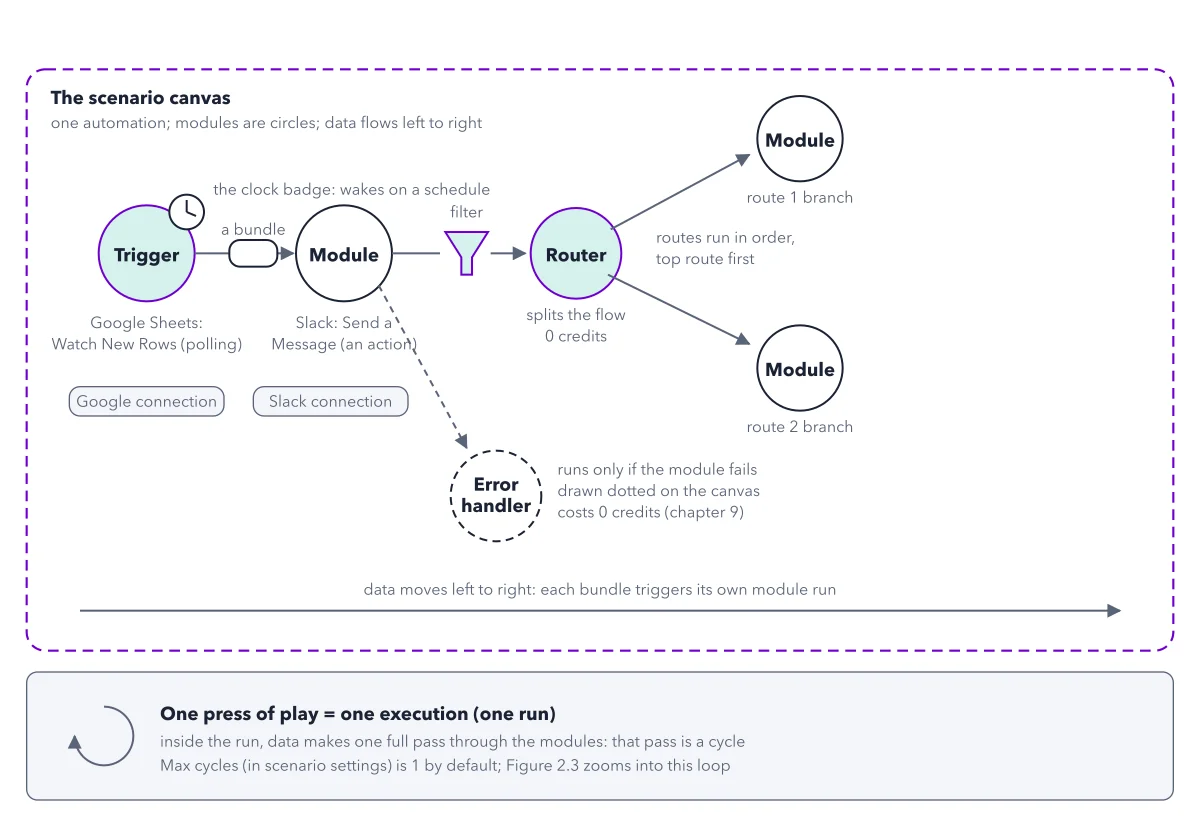
How to read this figure
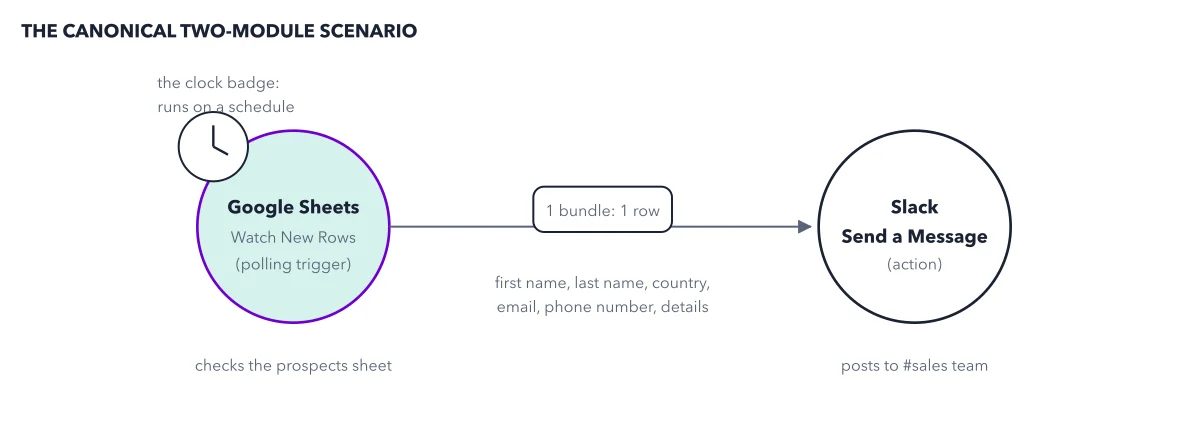
Start at the trigger and its clock. The trigger is always the first module, and a module is one circle: one step that does one thing. The trigger decides when a scenario starts and brings in the first data. Here it is Google Sheets Watch New Rows. The clock badge marks a polling trigger: it asks the app at set times whether anything is new.
Follow the bundle on the line. A bundle is one parcel of data, such as one row of a sheet. It rides the line to the next module, Slack Send a Message. That module is an action: it does something in an app. Each bundle makes it run once.
Read the badges under the circles. The pill under each module is its connection: your saved login to that app. Sign in to Google once, and every Google Sheets module in your account can reuse it. The connection belongs to whoever signed in.
Check the dotted line. The dotted line leads to an error handler. It runs only when the module before it fails, here the Slack module. A credit is what you pay Make with: most module runs cost 1. The handler costs 0 credits, so a scenario that can recover from a failure costs nothing extra to draw.
Pass the funnel, then the Router. The funnel sits on the line before the Router. It is a filter: a bundle that matches its rule goes on, any other bundle stops there. The Router splits the flow into two routes, run in order, top route first. The drawing puts no funnel on the routes, but in your scenario each route can carry its own filter. A bundle then goes down every route whose filter it passes. The Router costs 0 credits.
Finish on the band at the bottom. One press of play is one execution, also called a run. Inside the run, every bundle makes one full pass through the modules. The last line says every run is one pass: Make removed an old setting called Cycles per run. If an old tutorial tells you to raise Max cycles, skip that step.
Key takeaways
- Name the parts of any scenario you open: trigger, modules, bundles, connections, filters, Routers and handlers.
- Trace one bundle left to right and say what happens to it at every filter and Router.
- Add Routers and error handlers wherever the process needs them; both cost zero credits.
Try this: the 60 second scenario read
Use this drill on the figure now, then on every scenario you meet, even a stranger's 40 module one.
- Find the trigger: the first circle. Note whether it wears the clock badge.
- Count the modules a bundle passes on each path.
- Trace one bundle left to right through every filter and Router, and say what happens to it.
- Spot the free parts: Routers, error handlers, and the modules a filter keeps a bundle from.
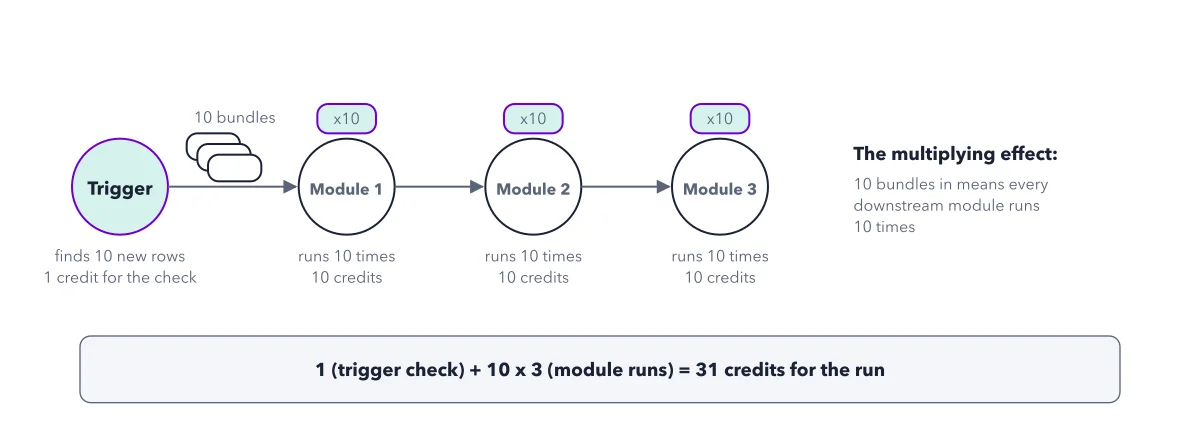
- Estimate one run: 1 credit for the trigger check, plus bundles times modules. Say the number before you press play.
Expected result: On the figure, the trigger wears the clock, so it checks on a schedule. The Router and the handler cost nothing. You can now price a run before it starts, and the multiplying effect works that sum with real numbers.
Questions readers ask
Why does Make's help center say operations when I pay in credits?
An operation is one module handling one bundle: the thing Make counts. A credit is what you pay. When credits replaced operations as the billing unit, the switch was one for one, so most operations cost one credit. Make kept the old word for the count.
Does a Make Router send a bundle down only one route?
No. Make offers the bundle to each route in turn, top route first, and it goes down every route whose filter it passes, not only the first. If you need exactly one path, use If-else: it sends the bundle down the first branch whose condition is true, and only that one.
What is the difference between a run and an operation in Make?
A run, which Make's screens call an execution, is one whole pass of the scenario. An operation is one module handling one bundle inside that run. One run that brings 3 new rows to a Slack module is 1 run and 3 operations on Slack.
Sources: How usage is counted; Make Help: Credits; Create your first scenario.
This figure is from Make.com Made Crystal Clear, chapter 2.
The chapter builds the idea step by step, with recipes you can follow, a Try it to check yourself, and every source.
Get the book