Make Google Sheets to Slack: a new row becomes a sales alert
By Christophe Paka · Facts checked on 23 October 2026
A new lead lands in the prospects sheet. Someone has to notice it, read the row and tell sales in Slack. On a busy day nobody does, and the lead waits until the next morning.
Speed to a new lead is one of the oldest levers in small business sales. The Make Google Sheets to Slack scenario closes that gap with two modules, in about 30 minutes. It is Make's own first tutorial, and the figure below shows the whole build.
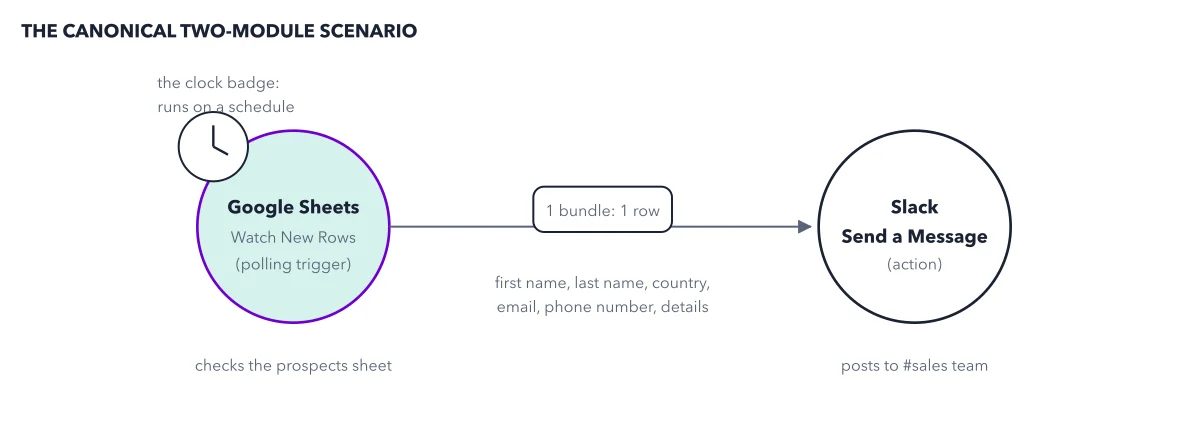
How to read this figure
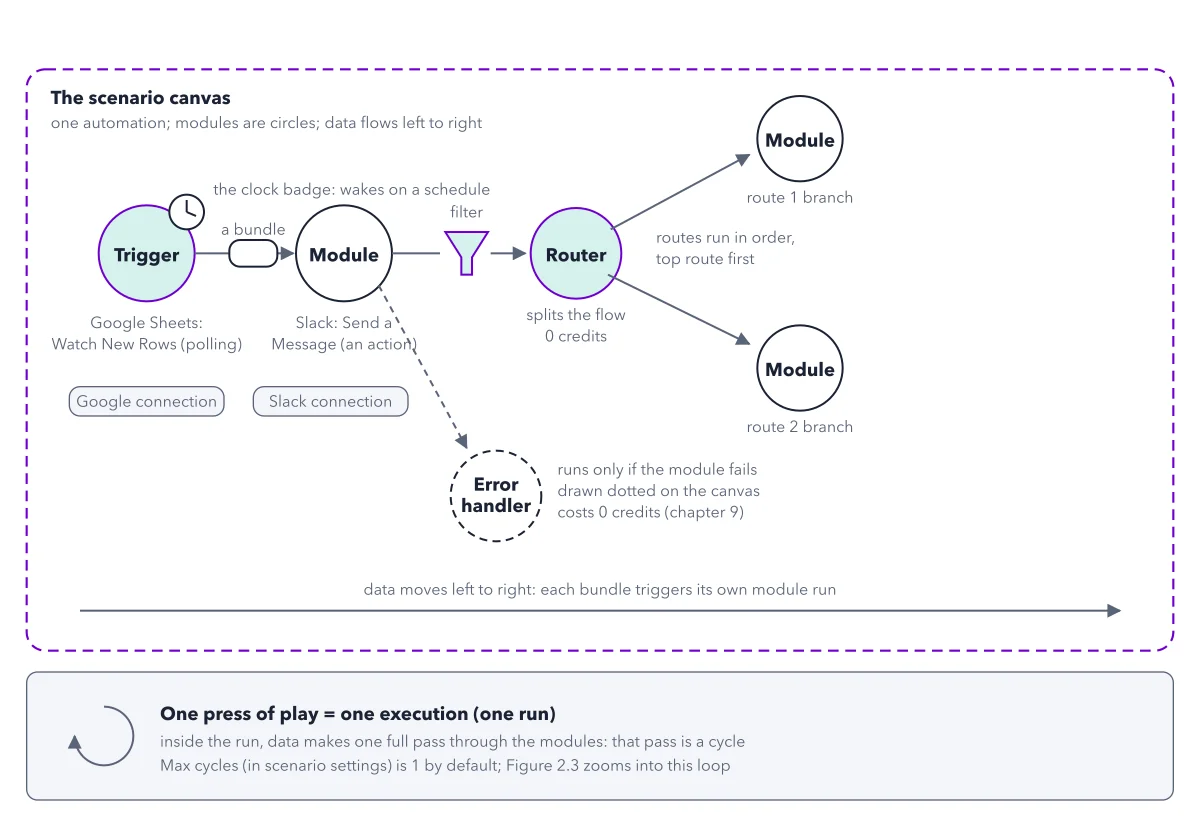
Start at the Google Sheets circle. This is the trigger, the module that starts each run. A module is one step that does one thing in one app. This one is Watch New Rows, and it checks the prospects sheet. The clock badge marks a polling trigger: it asks the sheet on a timer whether any row is new.
Follow the one bundle on the line. Each new row becomes one bundle, one parcel of data. Inside it are the row's items: first name, last name, country, email, phone number and details. Each column of the sheet becomes one item inside the bundle.
End at the Slack circle. Send a Message is an action: a module that does something in an app. It posts to the sales team channel. Each bundle makes it run once, so three new rows give three messages.
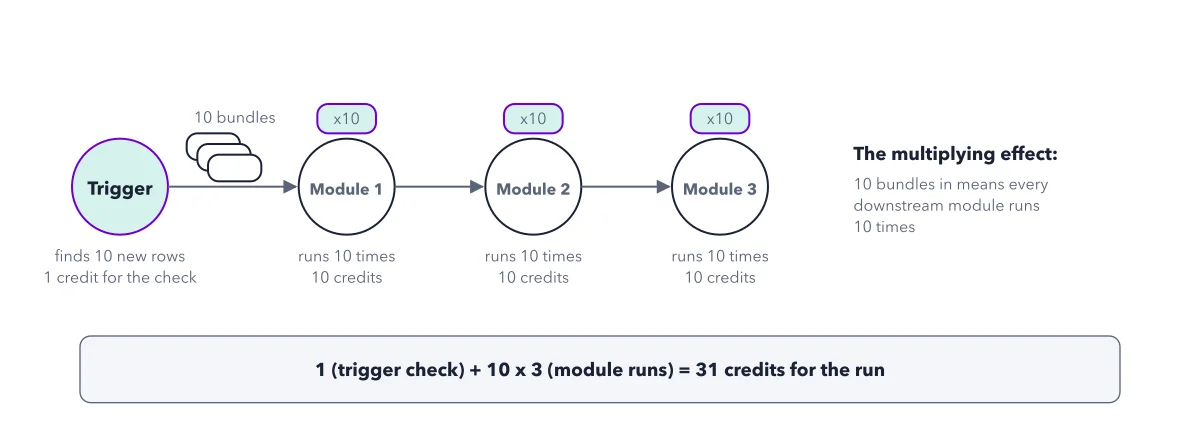
Price the clock before you start. Each check of the polling trigger costs 1 credit, new rows or not. Each message costs 1 more. So with one new row per check, each row costs 2 credits: 1 for the check and 1 for the message. The multiplying effect shows the sum for more rows.
Key takeaways
- Run the trigger alone first, and check that the bubble shows one bundle per row before you add Slack.
- Put a space between first name and last name in the message, or the two read as one glued word.
- Pick the schedule on purpose: every polling check costs 1 credit, even when nothing is new.
Try this: build the alert
You need a free Make account, a Google account and a Slack account where you can add a channel. Each step follows Make's tutorial.
- In Slack, create a public channel named sales team. In Google Sheets, create a sheet named prospects with six header columns: first name, last name, country, email, phone number, details. Add one sample row.
- In Make, create a scenario and add Google Sheets Watch New Rows. Connect Google, pick prospects, and set Limit, the most rows one run takes, to 20. When asked where to start, pick All, so rows already in the sheet count as new.
- Run the trigger alone and click the bubble above it. You should see one bundle, one item per column.
- Add Slack Send a Message. For the connection type pick Slack (user), the one that signs in as you, and allow Make in the Slack window. Post to sales team and click the sheet's items into the message text.
- Add a fresh row. Then reset the start point so both rows count as new: right click the Google Sheets module, choose Choose where to start, pick All and save. Click Run once, the button that runs the whole scenario one time for a test.
- Pick a schedule and turn the switch to Active. Then keep your work: click Save as version, and export the blueprint, a file copy of the scenario you can bring back if a later edit breaks it.
Expected result: Sales team shows one message per row with the right name and email. The run used 3 credits: 1 for the trigger check and 2 for the two Slack messages.
Questions readers ask
Why does Run once find nothing in my Google Sheets trigger?
No row was added after the trigger's start point, the moment from which rows count as new. Add a fresh row, or reset the start point: right click the module, choose Choose where to start, pick All and save.
What does Missing value of required parameter mean in Make?
A field the module needs was left empty. In this build it often means a blank sheet cell. Open the module and fill or map that field. It is the error readers quote most on a first run.
Why does Google refuse my personal Gmail account in Make?
If Google shows an error about restricted scopes and @gmail.com accounts, it wants a project of your own for a personal account. Sign in with a work Google account if you have one: the error names only @gmail.com accounts. If not, Make's help page on a custom OAuth client (the sign in method that lets one app act in another for you) shows how to create that project at Google.
How often should the scenario check the sheet?
Ask how fast sales must hear about a lead. Every 15 minutes, the default, is 96 checks a day; every hour is 24. Each check costs 1 credit even when nothing is new, so on the Free plan, check hourly or turn practice scenarios back to Inactive.
Sources: Create your first scenario; Step 5: Set up the trigger; Step 10: Schedule your scenario.
This figure is from Make.com Made Crystal Clear, chapter 3.
The chapter builds the idea step by step, with recipes you can follow, a Try it to check yourself, and every source.
Get the book