Test a Make scenario one module at a time, with one small loop
By Christophe Paka · Facts checked on 23 October 2026
"Is it just me or is make.com very difficult to use?" a reader asked on r/Make. "You need to spend 1 hour debugging." The hour usually has one cause: five modules added, play pressed, then a hunt for the one that went wrong.
There is a shorter way to test a Make scenario. Run each module as you add it, and read what came out before you add the next. The figure below draws the habit as a loop of four steps, with one way out.
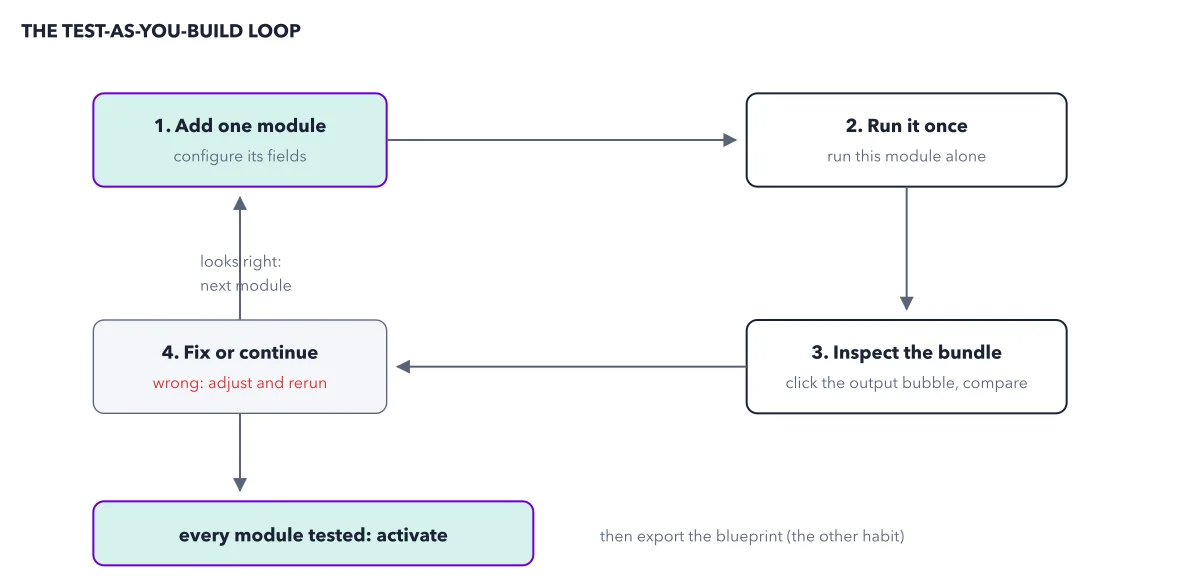
How to read this figure
Box 1: add one module. Add a single module and set up its fields. A module is one step that does one thing in one app, such as reading a row or posting a message. One at a time is the whole point: if something breaks, you know where.
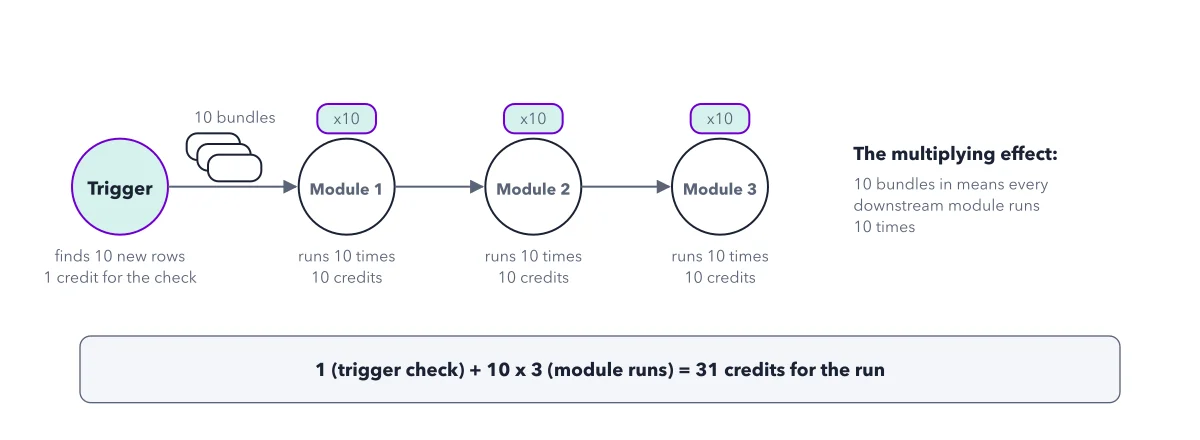
Box 2: run it once. Run this module alone, without the rest of the scenario: right click it and pick the option that runs only this module. Older guides call it Run this module only. A test spends credits like a live run: 1 for the trigger check, 1 per bundle an action handles.
Box 3: inspect the bundle. Click the output bubble, the small bubble above the module with a number in it. It shows the bundles that went in and came out. A bundle is one parcel of data, such as one row of a sheet. Compare it with what you expected.
Box 4: fix or continue. If the bundle looks wrong, adjust the module and rerun it. If it looks right, follow the arrow back up to box 1 and add the next module. Most first builds go wrong right here: a date arrives as text, a column name has a space, a field is empty.
Leave by the only exit. The only way out is every module tested. Then turn the scenario on with the Active switch. Then export the blueprint, the other habit: a file copy of the scenario that lives on your computer, outside Make.
Key takeaways
- Run each new module alone and read its output bubble before you add the next one.
- Check each bundle for the usual faults: dates sent as text, column names with spaces, empty fields.
- Turn the scenario on only when every module is tested, then export the blueprint.
Worked example: the loop on a Sheets to Slack alert
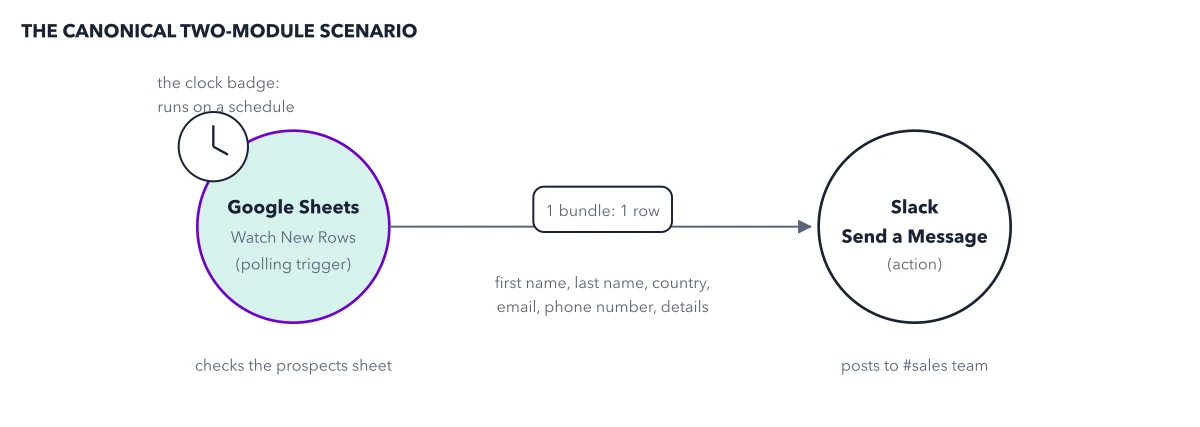
Take the two module alert from Make's first tutorial: a new row in a Google Sheet becomes a Slack message. One sample row sits in the sheet.
- Box 1: add the Google Sheets Watch New Rows trigger and pick the prospects sheet.
- Box 2 and box 3: run it alone and open the bubble. It shows one bundle, one item per column. The test used 1 credit.
- Box 4: it looks right, so go back to box 1. Add Slack Send a Message and click the sheet's items into the message text.
- Box 3 again: if first name and last name read as one glued word, box 4 says fix it. Add a space between them and rerun.
- Exit: with the sample row and one fresh row in the sheet, click Run once and read both bubbles: 1 credit for the trigger, 2 for Slack.
Result: The run used 3 credits, and the sales channel shows one message per row. You caught the glued name in one short test, not in an hour of hunting.
Questions readers ask
Is the module that failed always where the bug is?
Not always. A module can fail because an earlier one passed it data that looks different from what you expected, such as an empty field or a date as text. Testing each module as you add it shows the bad value where it first appears.
Does testing a Make scenario cost credits?
Yes. A test spends credits like a live run: 1 for the trigger check and 1 per bundle an action handles. In Make's tutorial, testing the trigger alone used 1 credit, and the first full run used 3.
What is the difference between Run once and running one module?
Run once runs the whole scenario a single time for testing, without turning it on. Running one module runs only that module. Use the single module run while you build, and Run once when every module is in place.
How do I avoid losing a scenario I worked on for days?
Use two habits. Click Save as version and describe what works, so you can go back to it. Then export the blueprint: a file on your computer that can rebuild the scenario in any Make account, without its connections.
Sources: Step 9: Test your scenario; Improved scenario toolbar and version control; Scenario blueprints.
This figure is from Make.com Made Crystal Clear, chapter 3.
The chapter builds the idea step by step, with recipes you can follow, a Try it to check yourself, and every source.
Get the book