Before you loop through items in n8n, count the runs
By Christophe Paka · Facts checked on 23 October 2026
Your sheet has three new orders. You want one email per order, so you go looking for a way to loop through them. Or the reverse happens: only the first row got an email, and the run still shows green.
Both cost you. A loop you did not need makes the workflow harder to read. A missed row means two customers hear nothing, and nothing turns red. Before you build an n8n loop through items, look at what a single node already does. The figure below zooms into one node with three items going in.
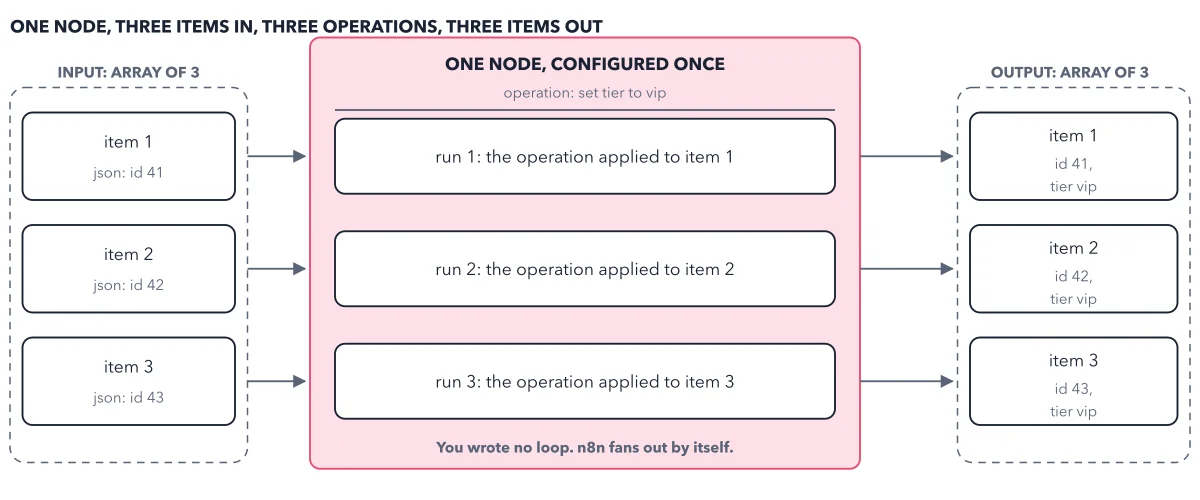
How to read this figure
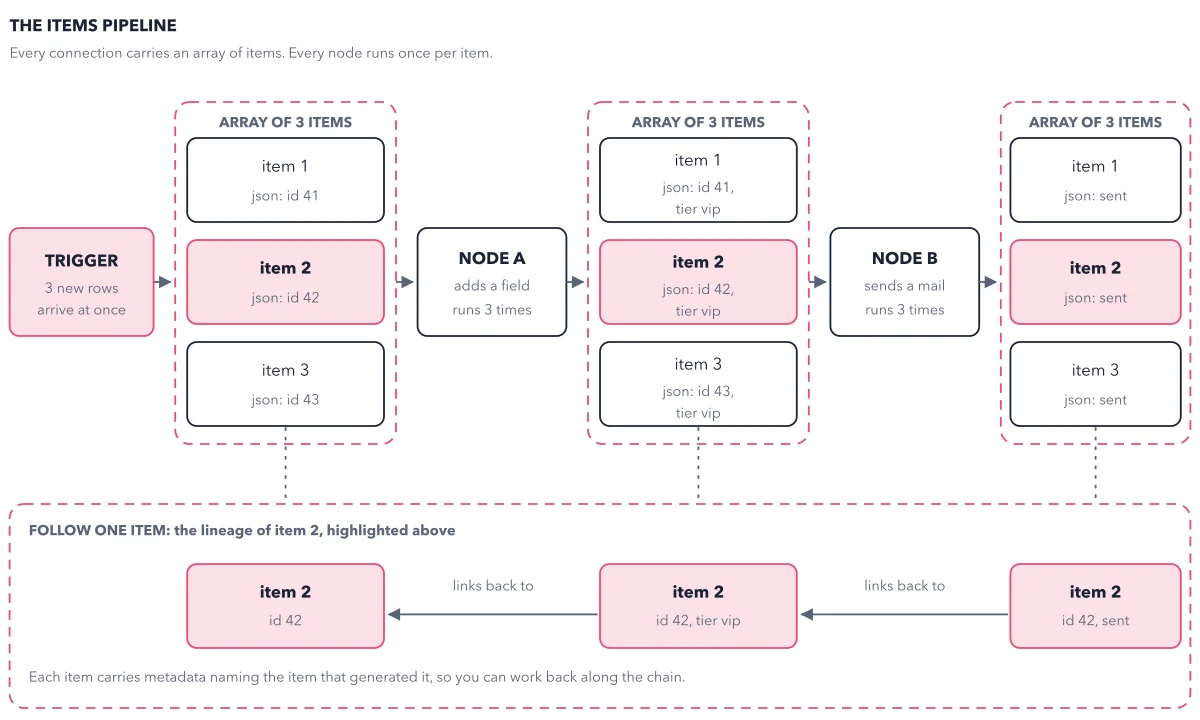
Start with the input on the left. An array of 3 items arrives, with the ids 41, 42 and 43. This is the list the node before it produced. In n8n, the data between two nodes is always a list like this (the items pipeline shows the whole belt).
Read the node header. The big box is one node, configured once. Its single setting is the operation: set tier to vip. You did not tell it how many times to run, and you did not write a loop.
Count the three runs inside. Inside the node are three rows: run 1, run 2 and run 3. Each applies the same operation to one item. When a node gets an array of items, it processes each item on its own.
Check the output on the right. Three items come out. Each keeps its id and now carries tier vip. Three in, three runs, three out. The caption under the node says it: you wrote no loop, and n8n fans out by itself.
Key takeaways
- Before a step that emails, posts or charges, check the item count on the node before it.
- Turn on Execute Once only when one run for the first item is what you want.
- Fix a trigger that outputs old rows with its own filter or an If node, not with a loop.
Worked example: three test orders through Order Desk
Order Desk is the shop automation the book builds. Follow its three test orders, 41, 42 and 43, and count what goes in and out of each step.
- A Manual Trigger with three orders runs once and outputs 3 items.
- Edit Fields sets tier to vip: 3 items in, 3 runs, 3 items out.
- Send Email: 3 items in, 3 runs, 3 emails, one per customer.
- The same Send Email with Execute Once on: 3 items in, 1 run, 1 email, to order 41 only.
- A sheet trigger on its first run finds 36 rows already in the sheet, so the next node runs 36 times and sends 36 emails.
Result: The first three steps are one execution, even though the email node ran three times. The last two steps are the two classic symptoms: only the first row, and 36 rows at once.
Questions readers ask
How do I make my n8n flow run multiple times during one execution?
It already does. Each node runs once for every item that reaches it, all inside one execution. If you want one email per row, make sure each row reaches the email node as its own item.
Why does my workflow only handle the first row?
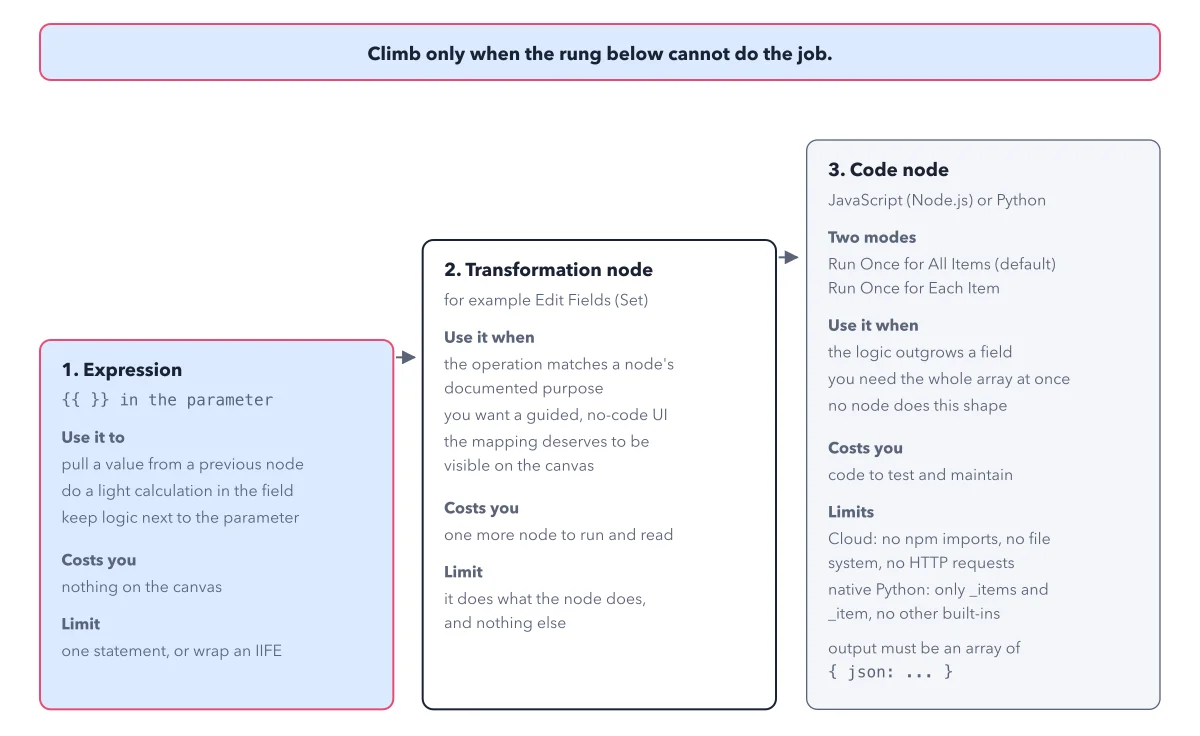
Two common causes. Someone turned on Execute Once in the node's Settings tab, so it reads the first item and stops. Or a field holds an expression (a small formula in double curly braces) that ends in .first(), which always reads item one (one expression, three answers shows the fix). Neither one turns the run red, so check the counts on the wires after a run: 1 where you expected 3 is your clue.
Why does my Google Sheet trigger output all 36 rows?
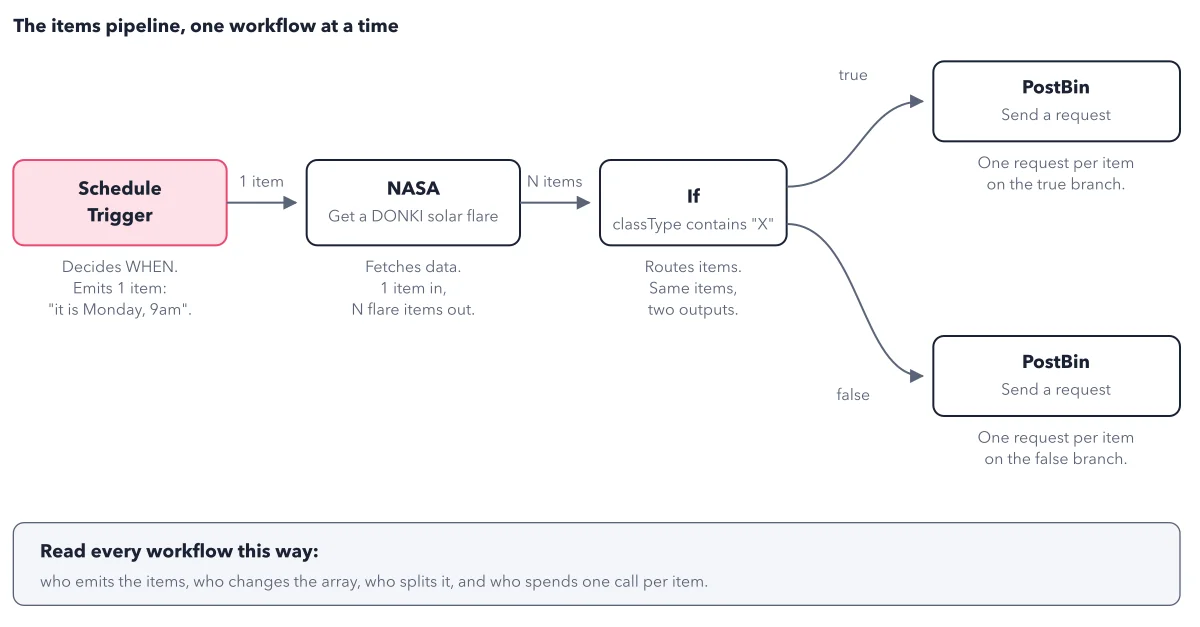
A trigger that watches a sheet outputs every record it finds as items. On its first run, every row already in the sheet looks new, so all 36 come out and every later node runs 36 times. Use the trigger's own filter, or an If node that passes only the rows you want.
Do I ever need a loop node in n8n?
Rarely. The book keeps loops for special cases, such as a service that accepts only a few calls a minute. For the everyday job of doing the same thing to every row, the node's own once per item behaviour is the loop.
Sources: Understand n8n's data structure (n8n docs); Work with nodes (n8n docs); Understand executions (n8n docs).
This figure is from n8n Made Crystal Clear, chapter 2.
The chapter builds the idea step by step, with recipes you can follow, a Try it to check yourself, and every source.
Get the book