Dockerfile CMD vs ENTRYPOINT: which one your arguments replace
By Christophe Paka · Facts checked on 7 November 2026
You want to check which user your container runs as, so you type docker run myapp:0.2 whoami. The app does not start. The word whoami ran instead, and the app you built never came up.
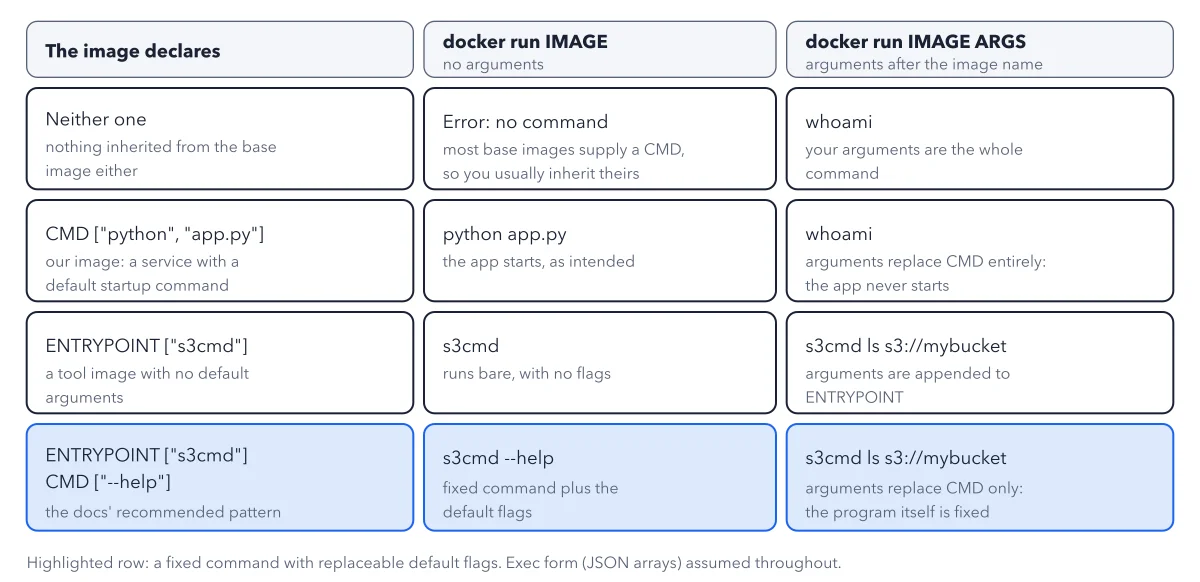
That is Dockerfile CMD vs ENTRYPOINT in one example. One of them is a default you can replace. The other is a fixed program. The figure below shows all four combinations, so you can tell what runs before you type a command.
Use this diagram on your site
Free to share in your blog post, docs, course or slides, as long as the credit link stays. Paste the code below where the figure should go.
How to read this figure
Read the three columns. The first column is what the image declares. The second is
docker run IMAGEwith no arguments. The third isdocker run IMAGE ARGS, with arguments after the image name.Row 1: neither one. With no arguments you get an error: no command. Most base images supply a CMD, so you usually inherit theirs. With arguments, yours are the whole command, here
whoami.Row 2: CMD only, myapp's case.
CMD ["python", "app.py"]makes a service with a default startup command. Bare, the app starts. Withwhoami, the arguments replace CMD entirely and the app never starts.Row 3: ENTRYPOINT only.
ENTRYPOINT ["s3cmd"]is a tool image with no default arguments. Bare, it runss3cmdwith no flags. With arguments, they are appended to ENTRYPOINT:s3cmd ls s3://mybucket.Row 4: both, the highlighted row. ENTRYPOINT
["s3cmd"]plus CMD["--help"]is the docs' recommended pattern. Bare, you gets3cmd --help. Arguments replace CMD only, so the program itself stays fixed.Check the footnote. The grid assumes exec form: JSON arrays in brackets. Shell form, with no brackets, behaves differently when you stop the container. For the states a stopped container moves through, see the container lifecycle.
Key takeaways
- Use CMD for a service and ENTRYPOINT for a tool, and write both in exec form with brackets.
- Remember the rule: arguments after the image name replace CMD and never touch ENTRYPOINT.
- In an image you did not write, look for the brackets; a startup script should end with exec on the real program.
Worked example: one s3cmd image, three ways to run it
Take an image that declares ENTRYPOINT ["s3cmd"] and CMD ["--help"]. Change only the arguments after the image name and see what runs.
- No arguments: Docker joins ENTRYPOINT and CMD and runs
s3cmd --help, the help text. - Arguments
ls s3://mybucket: they replace CMD, so Docker runss3cmd ls s3://mybucket. - Remove CMD and keep ENTRYPOINT: with no arguments Docker runs
s3cmdbare, with no flags.
Result: The program stays fixed, and only the flags change. If you want your own arguments to start something else entirely, the image needs CMD alone, not ENTRYPOINT.
Questions readers ask
What is the difference between CMD and ENTRYPOINT in a Dockerfile?
CMD is the default command, and anything you type after the image name replaces it. ENTRYPOINT is the fixed program the container always runs, and what you type is added after it. Use CMD for a service and ENTRYPOINT for a tool.
Why did my app not start when I added a word after the image name?
Your arguments replaced CMD entirely. With CMD only, as in myapp, the arguments become the whole command, so running the image with whoami after its name runs whoami and never starts the app.
What is exec form?
Exec form is a JSON list in brackets, such as ["python", "app.py"]. Your program itself is then the main process. Shell form has no brackets, so a shell is the main process.
Why does docker stop take ten seconds?
docker stop sends SIGTERM, the polite stop signal, to the main process only. In shell form that main process is a shell, which may not pass the signal on, so ten seconds later Docker kills the container. In exec form, Python gets the signal and exits at once.
Sources: Dockerfile reference (Docker docs); Building best practices (Docker docs).
This figure is from Docker Made Crystal Clear, chapter 5.
The chapter builds the idea step by step, with recipes you can follow, a Try it to check yourself, and every source.
Get the book